

Ask GeekWebGuides
Should You Buy the HomeView?
Apple's $299 HomeView is an all-new product introduced in October 2026. It is a centralized home hub with a 7-inch display that can control smart home products, answer questions with Siri AI, display pictures, make FaceTime calls, play music, show recipes, offer up calendar events, and much more.
Since the HomeView works as a home control device and a speaker, it can replace a HomePod or a HomePod mini. It is not a replacement for an iPhone or iPad. Some Apple apps, personal context features, and third-party apps require an iOS device.
If you use the HomeKit ecosystem or want to start, HomeView is a useful device that's more capable than a speaker, and the $299 price tag could be worth it. The new $149 HomePod mini will also offer Siri AI support if you want a more affordable option, but it does not have a display.
The HomeView launches on November 13, but it is available for pre-order. It is an all-new product, and now is the best time to buy.
Apple HomeView Details
Contents
Apple HomeView is a new home product that has elements of the HomePod, iPad, and Apple Watch. Apple says it is meant to be central to the home and personalized for all users with integrated Siri AI. HomeView recognizes up to six people in a home and offers a personalized experience for each user.
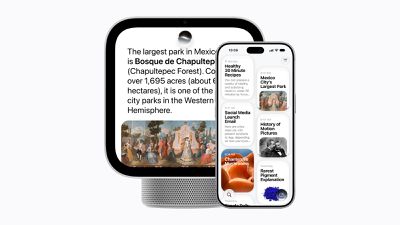
There is a 7-inch Liquid Retina display with adjustable brightness between 500 nits and 0.3 nits, which is the lowest brightness option on an Apple display to date. You can get the Apple HomeView with a speaker base or attach it to the wall with the wall-mounted version. The HomeView is 5.73 inches and square-shaped with a 9.8mm thickness, but with the base, it measures from 5.38 to 6.82 inches tall and 3.78 to 5.13 inches deep. The speaker model weighs 2.1 pounds and the wall model weighs 0.63 pounds.
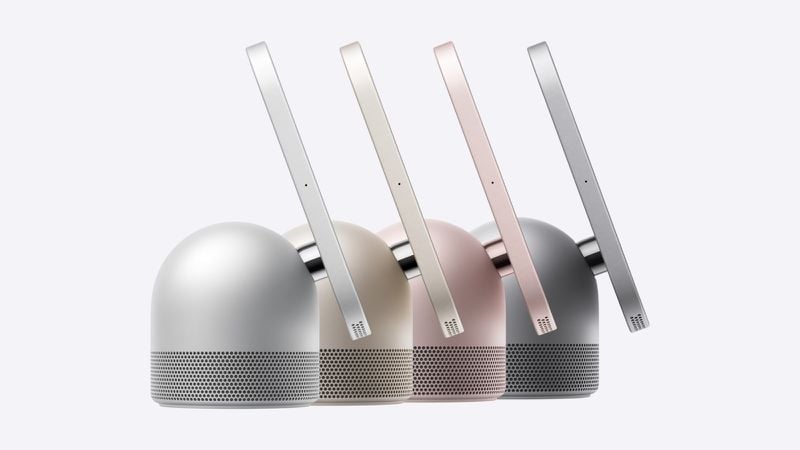
The speaker model has a dome-shaped base with small perforations in a band around the bottom. The base attaches to the display with a stainless steel hinge that has tilt adjustment. The speaker HomeView comes in silver, starlight, rose pink, and space gray, while the wall-mounted version is limited to silver and space gray.
A USB-C port is included at the back of both versions, and the HomeView must be plugged in to work. The speaker model comes with a color-matched 1.5m USB-C cable and a 30W power adapter. The wall-mounted version does not come with additional equipment, and it requires mounting hardware that must be purchased separately. Even though the wall-mounted version needs extra hardware and does not have a speaker base, both models are priced at $299.
Both versions of the HomeView have speakers at the bottom of the display with two custom full-range drivers with Spatial Audio support. The speaker base also includes a custom down-firing woofer and dual force-cancelling passive radiators. There are four microphones in each HomeView for far-field Siri support, including a front microphone, a rear microphone, and left and right microphones.
The HomeView supports computational audio for tuning loudness and bass at any volume level, and multiple HomeViews can be used for multiroom audio over AirPlay. There is a 12-megapixel camera on the front of the HomeView that can be used for FaceTime, and Center Stage is supported so the camera can adjust its view to be wider or closer depending on the user's location in the room or the number of people on the call.
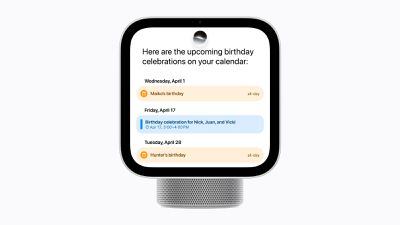
HomeView does not have an App Store, but it comes with Apple apps and widgets built in. Supported apps include Apple Music, Podcasts, Calendar, FaceTime, Safari, Alarms, Reminders, Find My, Home, Settings, Intercom, Weather, World Clock, Timers, and Messages. Audiobooks, Classical Music, News, and the Apple TV app are available through an iPhone connection. Third-party audio and video apps with HomeView integration will show up on the device when a user's iPhone is connected and authenticated.
With Safari, HomeView can display crafting tutorials or cooking instructions. Apple says recipes will include a Start Cooking button that will offer a step-by-step format users can follow along with. Songs, podcasts, recipes, audio calls, and video calls can be handed off from an iPhone to HomeView and vice versa.
HomeView has Apple Watch-like customizable faces that are displayed when it's not in use. A Photos face can show collections of images and serve as a digital picture frame. There are dedicated informative faces like Calendar and Weather. A new Flow face reacts to movement with colors and light, while a Snoopy face shows the time with Snoopy animations that change with time of day, weather, sporting events, and holidays. With the Home Modular face, the HomeView can serve as a smart home dashboard with thermostat controls, video, light options, and HomeKit scenes, and the Home Camera face shows up to nine live camera feeds. Some faces will change throughout the day.
There is an A18 chip in the HomeView with Siri AI support. Siri AI on HomeView works like Siri AI on other devices, but personal context understanding requires authentication and a nearby iPhone or iPad. Siri can be activated with a Siri command or by swiping down from the top of the display. Users will be able to ask Siri about content in Messages, Calendar, and more, plus Siri can hold back-and-forth conversations with information synced to the Siri app on other devices.
The A18 chip has a Secure Exclave for processing camera and microphone feeds in a way that can't be accessed by Apple or the operating system. HomeView recognizes each person's face and voice on-device with no visual or audio data exposed to the operating system. Household members need to have an Apple Account and must be added as a member of the shared home in the Home app. Personal content is shown only when a user is actively in front of the HomeView with a recently unlocked iPhone or iPad on the same Wi-Fi network as the device. The HomeView must also recognize the person by face to display data and keep everyone's personal information separate. Guests and unrecognized users can do things like control smart home accessories, set timers, play music, and check the weather, but personal information won't be available.
HomeView is equipped with Wi-Fi 6E, Thread, and Bluetooth 6, plus it supports peer-to-peer discovery for guest access. There is an accelerometer, ambient light sensor, and temperature and humidity sensor used for HomeView features and for smart home scenes and automations. Apple says some HomeView features will respond to proximity to show more information as you get closer to the device. Sound Recognition is available and HomeView can send alerts if it hears smoke alarms and carbon monoxide detectors.
Apple partnered with LG Electronics and Schneider Electric for an Apple Home Collection of accessories meant to work with HomeView. Products have an Apple aesthetic with premium materials and a clean, minimal look. The Apple Home Collection includes a video doorbell, indoor and outdoor security cameras, deadbolt lock, thermostat, and temperature sensors, with some products launching in December and others coming in early 2027. Existing HomeKit and Matter accessories also work with the HomeView.
HomeView requires iOS 27.2 or iPadOS 27.2 or later to work, plus it needs Wi-Fi access. Siri AI is only available in English to start with. HomeView is not launching in the European Union to begin with because of the Siri AI requirements.
Note: See an error in this roundup or want to offer feedback? Send us an email here.
How to Buy
The Apple HomeView can be pre-ordered from the Apple Store and other retailers such as Amazon and Best Buy for $299, and it launches on November 13 in the U.S., UK, Canada, New Zealand, Australia, India and Singapore. Customers in South Africa can pre-order now through resellers.
The wall-mounted version does not come with a speaker base, and three mounts from Schneider Home are sold separately.
The Power Mount USB-C Wall Connector is priced at $59.95, while the Power Mount AC Wired model that's meant to be installed by an electrician is $79.95. Apple also plans to sell a Power Mount PoE Wired version for $129.95, but it isn't launching until early 2027. The wall-mounted HomeView can be purchased with no mount, but mounting hardware and power are required for it to operate. Wall-mounted versions also require a 20W or better power adapter and a USB-C cable.
What It's For
Apple says the HomeView is meant to "bring more joy and convenience" to everyone in the home. Siri AI answers questions and completes tasks, while the display, speakers, and camera allow for FaceTime video and audio calls, playing music, watching videos, browsing content on the web, viewing information in apps, and controlling smart home devices.
It "keeps you engaged and entertained" with access to music, podcasts, audiobooks, and TV shows. Apple suggests having a sing-along, listening to a story, or watching sports while washing the dishes. You can use the Intercom feature to communicate with people throughout the house or send hands-free messages using Siri.
Apple calls the HomeView the "heart of your home."
Design
There are two versions of the Apple HomeView: one that is meant for a tabletop and one that's mounted on the wall. Both models have a 7-inch square display with a front-facing camera and microphones at the front, rear, left, and right, but the designs diverge from there.
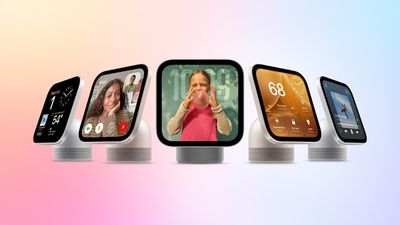
The display alone measures in at 5.73 inches square and 9.8mm thick. It weighs 0.63 pounds.
With the display-forward design, HomeView is meant to be a smart home dashboard and a central spot for household management. Up to six people can use HomeView, and it will offer a unique experience for each member of the home.
Tabletop HomeView
The tabletop HomeView comes with a dome-shaped speaker base that has a series of perforations around the bottom. A stainless steel hinge connects the display to the base and allows the display to be tilted for an ideal viewing angle. Colors for the HomeView include silver, starlight, rose pink, and space gray.
The HomeView with a speaker measures 5.38 to 6.82 inches tall and 3.78 to 5.13 inches deep depending on the hinge position. It weighs 2.1 pounds. There is a USB-C port on the back of the base for power.
The tabletop model comes with a 30W power adapter and a 1.5-meter color-matched USB-C cable.
Wall-Mounted HomeView
The wall-mounted HomeView does not have a speaker base, so it is limited to the speakers in the display itself. It comes in silver or space gray.
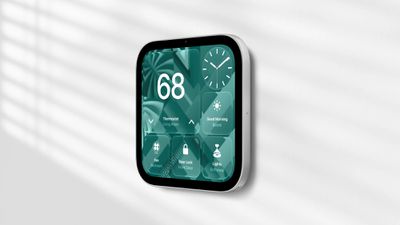
There is a USB-C port directly on the back of the wall-mounted HomeView, and it requires a mount. Apple partnered with Schneider Home for mounting options, and eventually, there may be other mounts available. The wall-mounted version does not come with a power adapter or cable.
Schneider makes three mount options that are priced starting at $59.95.
Sensors
The HomeView has an ambient light sensor, a temperature and humidity sensor, and an accelerometer.
Display
The HomeView has a 7-inch Liquid Retina touchscreen display with a 1088 by 1088 resolution at 220 pixels per inch. It is an LCD display with LED backlighting and a maximum brightness of 500 nits. It has a minimum brightness of 0.3 nits, which is the lowest brightness of an Apple display to date.
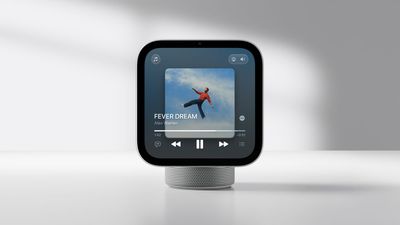
True Tone is supported so the display's white balance adjusts to match the lighting in the room. There's also a fingerprint-resistant oleophobic coating.
Faces
The HomeView supports customizable faces that are not unlike Apple Watch faces. There are multiple clock faces that show the time. A Photos face shows a selection of images you choose and works as a digital picture frame, and there's a "playful" Snoopy face with animations that change throughout the day based on weather, holidays, and sporting events.
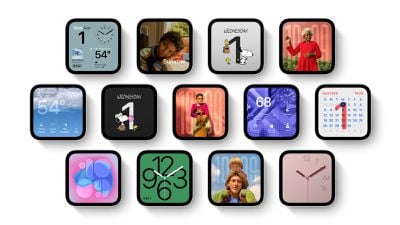
Informative options like Calendar, Home, and Weather show data from apps, and there's a Flow face that Apple says reacts to movement with "mesmerizing colors and light."
The Home Modular face gives you quick access to your smart home accessories, and the Home Camera face can be used to stream up to nine videos from the Home app.
A18 Chip
Apple equipped the HomeView with an A18 chip, which was first used in the iPhone 16. The A18 has a six-core CPU with two high-performance cores and four energy-efficient cores.
The A18 chip uses Secure Exclaves for processing camera and microphone data.
Audio
Both HomeView models have two custom full-range drivers in the display for sound, but the tabletop version has additional hardware. It includes a custom down-firing woofer and dual force-cancelling passive radiators.
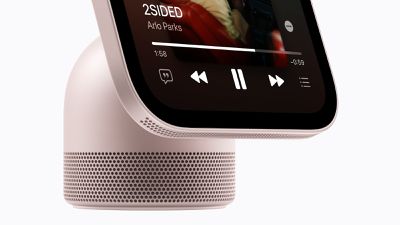
The A18 supports computational audio for real-time tuning. Spatial Audio with Dolby Atmos is also supported, and the HomeView can recognize the sound of smoke and carbon monoxide alarms to send alerts.
The HomeView can be paired with the HomePod, Apple TV 4K, and other compatible speakers using AirPlay for multiroom audio.
Camera
For FaceTime video calls, the HomeView has a 12-megapixel Center Stage camera with an ƒ/2.4 aperture. Center Stage adjusts the view of the camera to keep you in frame during the call, and it can accommodate multiple people on a call.
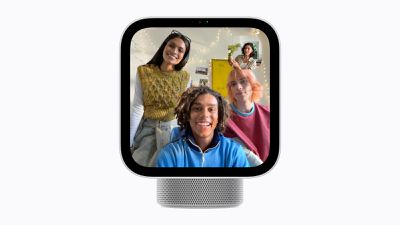
The camera is also used to identify who is using the HomeView for Siri AI personal context requests.
Siri AI and Software
Siri AI is a central part of the HomeView and a main method of control. Siri AI is the smarter version of Siri that Apple introduced with iOS 27. It uses Apple Intelligence and can answer broad world knowledge questions, look up personal context on your iPhone from apps like Messages, control smart home devices, complete tasks in apps for you, and more.
It is more similar to a chatbot like Claude or ChatGPT than the prior version of Siri, but it does not have agentic capabilities. It can look something up in your Messages or send an email for you, but it isn't designed to create documents, build websites, or write code.
HomeView has Siri AI natively, but for personal context responses, a paired iPhone or iPad is required. Personal responses require each user to have an Apple account, and the HomeView authenticates identity before it will answer questions or take actions with your data. Apple says Siri AI adapts to each person and shows them what matters most to them.
There are four beamforming microphones on the HomeView, which Apple says will pick up Siri commands "from across the room."
Siri requests not processed on-device are handled with Private Cloud Compute, and conversations started on HomeView sync to the Siri app on other devices.
Users
Up to six members of your Apple Home can use HomeView, each with a custom view and access to their own apps and information. HomeView authenticates using voice and the built-in camera, and it identifies each person before giving information that includes personal context.
Guests can use HomeView to ask world knowledge questions, play music, control smart home accessories, check the weather, view shared photo albums, and set timers, plus there is peer-to-peer discovery so guests can AirPlay audio content to the device.
Apps
HomeView does not have an App Store, but it comes with the following built-in Apple apps.
- Alarms, Timers, and World Clock
- Calendar
- FaceTime
- Find My
- Home
- Intercom
- Messages
- Music
- Podcasts
- Reminders
- Safari
- Settings
- Weather
The Audiobooks, Classical Music, News, and Apple TV apps are available when an iPhone is connected to the HomeView.
Some third-party video and audio apps can also be used on HomeView when connected to an iPhone.
Special Features
Safari can convert a recipe into a step-by-step list that you can follow along with. It shows you the ingredients you need and then offers a "Start Cooking" button when you're ready to begin.

Handoff allows a song, podcast, call, video, or recipe to be started on the iPhone and then continued on the HomeView.
Live Activities are supported for things like timers, so you can keep an eye on a Live Activity while using other apps.
Connectivity
HomeView supports Wi-Fi 6E, so it can connect to 6GHz Wi-Fi networks. It also supports Bluetooth 6 and Thread. Thread is a mesh networking technology that allows smart home devices to communicate with one another for improved reliability.
Like the HomePod and Apple TV 4K, HomeView works as a home hub for connecting to HomeKit and Matter devices when you're away from home.
Apple Home Collection
To go along with the HomeView, Apple partnered with Schneider Electric and LG to create smart home accessories compatible with HomeKit.
Apple says each one is made from premium materials with a minimal aesthetic. The accessories can be set up with a single tap from the iPhone, and can be controlled with the Home app and through Siri.
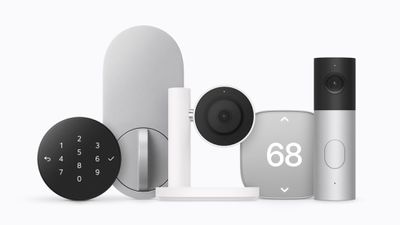
All of the cameras record up to 2.5K video and recognize people, pets, vehicles, and packages.
- LG Video Doorbell ($249.95) - The Video Doorbell has dual cameras that capture views of visitors and packages. The front camera has a 2.5K resolution and the bottom camera is full HD resolution. It has a built-in spotlight and a chime that plays through HomeView, HomePod, or HomePod mini.
- LG Outdoor Cam ($299.95) - The Outdoor Cam has low-light color night vision and can be angled in multiple positions.
- LG Indoor Cam ($199.95) - The Indoor Cam has a privacy-preserving feature that allows it to tilt down when people are in the home so it's not recording, and up for keeping an eye on the home. The tilt function works based on geofencing, but can also be controlled in the Home app or manually.
- LG Floodlight Cam ($399.95) - The Floodlight Cam has dual floodlights that activate when motion is detected and low-light color night vision.
- LG Smart Deadbolt Lock ($349.95) - The lock has Ultra Wideband (UWB) and can unlock automatically when the homeowner approaches, with no tap required. It also supports unlocking via PIN or a hidden backup key slot, and there is detection for whether the door is opened, closed, or has been tampered with. The doorbell and lock can work together as one, letting users see who is at the door and unlock it if needed.
- LG Thermostat ($199.95) - The thermostat supports Adaptive Temperature, and in the U.S., heating and cooling can be activated during lower-cost periods for users with a compatible utility plan. The thermostat can read temperature and humidity across multiple rooms using separate temperature and humidity sensors. Sensors are priced at $39.95.
- Schneider Electric Thermostat ($199.95) - Also supports Adaptive Temperature and can be used with temperature and humidity sensors. Sensors are priced at $39.95.
Cameras work with iCloud+ plans, and users can view live footage and camera activity from the Home app on iPhone, iPad, Mac, Apple TV 4K, and HomeView.
The devices will be available starting in December 2026, but some accessories won't launch until early 2027.
Apple has partnered with ADT for wall-mounted HomeView and Home Collection installation.
What's Next for HomeView
Apple is working on a higher-end HomeView with a 9-inch display and robotic arm that can swivel a full 360 degrees. It could launch in 2027 or 2028.
