

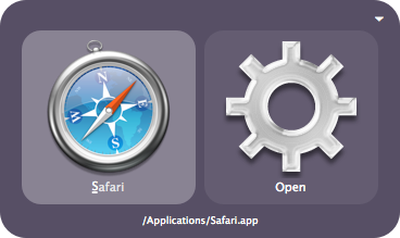
Quicksilver, an open source launch utility for Mac OS that saw few substantial updates over the last several years, has seen a revival recently with a new version released late last week.
Quicksilver is a computer utility software program for Mac OS X, made by Blacktree Software and distributed freely. It is essentially a graphical shell for the Mac OS X operating system, allowing users to use the keyboard to rapidly perform tasks such as launching applications, manipulating files, or sending e-mail.
Version 1.0β59 for Mac OS 10.6 is now available and there are also older versions available for Mac 0S 10.3 through 10.5. Unlike Spotlight, the universal search feature built into Mac OS X since 10.4, Quicksilver focuses on a defined "catalog" of items like music, contacts, URLs, and emails and can search and launch these items more quickly.
Quicksilver became open source in 2007 when its creator at Blacktree, Nicholas Jitkoff, transitioned to focus on other projects. Its source code is currently available on Github.



















Top Rated Comments
Alfred supports fuzzy matching like Quicksilver, so that you can search for non-contiguous characters in an app's name (e.g. FF for Firefox). Results are weighted towards most used applications. Fuzzy matching can be disabled entirely or anchored to match from the beginning character of the string to improve performance.
Alfred may not be everything QS is, but it is much more than a simple file launcher, especially with the Powerpack. I suggest you visit the Alfred website (http://help.alfredapp.com/) for more information if you're interested. I'm sure the developers would be glad to answer any questions you might have.
Alfred does everything Quicksilver used to do for me only more intuitively and with far easier configuration.
As I also already mentioned I've got no axe to grind with Quicksilver and certainly am not trying to say something ridiculous like it "sucks". I used it for a long time and, again, I'm happy it's in development again. Cheers.
Alfred's developers are another reason I love it. They are extremely dedicated to the product and their customers.
What's next, a news article about TextMate making more false promises?
<grumpy mac user is grumpy (i had flu for a week)>
Quicksilver is a lot, lot more stable than it used to be. Those who have abandoned it in the past for bugs should really give it another try. I cannot remember the last time it crashed on me, and I use it constantly, probably 30-50 times a day. For those who don't even know what it is, some people above have sort of described it, but you have to understand just how quick it is.
You hit control-space (or whatever), and this little box magically appears. Quicksilver has this famous checkbox in the preferences for "Superfluous visual effects", so it really does seem like magic. It's really instantaneous, and it's very pretty. Without even needing to wait for it to complete its summons, which takes only slightly longer than it takes you to blink, you start typing. Whatever the last thing was you used it for, you can just hit return and it'll do it again, but if you start typing characters, the real magic happens. First of all, it remembers what you use Quicksilver for. I type the letter "a" and it already pops up as "AirPort Utility" before I can even finish typing "air". I've sort of gotten used to typing three letters for everything, in some cases four letters, but generally one or two does it, because Quicksilver learns fast. It knows to give me AirPort Utility for the letter A, and then only switch to Activity Monitor if I type "ac", because I open AirPort Utility a lot more often. It does require a little bit of training at first, but not much. The best thing is, you're not screwed if you type in something wrong, or even if you forget the name of something. Pause for a second or two, or hit delete, and you can retype it. It picks up on acronyms, on partial words, on typos, and it's as fast as you can type. Those few times I have to dig around in the Applications Folder or something (usually Quicksilver), I'm struck by how lost and confused I feel. Those few moments before Quicksilver launches on log-in, if I get ahead of myself and try to launch something and nothing happens, I feel all panicky and bewildered. I guess you could say I'm addicted to the ease of use I've grown accustomed to using Quicksilver all these years. My Dock has been relegated to telling me what I already have open, rather than something to launch applications with. That's right, it's easier for me to open something with Quicksilver than to click a convenient icon right there on my screen.
It's not Spotlight. Spotlight tries to know everything and present you with everything. It's the brute force approach, and of course it's limited to files, and it's incredibly slow by comparison. Spotlight is the conventional army. Quicksilver is like a rapidly deployed commando team. It's smarter, more capable, and it's more direct because it provides you with just the specific result you want, as if it can read your mind. In fact, it does read your mind, because it learns from you, and picks up on things you don't even realize. Rather than carpet bombing you with choice, it chooses for you, but then you always have the option of typing a little bit more, or going down the normally hidden list of results for what you're really looking for. As I said, within two or three characters, it can nearly always get you exactly what you want. Considering my typing speed, I can be launching an application less than a second after I decide to open it, pretty much before I even realize what I'm doing. Occasionally I'll try to do something I haven't done before, and I might have to type a little more than I'm used to, but the next time I try to do that same thing, it'll know what I'm doing a lot sooner.
I've definitely not used all of Quicksilver's features. There's stuff in there I'm sure I don't even know about. In fact, in writing up this post, I discovered something new. I know some hardcore Quicksilver users who do some really crazy stuff.
Quicksilver is not for everybody. Some people just don't work with that many applications, or maybe they're not that confident with the computer, or with their typing. The official Apple ways of opening things and working with applications is intended for a slower user. If you're ready to graduate to instant speed and maximized productivity, give Quicksilver, or something like it, a try. If you work with a lot of web searches, like Google/Wikipedia/Dictionaries/Literally-Any-Website-You-Can-Think-Of, check out iSeek too.