
Mac OS X Lion to Bring iOS-Like Uninstall Process for Mac App Store Apps - MacRumors
Skip to Content

Mac OS X Lion to Bring iOS-Like Uninstall Process for Mac App Store Apps

171331 lion delete evernote

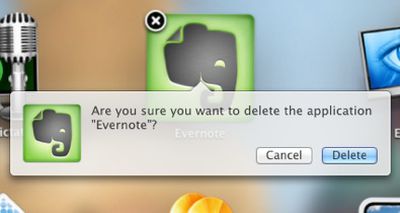
As noted by Apple iGuide (via TUAW), the latest developer build of Mac OS X Lion seeded last Friday brings a new iOS-like mechanism for deleting applications installed via the Mac App Store.

Invoking the new iOS-like "Launchpad" in Mac OS X Lion for managing applications allows users to click and hold on an icon to bring up the "jiggling" icon mode familiar to iOS users as the mechanism for organizing and deleting applications. Mac OS X Lion now allows users to delete Mac App Store application in the same way as in iOS, by clicking on an "X" button at the top left of the application's icon.

In Lion a user simply needs to invoke the Launchpad, click and hold on the icon of the application they wish to delete, and when the icons begin to wiggle a cross appears on icons of apps installed via the Mac App Store. Clicking this cross brings up the message "Are you sure you want to delete the application...?", and clicking 'Delete' confirms and removes the app.

This only works with applications installed from the Mac App Store, but will be a welcome addition to many, and makes removing applications easier for users familiar with iOS devices.

Those familiar with the Lion developer builds note that it is clear than the feature was coming in earlier releases, but is finally functional in the latest build.

Apple has of course stressed the "Back to the Mac" nature of Mac OS X Lion, bringing a number of the user interface aspects of iOS to the Mac OS X platform, offering a more consistent experience with the goal of making it easier for users to move between platforms and making Mac OS X more intuitive.


Popular Stories

M5 MacBook Pro

RIP, MacBook Ultra

Monday October 19, 2026 9:37 am PDT by
Apple today sent out invites for an experience in Los Angeles on Wednesday, October 28, and the "Pro and tell" tagline on the invitation likely means that the rumored MacBook models with touch-enabled OLED displays will stick with MacBook Pro branding instead of the once-rumored "MacBook Ultra" name. The long-rumored "iPhone Ultra" ended up being named iPhone Duo, so speculation that Apple...
iPhone Duo Trio

Here's What Apple's Apps Look Like on the iPhone Duo

Tuesday October 20, 2026 11:12 am PDT by
With just three days to go until the iPhone Duo is released, Apple is getting ready for the launch. Behind the scenes, the App Store now has screenshots of Apple's built-in apps running on the Duo. We've seen some apps in marketing materials, but images of the ones we haven't seen give us an idea of what it will be like using the iPhone Duo day to day. Many apps are shown in landscape...
apple pro tell logo

Apple Announcing New Products Next Week: 'Pro and Tell'

Monday October 19, 2026 9:05 am PDT by
Apple's Greg Joswiak today hinted at new product announcements coming next week, sharing a social media post that says "Can't wait to pro and tell next week." Rumors suggest Apple is planning to debut the new MacBook Pro with an OLED touchscreen display, an M6 entry-level MacBook Pro, an M6 iMac, an iPad mini with an OLED display. Can't wait to pro and tell next week....

Top Rated Comments

202 months ago
Whatever happened to Command-Delete?

....this is starting to look like Aero in Windows Vista.

SEE ANY SIMILARITIES?

Image (http://thecustomizewindows.com/wp-content/uploads/2011/01/How-to-remove-the-confirmation-prompt-to-delete-any-file-in-Windows-7-2.png)

It's a dialogue box for christ sake. :rolleyes:
Score: 15 Votes (Like | Disagree)
fabian9 Avatar
202 months ago
This concept might seem alien to a lot of MacRumours users, but being a 'switcher', the method of deleting any app on OS X currently seems very ad hoc. I've been a mac user now for about 4 years and yet the idea of having to delete an app by dragging it to the trash seems very... strange. You never know if you've deleted ALL of that program.

Microsoft have managed to get one thing right in Windows. A specific tool (Add/Remove Programs) to delete a program. That's something that I genuinely feel is lacking in OS X and this idea of clicking and holding in LaunchPad makes sense. It's imple enough: most users who own an iPhone will have no trouble in adopting this method. And what's more, it makes it instantly accessible to anyone who uses a mac. In addition, it goes a step further than Microsoft. It avoids making more novice users from having to delve in to a complex window of settings. A step in the right direction? I think so!

So personally, I think this is a very simple yet very effective change to make to OS X and should be a welcome sign of the things to come in Lion!
No, Microsoft have not got it right. There should be no need for a specific tool to uninstall applications. applications should be self-contained and be deletable with the press of a button…

Many applications work this way on Mac, some developers still put related files into various other locations though unfortunately...
Score: 10 Votes (Like | Disagree)
202 months ago
Hmm..that'll feel odd...

Hold down for 2(ish) seconds
click 'X'
click 'ok'.

OR

Drag to trash...

Seems like change for the sake of change. Hardly a groundbreaking new feature.
Score: 10 Votes (Like | Disagree)
202 months ago
This concept might seem alien to a lot of MacRumours users, but being a 'switcher', the method of deleting any app on OS X currently seems very ad hoc. I've been a mac user now for about 4 years and yet the idea of having to delete an app by dragging it to the trash seems very... strange. You never know if you've deleted ALL of that program.

Microsoft have managed to get one thing right in Windows. A specific tool (Add/Remove Programs) to delete a program. That's something that I genuinely feel is lacking in OS X and this idea of clicking and holding in LaunchPad makes sense. It's imple enough: most users who own an iPhone will have no trouble in adopting this method. And what's more, it makes it instantly accessible to anyone who uses a mac. In addition, it goes a step further than Microsoft. It avoids making more novice users from having to delve in to a complex window of settings. A step in the right direction? I think so!

So personally, I think this is a very simple yet very effective change to make to OS X and should be a welcome sign of the things to come in Lion!

When I switched (back in 2002), the hardest thing in this respect was getting it through my head that that one icon sitting in the /Applications folder really is the whole app (*for well-behaved drag-install apps). Yes, you have "tools" like AppCleaner which delete all the prefs and user files for an app as well, obliterating any trace that the app was ver on your system, but those are just prefs. If the app itself is removed, the prefs are just text (or sometimes binary compressed) files sitting on the hard drive. They don't matter.

This is in absolute contrast to Windows where any app worth its salt comes with an installer, which spreads unknowable components throughout the hard drive and changes various settings everywhere in the system. Of course you need another automated tool to (sometimes) undo all those changes.

Since 2002, the trend in Mac software has been a lot of large installers (the majority are well-behaved drag-install apps, but I see installers on apps which really shouldn't need an opaque installer at all). OS X doesn't have a good answer for those kinds of apps, and it is indeed messy.

The App Store, however, essentially moves us back to a compartmentalized app workspace which can be removed as automatically as it is laid down.
Score: 9 Votes (Like | Disagree)
202 months ago
I guess that's way easier than dragging it to the trash?
Score: 8 Votes (Like | Disagree)
202 months ago
They could have simplified the whole process in the following way:


* Hover the mouse pointer over an app in launchpad.
* Right click -> contextual menu OR popup with get info and delete options.

OR

* Hover the mouse pointer over an app in launchpad.
* Delete and info buttons appear below the app. Click to apply.

Both sound more logical and intuitive than this.
Score: 7 Votes (Like | Disagree)
Latest Stories
1Password for Agents Keeps Your Passwords Hidden From AI
26 minutes ago
iPhone Duo 24 Hours Later: Your Questions Answered
58 minutes ago
Apple's iWork Apps Get 'Intelligent Assistant' and iPhone Duo Support
2 hours ago
Apple is Apparently Considering a Slightly Larger iPhone Duo
2 hours ago
Giant iPhone Duo Displays Coming to Four Apple Stores
3 hours ago
Apple Pulls Keynote, Pages and Numbers From App Store [Update: Back]
4 hours ago
Apple Updates More Apps With iPhone Duo Support
4 hours ago
Apple Will Label Apps 'Made for iPhone Duo' in App Store
7 hours ago
Amazon Takes $49 Off iPad With Prices Starting at $399.99
8 hours ago
F1 on Apple TV Now Available in Dolby Atmos
8 hours ago
Apple Reveals More Than 50 Apps That Will Be Updated for iPhone Duo
9 hours ago
Apple Blocks Certificates That Could Help Attackers Fake Websites
10 hours ago
Giant iPhone Duo Installations Spotted at Apple Fifth Avenue
11 hours ago
iPhone Duo 2 Prototypes Include Under-Display Face ID
11 hours ago
Tesla App Gains iPad and iPhone Duo Support
15 hours ago
Apple Reportedly Boosts iPhone Duo Orders by 44%
16 hours ago
Fortnite Returning to Australian App Store After Court Ruling
16 hours ago
Apple Ordered to Open iPhone to Rival App Stores in Australia
16 hours ago
Apple Suppliers Face Hurdles Cutting Circuit Board Emissions
17 hours ago
Things Updated for iPhone Duo With Adaptive Layout
17 hours ago
Simplicity and Siri AI Are HomeView's Killer Features, Apple Says
17 hours ago
iPhone Duo Reviewers Really Miss Face ID
22 hours ago
Does the iPhone Duo Run Hot? Here's What Reviews Found
1 day ago
Apple Music's New Look is Now Live on Apple's Website
1 day ago
Anthropic Launches Claude Duet, a Proactive AI Agent
1 day ago
What 32,000 Folds Did to the iPhone Duo's Hinge
1 day ago
iPhone Duo's Hidden FaceTime Camera Takes 'Trash' Photos
1 day ago
iPhone Duo Has 'Edge Light' Feature That Debuted on Macs Last Year
1 day ago
Apple Support App Updated for iPhone Duo's Larger Display
1 day ago
Amazon Sweetens the Deal on Entry-Level 16-Inch MacBook Pro With $570 Off
1 day ago









































