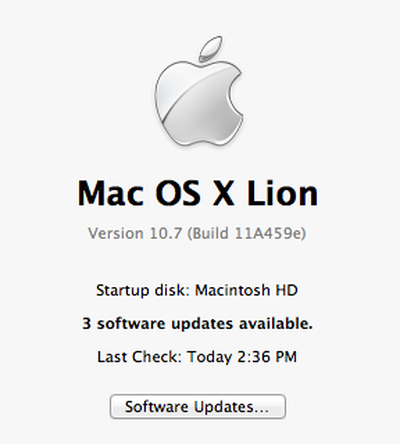
Per MacStories, Apple has released a new Mac OS X Lion Developer Preview 3 to its developers this evening as well as Xcode 4.1 Developer Preview 5. Apple last updated Lion for developers in late April. That version contained several UI changes presumably based on feedback from developers.
Apple is expected to discuss lion at WWDC which takes place in early June. Apple has targeted Mac OS X Lion for a summer release. No word yet on what's new in this build of Lion. The build for this latest version is 11A459e.
Update: MacStories reports: "We’re hearing the first changes in Lion DP 3 include a new boot animation, new graphical elements in the Finder’s toolbar, new desktop wallpapers and the Reading List, now enabled in Safari."
Update: Itsalltech.com details (with screenshots) many of the new changes in Lion:
- New options in System Preferences>Mission Control - There is a new animation when logging into the computer and displaying the desktop (seems buggy at this time) - New Reminders menu in iCal - New next desktop button in Dashboard space: - New options when right-clicking (this appears to be buggy at this time): - Compatibility to external displays has been improved (especially in Mission Control) - There is now a Mission Control app - Finder’s toolbar has been slightly updated: - Desktop wallpapers have been updated (and new ones have been added); - Reading List has been enabled in Safari: - New changes in Mission Control: can add “desktops” right from Mission Control by clicking “+” button, close spaces from Mission Control, Mission Control no longer displaying text “Desktop 1″ etc., when hovering over desktop thumbnails, magnification of thumbnails are seen - Scrollbars now change color depending on the background (black background=light scrollbar and vice versa):
Thursday February 5, 2026 12:54 pm PST by Joe Rossignol
Apple turns 50 this year, and its CEO Tim Cook has promised to celebrate the milestone. The big day falls on April 1, 2026.
"I've been unusually reflective lately about Apple because we have been working on what do we do to mark this moment," Cook told employees today, according to Bloomberg's Mark Gurman. "When you really stop and pause and think about the last 50 years, it makes your heart ...
Thursday February 5, 2026 12:22 pm PST by Joe Rossignol
Apple plans to announce the iPhone 17e on Thursday, February 19, according to Macwelt, the German equivalent of Macworld.
The report, citing industry sources, is available in English on Macworld.
Apple announced the iPhone 16e on Wednesday, February 19 last year, so the iPhone 17e would be unveiled exactly one year later if this rumor is accurate. It is quite uncommon for Apple to unveil...
Friday February 6, 2026 3:06 pm PST by Juli Clover
In the iOS 26.4 update that's coming this spring, Apple will introduce a new version of Siri that's going to overhaul how we interact with the personal assistant and what it's able to do.
The iOS 26.4 version of Siri won't work like ChatGPT or Claude, but it will rely on large language models (LLMs) and has been updated from the ground up.
Upgraded Architecture
The next-generation...
Saturday February 7, 2026 9:26 am PST by Joe Rossignol
Apple today shared an ad that shows how the upgraded Center Stage front camera on the latest iPhones improves the process of taking a group selfie.
"Watch how the new front facing camera on iPhone 17 Pro takes group selfies that automatically expand and rotate as more people come into frame," says Apple. While the ad is focused on the iPhone 17 Pro and iPhone 17 Pro Max, the regular iPhone...
Tuesday February 3, 2026 7:47 am PST by Joe Rossignol
While the iOS 26.3 Release Candidate is now available ahead of a public release, the first iOS 26.4 beta is likely still at least a week away. Following beta testing, iOS 26.4 will likely be released to the general public in March or April.
Below, we have recapped known or rumored iOS 26.3 and iOS 26.4 features so far.
iOS 26.3
iPhone to Android Transfer Tool
iOS 26.3 makes it easier...
All day to learn 5, yes count 'em, two letter words ?
Here you go :
ls - list files cd - change directory cp - copy mv - move rm - delete
All done in 2 minutes.
In your bid to sound better than the other poster, you are giving dangerous advice. I use the terminal often, but using those commands is difficult without knowing how they work and potentially dangerous.
1. Previously, when one used to open the app, the app would open as a picture with a processing image and then come to action in 2-3 seconds or maybe more. This is removed in this update as I see it. When you start an app or do anything, it first recovers all the require data and then opens the app completely. A great user experience improvement in my opinion.
2. For most people, Safari was unusable before. Safari is fine now. Although there are some gripes, overall it feels good and is very usable. Safari Version - 5.1 (7534.34.4)
3. The overall usage is just awesome. I cannot explain how the OS has been awful on low specced machines. But as expected, it was supposed to get better and now with DP3, its become exceptionally well. It just works great. Very smooth on MacBook Late 2008 [standard without upgrade].
4. LaunchPad is now closer to perfectness. There are no issues with making folders. The animation is gone but it feels very smooth. No problems at all. There's an extra Utilities folder which is empty. But it doesn't bother me as I don't use LaunchPad. :cool:
5. Launching Mission Control has become smoother but still requires a lot of work. A lot.
6. As explained in Pt.1, launching of apps can take some time as it caches the app+data/document completely.
7. The login is pretty smooth and going from the login screen to the home screen is awesome. It's plain but it makes a lot of sense. Might witness a delay but its worth the wait. :cool: