
Sparrow 1.5 Update Brings Dropbox Integration, Better Search - GeekWebGuides
Skip to Content

Sparrow 1.5 Update Brings Dropbox Integration, Better Search

by

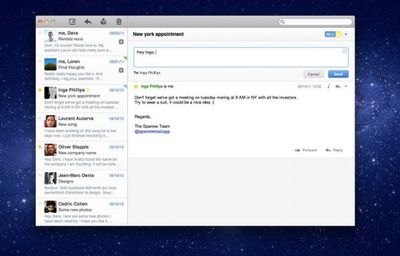
The OS X version of Sparrow, a popular alternative mail application, has been updated to version 1.5. The update brings bug fixes and 3 new features:

- Dropbox integration. Drag, drop, send (and sync). Sending a mail with attachment has never been simpler.
- Improved search with tokens and suggestions.
- Remote image blocking for a better Spam control.
sparrow
MacStories writes of the update:

New to Sparrow is Dropbox integration, which uploads large attachments to Dropbox as an alternative to CloudApp. If you’d prefer to use Dropbox over CloudApp (or haven’t yet connected to one of these optional services), you can visit the Services tab in the preferences to choose your option. You’ll have to log out of CloudApp first if you plan on using Dropbox (you have to restart the app to see the new login buttons). If you upload an attachment that’s bigger than 25 megabytes in size, Sparrow will choose Dropbox as the alternative host for the attachment and continue to send your message.

Sparrow is available in two flavors, a free, ad-supported version, and a $9.99 fully-featured version.

Sparrow Free is available from the Sparrow website. Sparrow is available for $9.99 from the Mac App Store [Direct Link]


Top Rated Comments

achtung! Avatar
194 months ago
sparrow is beautiful, is clean and it's fast! sure it's doesn't have all the bells and whistles like outlook or entourage, but for me it's just perfect. since lion, the apple mail is too confusing while handling multiple accounts. i have 4 mail accounts simultaneously on Sparrow and its just works. i haven't had any trouble with configurations or compatibilities. they have a solid costumer support and Facebook staff, so you can post doubts and expect replies and tips from their teams really quick. i've tested a lot mail apps before buying Sparrow, and it was love at the first sight. do yourself a favor and grab a copy of Sparrow,and be prepare for the iPhone version too! ;) cheers
Score: 4 Votes (Like | Disagree)
190 months ago
I want mail to be one solution. Regardless what device or computer I am on.
Gmail has provided this in the past, by simply allowing me to add an account to any mail client, secured imap, or access via any browser.

Sparrow is a great mail app replacement, but not yet on every device.

Sparrow does not (yet) have push, does not (yet) have landscape mode support, and does not yet make use of the iPad resolution as a universal app (and probably have to pay for it yet again).

While looks are nice, they're certainly not everything, nor the solution in my opinion.

Sorry to be so negative, and I hope Sparrow isn't going to be like Instagram where it takes 2+ years before they support another device, and probably another two before they support landscape/ipad.

[edit] - Tweeted Co-founder of Sparrow and got some positive news from him:

https://twitter.com/#!/domleca/status/187810418440404992
"@Floris Push is coming, composing in landscape too. And iPad is in the works.", @domleca
Score: 3 Votes (Like | Disagree)
194 months ago
I've had a mac for about 3 years but only started using the stock Mail.app about a year ago and I like it. How is Sparrow better?
I used Mail ever since I switched to a Mac. I just love the simple and elegant look, it is much more convenient than any web app. However, since Lion I actually hate it a lot. The long-awaited third column is glitchy and cannot be properly customised. The conversation view does not work with most e-mail providers including, to my astonishment, Gmail, whereas the much more useful ‘view by thread’ function is gone. Furthermore, the ‘simplified’ e-mail header is an impairment; it shows not enough in compact mode and too much in extended mode, while the save-attachment button is only viewable in the extended mode. For me, Mail for Lion feels like an unfinished product and I would love to get the old version back.

I think that Sparrow becomes more and more a solid alternative to Mail. It has some refreshing ideas, like the Facebook and Dropbox integration which seem very useful to me. The interface is much cleaner and the overall structure of the program is much more simple. However, I cannot use it as it does not properly support my university and work e-mail accounts. It works well with iCloud, Gmail and Yahoo, but not very well with other accounts. Also, I think Sparrow offers not enough customisation options, e.g. to remove the pictures in the mail list and to view all your folders at once, not only the folders per account (at least the last time I used it).
Score: 3 Votes (Like | Disagree)
jpbl1976 Avatar
188 months ago
#1 - This is about the Mac app, not the iOS app, which already has push.

#2 - The current iOS version doesn't have push, so why would you quit using it when they go to a subscription push (which you can choose to opt out of)?

On the IOS tangent -- if you jailbreak, you can download Sparrow Push or Sparrow + and it enables push for Sparrow. I hope Sparrow doesn't close-off that functionality when they launch their subscription service.
Score: 2 Votes (Like | Disagree)
194 months ago
I must have been left behind when this 'popular' mail application was announced. I've never heard of it. Cant beat a good Safari window with gmail.com loaded inside it ;)

Oh, but you can. IIRC, Sparrow was made FOR Gmail; it's their specialty. Give the free version a look; I bought the app, and LOVE it. I have 5 gmail (and Google Apps) accounts and Sparrow works wonderfully with them.
Score: 2 Votes (Like | Disagree)
194 months ago
I've had a mac for about 3 years but only started using the stock Mail.app about a year ago and I like it. How is Sparrow better?

I don't think it's fair to say whether or not it's "better" than another mail app, per se; it's just particularly geared for—though not exclusive to—Gmail users. A few features especially worthy to note are:

• Supports using DropBox and CloudApp for attachments that exceed sending limits on most email hosts
• Has pretty comprehensive Gmail label support (unlike Mail.app's folder system)
• Supports Priority Inbox (a popular Gmail feature)
• Supports Facebook connectivity if the user prefers to link FB friends' images with email contacts (with live updating)

Perhaps development of Lion's Mail.app had been progressing for a while when Sparrow burst onto the scene, but for the uninitiated, many might claim that Lion's Mail stole most (all?) of its key features from Sparrow. In short, it's a rather top-notch program with incredibly helpful and consistent customer support, as well as solid and frequent feature updates.
Score: 2 Votes (Like | Disagree)

Popular Stories

iPhone Duo Trio

Here's What Apple's Apps Look Like on the iPhone Duo

Tuesday October 20, 2026 11:12 am PDT by
With just three days to go until the iPhone Duo is released, Apple is getting ready for the launch. Behind the scenes, the App Store now has screenshots of Apple's built-in apps running on the Duo. We've seen some apps in marketing materials, but images of the ones we haven't seen give us an idea of what it will be like using the iPhone Duo day to day. Many apps are shown in landscape...
Apple Creator Studio iWork suite

Apple Pulls Keynote, Pages and Numbers From App Store [Update: Back]

Thursday October 22, 2026 11:01 am PDT by
Apple has temporarily removed Keynote, Pages, and Numbers from the App Store, just after releasing an update that added iPhone Duo support and a new Intelligent Assistant. It is not clear if the apps were removed intentionally, or if it is a bug. Apple has not said when the apps will be reinstated, but if it was in error, they should return soon. Update: The Mac versions are back without...
M5 MacBook Pro

RIP, MacBook Ultra

Monday October 19, 2026 9:37 am PDT by
Apple today sent out invites for an experience in Los Angeles on Wednesday, October 28, and the "Pro and tell" tagline on the invitation likely means that the rumored MacBook models with touch-enabled OLED displays will stick with MacBook Pro branding instead of the once-rumored "MacBook Ultra" name. The long-rumored "iPhone Ultra" ended up being named iPhone Duo, so speculation that Apple...
Latest Stories
MacBook Neo Helps Apple Outpace Rivals as Market Declines
36 minutes ago
Happy 25th Anniversary, iPod
1 hour ago
iPhone Duo Demand Reportedly Exceeds Apple's Expectations
4 hours ago
iPhone Duo Launch Begins as First Orders Reach Customers
10 hours ago
1Password for Agents Keeps Your Passwords Hidden From AI
11 hours ago
iPhone Duo 24 Hours Later: Your Questions Answered
11 hours ago
Apple's iWork Apps Get 'Intelligent Assistant' and iPhone Duo Support
12 hours ago
Apple is Apparently Considering a Slightly Larger iPhone Duo
12 hours ago
Giant iPhone Duo Displays Coming to Four Apple Stores
13 hours ago
Apple Pulls Keynote, Pages and Numbers From App Store [Update: Back]
14 hours ago
Apple Updates More Apps With iPhone Duo Support
15 hours ago
Apple Will Label Apps 'Made for iPhone Duo' in App Store
17 hours ago
Amazon Takes $49 Off iPad With Prices Starting at $399.99
18 hours ago
F1 on Apple TV Now Available in Dolby Atmos
19 hours ago
Apple Reveals More Than 50 Apps That Will Be Updated for iPhone Duo
19 hours ago
Apple Blocks Certificates That Could Help Attackers Fake Websites
20 hours ago
Giant iPhone Duo Installations Spotted at Apple Fifth Avenue
21 hours ago
iPhone Duo 2 Prototypes Include Under-Display Face ID
21 hours ago
Tesla App Gains iPad and iPhone Duo Support
1 day ago
Apple Reportedly Boosts iPhone Duo Orders by 44%
1 day ago
Fortnite Returning to Australian App Store After Court Ruling
1 day ago
Apple Ordered to Open iPhone to Rival App Stores in Australia
1 day ago
Apple Suppliers Face Hurdles Cutting Circuit Board Emissions
1 day ago
Things Updated for iPhone Duo With Adaptive Layout
1 day ago
Simplicity and Siri AI Are HomeView's Killer Features, Apple Says
1 day ago
iPhone Duo Reviewers Really Miss Face ID
1 day ago
Does the iPhone Duo Run Hot? Here's What Reviews Found
1 day ago
Apple Music's New Look is Now Live on Apple's Website
1 day ago
Anthropic Launches Claude Duet, a Proactive AI Agent
1 day ago
What 32,000 Folds Did to the iPhone Duo's Hinge
2 days ago








































