
'Air Display' Updated to Support HiDPI OS X Mode on New iPad

Last month, we noted that Avatron had announced forthcoming support for the new iPad in its Air Display software that allows users to add an iOS device as a wireless external monitor for their Mac.

With the new iPad's Retina display running at 2048x1536, Air Display would be able to display a relatively large OS X desktop, but at very small size. But Avatron has been working to make Air Display compatible with the high-resolution "HiDPI" mode that has been quietly built into OS X. Apple has kept the HiDPI feature hidden by default due to an absence of any Macs with ultra high-resolution "Retina" displays that could use it to significant effect.
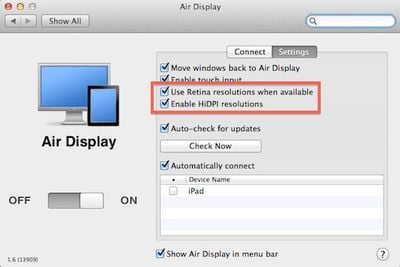
air display retina hidpi settings
Settings for Retina and HiDPI modes in Air Display Connect computer-side app for OS X (Source: MacStories)

The updated version of Air Display is now available [App Store, $9.99], allowing users to set the new iPad as a 1024x768 HiDPI display, taking advantage of the device's Retina display to display the high-resolution elements and text present in OS X Lion.

If you have Mac OS X Lion and a Retina iOS device, now you can turn on "HiDPI mode." HiDPI is a built-in Mac OS X feature that makes UI elements render at double resolution. It's absolutely stunning on a Retina display. By default, Mac OS X disables HiDPI because until now, there has been no Mac display with high enough resolution. Air Display on a new iPad, with its 2048x1536 264-dpi Retina display, finally brings HiDPI to life.

MacStories has some hands-on reports with the new version of Air Display, noting that the feature works very well without significant lag or compression visible when windows are still. When moving windows around the desktop, resolution is degraded as the app works to keep up with the on-screen movements, but for viewing relatively static content the app delivers "incredible image quality".

Air Display is compatible with most Macs running Mac OS X Snow Leopard or later. Notably, late 2008/mid-2009 15-inch MacBook Pro models and early 2009/mid-2009 17-inch MacBook Pro models are not compatible with the Air Display Connect computer-side application when running OS X Lion.

As we also noted last month, Apple's work on HiDPI mode is becoming more visible in OS X Mountain Lion, with the beta version of Messages available for OS X Lion showing some of the fruits of that labor to the public.


Related Roundup: iPad
Buyer's Guide: iPad (Don't Buy)
Related Forum: iPad

Popular Stories

wwdc sans text feature

Apple Rumored to Announce New Product on February 19

Thursday February 5, 2026 12:22 pm PST by
Apple plans to announce the iPhone 17e on Thursday, February 19, according to Macwelt, the German equivalent of Macworld. The report, citing industry sources, is available in English on Macworld. Apple announced the iPhone 16e on Wednesday, February 19 last year, so the iPhone 17e would be unveiled exactly one year later if this rumor is accurate. It is quite uncommon for Apple to unveil...
maxresdefault

Apple Shows Off a Key Reason to Upgrade to the iPhone 17

Saturday February 7, 2026 9:26 am PST by
Apple today shared an ad that shows how the upgraded Center Stage front camera on the latest iPhones improves the process of taking a group selfie. "Watch how the new front facing camera on iPhone 17 Pro takes group selfies that automatically expand and rotate as more people come into frame," says Apple. While the ad is focused on the iPhone 17 Pro and iPhone 17 Pro Max, the regular iPhone...
Apple Logo Zoomed

Tim Cook Teases Plans for Apple's Upcoming 50th Anniversary

Thursday February 5, 2026 12:54 pm PST by
Apple turns 50 this year, and its CEO Tim Cook has promised to celebrate the milestone. The big day falls on April 1, 2026. "I've been unusually reflective lately about Apple because we have been working on what do we do to mark this moment," Cook told employees today, according to Bloomberg's Mark Gurman. "When you really stop and pause and think about the last 50 years, it makes your heart ...
Finder Siri Feature

Why Apple's iOS 26.4 Siri Upgrade Will Be Bigger Than Originally Promised

Friday February 6, 2026 3:06 pm PST by
In the iOS 26.4 update that's coming this spring, Apple will introduce a new version of Siri that's going to overhaul how we interact with the personal assistant and what it's able to do. The iOS 26.4 version of Siri won't work like ChatGPT or Claude, but it will rely on large language models (LLMs) and has been updated from the ground up. Upgraded Architecture The next-generation...
iOS 26

iOS 26.3 and iOS 26.4 Will Add These New Features to Your iPhone

Tuesday February 3, 2026 7:47 am PST by
While the iOS 26.3 Release Candidate is now available ahead of a public release, the first iOS 26.4 beta is likely still at least a week away. Following beta testing, iOS 26.4 will likely be released to the general public in March or April. Below, we have recapped known or rumored iOS 26.3 and iOS 26.4 features so far. iOS 26.3 iPhone to Android Transfer Tool iOS 26.3 makes it easier...

Top Rated Comments

DrNeroCF Avatar
181 months ago
It may make more sense to use an external Display ($100.00) than to waste your iPad's display acting as an external monitor.

Care to link me to a $100 monitor with 2048×1536 resolution...?
Score: 7 Votes (Like | Disagree)
spacepower7 Avatar
181 months ago
Why use an $800 device to do the work of a $100 device??? That's just plain stupid, don't you think? It would be a waste of an iPad's processor to use it as a plain display. And on top of that, laggy.

----------


You could convert those diagrams to PDF, then view them on the iPad while programming, plus you could be making annotations of all kinds to it.

I would recommend the GoodReader App for this purpose. It's the most complete and stable of them all.

Combine it with Dropbox for synchronization, and you've got yourself a complete solution.


----------


Here's a better solution: http://www.startech.com/usb-video-adapters

For portability, I agree with you.

But as I said before I wouldn't be using an $800 device to do the job of a $100 device. It's like buying a monster truck to deliver pizza in Brooklyn.

I would rather use the iPad as a second computer in my configuration, and take advantage of it this way.
I currently do Email, Skype, and other tasks on the iPad while working on my main Mac in multi-monitor mode.

Wow, so ignorant when not considering other peoples uses.

$800 why, try $499 plus $10.

Why deal with annotating a PDF in iOS when you can do it on your Mac without moving your fingers off your keyboard.

Why you keep complaining about a $10 software that some people have uses for, but obviously not you. Considering the target market already purchased an iPad, $10 more for bringing more uses to an iPad is obvious, your complaints are really silly.

Sorry I can't fit a 20" external display and USB adaptor in my small bag that fits my 13" MBA and iPad..

I own the app and occasionally use it because of my current setup, but the times I do/did was well worth over $100 in every instance.
Score: 6 Votes (Like | Disagree)
jclardy Avatar
181 months ago
It may make more sense to use an external Display ($100.00) than to waste your iPad's display acting as an external monitor.

On the new Air's you can only have one external display, this makes an easy and cheap way to add a tertiary monitor if you already own an iPad.

Also with the Air you have an awesome portable dual screen setup.
Score: 5 Votes (Like | Disagree)
OneMike Avatar
181 months ago
It may make more sense to use an external Display ($100.00) than to waste your iPad's display acting as an external monitor.

If it worked well I could make use of it. Plenty of us already have an external display, this could be an additional.
Score: 4 Votes (Like | Disagree)
mcsenerd Avatar
181 months ago
Have Mac peeps always been this pissy? Are they never happy? Do they still have their panties twisted from Steve's passing? Anyway...this program works just fine so long as you live within its confines (can't we say the same damn thing about a great many things in life?). If you expect to be playing first person shooters on a dang display hooked up over heavily trafficked wifi connections...well...let's just say there's more than just a screw loose going around. If you don't mind using it to improve your productivity with some slightly static information...well...it's not a bad little program for only $9.99.
Score: 3 Votes (Like | Disagree)
OnEMoReTrY Avatar
181 months ago


Why would you use an iPad for a second display? I'm guessing people on here have the ridiculous 27 incher and a cinema display. So what's the point. Enlighten me please... :)
I do a lot of programming at school and from various locations with my group on my Macbook Air. I would use this to have a Visio document with sequence diagrams, data models, etc. while I'm programming. It would come in handy for when I have work to do and I'm not at home on my desktop. It's definitely better than nothing in those situations.
Score: 3 Votes (Like | Disagree)














