Apple Releases Second Update to Java in Two Days

Apple has released its second update in two days to the OS X implementation of Java. The first update closed a vulnerability that has led to the infection of more than 600,000 Macs via a trojan horse. The infections have received increased media attention in the past day, including a splashed headline on the Drudge Report.
javaupdate
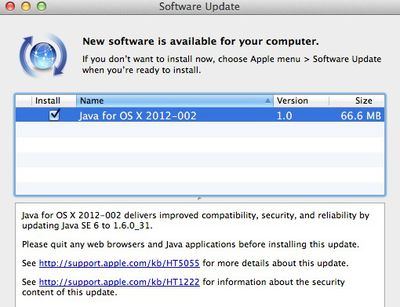
While yesterday's Java for OS X Lion 2012-001 update closed the vulnerability in Java 1.6.0_29, there's no indication what the new update -- called Java for OS X 2012-002 -- fixes. The update notes link to the same support document as update 2012-001.

Last year, Apple introduced a security update to OS X that would automatically remove malicious software from OS X installations. It isn't clear if the infected machines can be fixed via the internal OS X security mechanisms.

In OS X Mountain Lion, the next version of the OS X software that will be released this summer, Apple will include a feature called Gatekeeper. The new system relies not only on Mac App Store distribution as means of vetting apps, but also on a new "identified developer" program under which developers distributing their applications outside of the Mac App Store can register with Apple and receive a personalized certificate they can use to sign their applications. Apple can then use that system to track developers and disable their certificates if malicious activity is detected.

Popular Stories

maxresdefault

Apple Shows Off a Key Reason to Upgrade to the iPhone 17

Saturday February 7, 2026 9:26 am PST by
Apple today shared an ad that shows how the upgraded Center Stage front camera on the latest iPhones improves the process of taking a group selfie. "Watch how the new front facing camera on iPhone 17 Pro takes group selfies that automatically expand and rotate as more people come into frame," says Apple. While the ad is focused on the iPhone 17 Pro and iPhone 17 Pro Max, the regular iPhone...
Finder Siri Feature

Why Apple's iOS 26.4 Siri Upgrade Will Be Bigger Than Originally Promised

Friday February 6, 2026 3:06 pm PST by
In the iOS 26.4 update that's coming this spring, Apple will introduce a new version of Siri that's going to overhaul how we interact with the personal assistant and what it's able to do. The iOS 26.4 version of Siri won't work like ChatGPT or Claude, but it will rely on large language models (LLMs) and has been updated from the ground up. Upgraded Architecture The next-generation...
wwdc sans text feature

Apple Rumored to Announce New Product on February 19

Thursday February 5, 2026 12:22 pm PST by
Apple plans to announce the iPhone 17e on Thursday, February 19, according to Macwelt, the German equivalent of Macworld. The report, citing industry sources, is available in English on Macworld. Apple announced the iPhone 16e on Wednesday, February 19 last year, so the iPhone 17e would be unveiled exactly one year later if this rumor is accurate. It is quite uncommon for Apple to unveil...
apple wallet drivers license feature iPhone 15 pro

Apple Says These 7 U.S. States Plan to Offer iPhone Driver's Licenses

Monday February 9, 2026 6:24 am PST by
In select U.S. states, residents can add their driver's license or state ID to the Apple Wallet app on the iPhone and Apple Watch, and then use it to display proof of identity or age at select airports and businesses, and in select apps. The feature is currently available in 13 U.S. states and Puerto Rico, and it is expected to launch in at least seven more in the future. To set up the...
14 inch MacBook Pro Keyboard

New MacBook Pros Could Now Arrive in March

Sunday February 8, 2026 6:02 am PST by
New MacBook Pro models with the M5 Pro and M5 Max chips could arrive as soon as Monday, March 2, according to Bloomberg's Mark Gurman. In today's "Power On" newsletter, Gurman said that the release of new MacBook Pro models is tied to the release of macOS Tahoe 26.3. The launch is said to be slated for as early as the week of March 2. He added that the M4 Pro and M4 Max models on sale today...


Top Rated Comments

Dragado Avatar
181 months ago
It's also Friday the 6th right now.
Does this mean the world's going to end again? I don't think I can take another world ending; I may die of laughter.

Hi. Can you guys tell me whether you think my Macbook got infected? Yesterday I did a search for "msnbc live feed online." Two of the results were websites called zahipedia.info.com and the other epctv.com. I can't remember which of the two it was (I think the latter), but, when I went to it, a small window popped up telling me that I should clean my computer of junk. I clicked OK to get rid of the window, then Safari froze up. I couldn't even quit it until I forced quit it via Finder. Could this have infected my computer? My Macbook is fairly new and, as far as I know, free of junk. Is epctv a dangerous site? Why did it tell me I had junk? How would I find out if I got infected? Thanks.
By the way, laws of computing 101: The OK button agrees to something, the Cancel/close window button disagrees. If you click OK, know what you're saying OK to.

EDIT: In other words, stop using it to close windows.
Score: 16 Votes (Like | Disagree)
fel10 Avatar
181 months ago
66.6 :eek:

Score: 9 Votes (Like | Disagree)
MonkeySee.... Avatar
181 months ago
I love how these "professionals" are calling it a virus :rolleyes:
Score: 8 Votes (Like | Disagree)
MarkMS Avatar
181 months ago
Straight from Apple's Java mailing list. Just an issue with Xcode and App Loader in OS X Lion. Snow Leopard users don't need the tiny update.

Java developers,

Today we re-shipped our Java 1.6.0_31 for OS X Lion today to address a critical issue we found in Xcode and the Application Loader tool. This new "Java for OS X 2012-002" package is effectively identical to "Java for OS X 2012-001", with the exception of a few symlinks and version numbers.

For the sake of expediency, we have re-rolled the automatic update as our standard full combo updater, with the hope that most users have not yet been presented with 2012-001. We considered creating a delta update for users who already installed 001, but that would have made the process of getting these fixes to you take longer.

We apologize for the inconvenience, and would like to offer our thanks to the developers who caught this issue and reported it to us as quickly as they did. This issue only impacts Lion users, so Snow Leopard users have nothing to reinstall.

Over the next few days, we will catch up with producing updated release notes, tech notes, and developer packages with the revised 002 version numbers.

Manual download links:
Java for OS X 2012-002: <http://support.apple.com/kb/DL1515>
Java for Mac OS X 10.6 Update 7: <http://support.apple.com/kb/DL1516>
Score: 7 Votes (Like | Disagree)
Jabman Avatar
181 months ago
Hey if it's broken fix it.:cool:
Score: 7 Votes (Like | Disagree)
Morod Avatar
181 months ago
Hi. Can you guys tell me whether you think my Macbook got infected? Yesterday I did a search for "msnbc live feed online." Two of the results were websites called zahipedia.info.com and the other epctv.com. I can't remember which of the two it was (I think the latter), but, when I went to it, a small window popped up telling me that I should clean my computer of junk. I clicked OK to get rid of the window, then Safari froze up. I couldn't even quit it until I forced quit it via Finder. Could this have infected my computer? My Macbook is fairly new and, as far as I know, free of junk. Is epctv a dangerous site? Why did it tell me I had junk? How would I find out if I got infected? Thanks.

To find out if you're infected, do this:


Originally Posted by Sirolway
What's the easiest way to determine if you're infected?...


In terminal run:
Quote:
defaults read /Applications/Safari.app/Contents/Info LSEnvironment
You should get this error:
Quote:
The domain/default pair of (/Applications/Safari.app/Contents/Info, LSEnvironment) does not exist
Then run:
Quote:
defaults read ~/.MacOSX/environment DYLD_INSERT_LIBRARIES
You should get this error:
Quote:
The domain/default pair of (/Users/YOURUSER/.MacOSX/environment, DYLD_INSERT_LIBRARIES) does not exist


You can copy and paste the two commands into Terminal. To open Terminal, go to Finder>Applications>Utilities>Terminal. Double click on Terminal. Hit enter after each command.
Just be careful when using Terminal. It's one of the few places where you can really mess up your computer.
Score: 6 Votes (Like | Disagree)