
A Closer Look at the New MacBook Pro's Retina Display - GeekWebGuides
Skip to Content

A Closer Look at the New MacBook Pro's Retina Display

AnandTech takes a closer look at the new MacBook Pro's 2880x1800 Retina display, revealing just how well the display stacks up against its predecessor and other notebook displays and delving into the details of how it handles various resolutions.

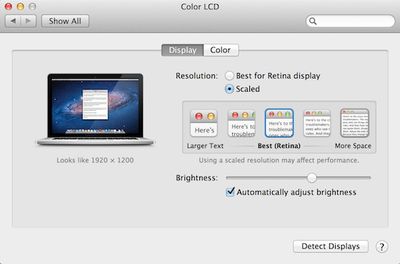
In looking at scaling, the report explains the new slider option in System Preferences that allows users to select from a spectrum of resolutions that include not only the 1440x900 resolution in Retina quality using the full 2880x1800 pixels, but also larger desktop spaces at 1920x1200 and 1680x1050.

Retina Display MBP owners now get a slider under OS X's Display Preferences that allow you to specify desktop resolutions other than 1440 x 900. At 1440 x 900 you don't get any increase in usable desktop resolution compared to a standard 15-inch MacBook Pro, but everything is ridiculously crisp. If you're like me however and opted for the 1680 x 1050 "high-res" upgrade last generation, this won't do. Thankfully Apple offers 1680 x 1050 and 1920 x 1200 scaling options that trade a bit of image quality and performance for added real estate.
retina macbook pro display preferences
AnandTech's report also describes how Apple's display design has done away with the cover glass that in some circumstances suffers from significant glare on the standard non-Retina MacBook Pro. Phil Schiller noted during the keynote introduction that glare has been reduced 75% from the previous MacBook Pro, and AnandTech calls the Retina MacBook Pro's glare "remarkably close" to that seen on an earlier-generation matte MacBook Pro.

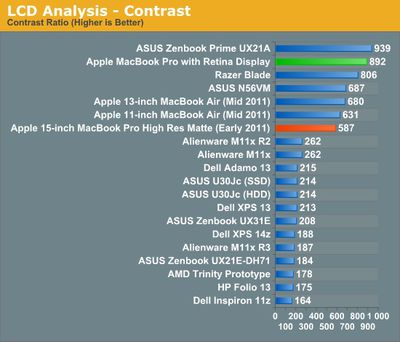
Comparing color and contrast, AnandTech discovered that the Retina MacBook Pro's display has remarkably improved black levels, which help compensate for slightly lower brightness. Contrast is also excellent, making for crisp and vivid content display.
macbook pro retina contrast
As with Retina displays on iOS devices, Apple automatically scales text to display at the crisper Retina resolution, but it is dependent on apps using Apple's text rendering. AnandTech notes that Google Chrome currently uses its own text rendering engine and is thus unable to take advantage of the sharper text available in Safari.

Finally, the report takes a look at how games handle the Retina display, with Diablo III taking full advantage of the 2880x1800 display as touted by Apple during the keynote. Some games are able to see the full resolution while others are limited to the "non-Retina" resolutions topping out at 1920x1200, but it seems reasonable to believe that over time game developers will be building in support for the ultra-high resolution of the new MacBook Pro.


Related Roundup: MacBook Pro

Popular Stories

M5 MacBook Pro

RIP, MacBook Ultra

Monday October 19, 2026 9:37 am PDT by
Apple today sent out invites for an experience in Los Angeles on Wednesday, October 28, and the "Pro and tell" tagline on the invitation likely means that the rumored MacBook models with touch-enabled OLED displays will stick with MacBook Pro branding instead of the once-rumored "MacBook Ultra" name. The long-rumored "iPhone Ultra" ended up being named iPhone Duo, so speculation that Apple...
iPhone Duo Trio

Here's What Apple's Apps Look Like on the iPhone Duo

Tuesday October 20, 2026 11:12 am PDT by
With just three days to go until the iPhone Duo is released, Apple is getting ready for the launch. Behind the scenes, the App Store now has screenshots of Apple's built-in apps running on the Duo. We've seen some apps in marketing materials, but images of the ones we haven't seen give us an idea of what it will be like using the iPhone Duo day to day. Many apps are shown in landscape...
apple pro tell logo

Apple Announcing New Products Next Week: 'Pro and Tell'

Monday October 19, 2026 9:05 am PDT by
Apple's Greg Joswiak today hinted at new product announcements coming next week, sharing a social media post that says "Can't wait to pro and tell next week." Rumors suggest Apple is planning to debut the new MacBook Pro with an OLED touchscreen display, an M6 entry-level MacBook Pro, an M6 iMac, an iPad mini with an OLED display. Can't wait to pro and tell next week....

Top Rated Comments

gregwyattjr Avatar
187 months ago
I'm scared to look at this beautiful new display. It'll make my 1280x800 MacBook display look like a Lite-Brite.
Score: 29 Votes (Like | Disagree)
187 months ago
The 75% reduction in glare is the most interest to me - hoping they might take this into the next iMac refresh to make it more viable for pros perhaps?
Score: 27 Votes (Like | Disagree)
KnightWRX Avatar
187 months ago
Scaled at 1680x1050:
[url=http://images.anandtech.com/galleries/2078/Screen%20Shot%202012-06-11%20at%204.35.55%20PM_thumb.png]Image (http://images.anandtech.com/galleries/2078/Screen%20Shot%202012-06-11%20at%204.35.55%20PM.png)[/URL]
(Click to enlarge)

Look at the size of the image. It's a 3,360px × 2,100px image. Basically, it's a pixel perfect rendition of a retina 1680x1050 image. That's no good to evaluate the downscaling algorithm used to display it in full screen on a 2880x1800 screen.

Sure we can use Photoshop or Gimp to downscale it, but then we have Photoshop or Gimp's downscaling algorithm coming into play. What we need to know and see is a 2880x1800 shot of the 3360x2100 shot downscaled using the same code OS X uses.

That's why I say Anand's comparison is bunk, it's not possible to see what it actually looks like on the screen.

I'll wait to see it in store. Feel free to downrank me for not "believing" blindly.
Score: 16 Votes (Like | Disagree)
187 months ago
If you were to select a resolution that wasn't exactly the native pixel density (2880x1800) or exactly half (1440x900), and were to instead pick a larger resolution like 1680x1050 or 1920x1200 (as mentioned in the article) wouldn't you experience fuzzing as the software tries to compensate for the hardware vs. software pixel boundaries?
When you pick the "more space" option, which is equivalent to 1920x1200, OSX actually renders it at double that size in both directions, or 3840x2400, using the retina quality graphics. It then smoothly downscales to 2880x1800.

It probably isn't perfect, I haven't seen one in person yet, but it should be much better than simply setting a display to a non-native resolution.

Instead of upscaling a low resolution image, it's downlscaling a high resolution one.
Score: 12 Votes (Like | Disagree)
Littleodie914 Avatar
187 months ago
If you were to select a resolution that wasn't exactly the native pixel density (2880x1800) or exactly half (1440x900), and were to instead pick a larger resolution like 1680x1050 or 1920x1200 (as mentioned in the article) wouldn't you experience fuzzing as the software tries to compensate for the hardware vs. software pixel boundaries?
Score: 9 Votes (Like | Disagree)
187 months ago
Yes. Also not much point paying for an expensive 2880 screen and running it at 1680 when a native 1680 screen would be both sharper and cheaper, if they offered it.
Anandtech specifically says that the '1680x1050' mode on the Retina Macbook Pro looks better than the old 1680x1050 display:

Even at the non-integer scaled 1680 x 1050 setting, the Retina Display looks a lot better than last year's high-res panel. It looks like Apple actually renders the screen at twice the selected resolution before scaling it to fit the 2880 x 1800 panel (in other words, at 1920 x 1200 Apple is rendering everything at 3840 x 2400 (!) before scaling - this is likely where the perf impact is seen, but I'm trying to find a way to quantify that now). Everything just looks better. I also appreciate how quick it is to switch between resolutions on OS X. When I'm doing a lot of work I prefer the 1920 x 1200 setting, but if I'm in content consumption mode I find myself happier at 1440 x 900 or 1680 x 1050.
The scaling that Apple is doing is very different than just running a display at a non-native resolution.
Score: 8 Votes (Like | Disagree)
Latest Stories
iPhone Duo 24 Hours Later: Your Questions Answered
26 minutes ago
Apple's iWork Apps Get 'Intelligent Assistant' and iPhone Duo Support
1 hour ago
Apple is Apparently Considering a Slightly Larger iPhone Duo
1 hour ago
Giant iPhone Duo Displays Coming to Four Apple Stores
3 hours ago
Apple Pulls Keynote, Pages and Numbers From App Store [Update: Back]
3 hours ago
Apple Updates More Apps With iPhone Duo Support
4 hours ago
Apple Will Label Apps 'Made for iPhone Duo' in App Store
7 hours ago
Amazon Takes $49 Off iPad With Prices Starting at $399.99
7 hours ago
F1 on Apple TV Now Available in Dolby Atmos
8 hours ago
Apple Reveals More Than 50 Apps That Will Be Updated for iPhone Duo
8 hours ago
Apple Blocks Certificates That Could Help Attackers Fake Websites
10 hours ago
Giant iPhone Duo Installations Spotted at Apple Fifth Avenue
10 hours ago
iPhone Duo 2 Prototypes Include Under-Display Face ID
11 hours ago
Tesla App Gains iPad and iPhone Duo Support
15 hours ago
Apple Reportedly Boosts iPhone Duo Orders by 44%
15 hours ago
Fortnite Returning to Australian App Store After Court Ruling
15 hours ago
Apple Ordered to Open iPhone to Rival App Stores in Australia
16 hours ago
Apple Suppliers Face Hurdles Cutting Circuit Board Emissions
16 hours ago
Things Updated for iPhone Duo With Adaptive Layout
17 hours ago
Simplicity and Siri AI Are HomeView's Killer Features, Apple Says
17 hours ago
iPhone Duo Reviewers Really Miss Face ID
22 hours ago
Does the iPhone Duo Run Hot? Here's What Reviews Found
23 hours ago
Apple Music's New Look is Now Live on Apple's Website
1 day ago
Anthropic Launches Claude Duet, a Proactive AI Agent
1 day ago
What 32,000 Folds Did to the iPhone Duo's Hinge
1 day ago
iPhone Duo's Hidden FaceTime Camera Takes 'Trash' Photos
1 day ago
iPhone Duo Has 'Edge Light' Feature That Debuted on Macs Last Year
1 day ago
Apple Support App Updated for iPhone Duo's Larger Display
1 day ago
Amazon Sweetens the Deal on Entry-Level 16-Inch MacBook Pro With $570 Off
1 day ago
iPhone Duo Tips Over on MagSafe Stands When Unfolded
1 day ago









































