
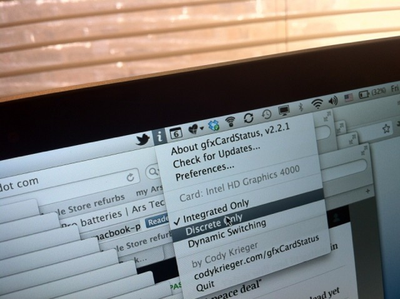
gfxCardStatus allows users to control which graphics card is enabled -- integrated or discrete -- on MacBook Pro models with multiple graphics cards. By more precisely controlling when each graphics card is enabled, users can improve system performance or battery life. gfxCardStatus is a menu bar application for OS X that allows MacBook Pro owners to view which GPU is in use at a glance, and switch between them on-demand.
NewImage
Ars Technica has much more, including the fact that the Retina MacBook Pro can be pushed to nearly 10 hours of battery life with some minor battery saving techniques:

I was consistently able to get between 8 and 8.5 hours of continuous use from the Retina MacBook Pro when running integrated graphics only. Turning down screen brightness to just two "dots," a technique I often use to maximize battery life when using a MacBook Air during conferences, caused OS X to report potential battery life as high as 10 hours. I simply didn't have the stamina to test that claim, but I did make one nine-hour run with OS X reporting a nine percent remaining battery capacity.

gfxCardStatus is a free download from creator Cody Krieger's website.

Top Rated Comments

yetanotherdave Avatar
177 months ago
I'll try this out on my mid 2009 mbp, where you have to log out, back in to switch cards... not hoping for much, but it'd be very nice!

edit: Wow! It works! Or at least claims to, will have to do some testing. Why can't apple make it work this easy??????
Score: 4 Votes (Like | Disagree)
toke lahti Avatar
177 months ago
Why can't apple make it work this easy??????
Because switching-on-the-fly was the main new feature of the next model...
Score: 3 Votes (Like | Disagree)
alphaod Avatar
177 months ago

Makes sense too, as if your at a desk your likely to be plugged in to the mains so why does it matter the dGPU is running or not?

Because most of the time the dGPU runs hotter than the integrated GPU hence my computer spends more time sounding like a jet engine.
Score: 2 Votes (Like | Disagree)
kockgunner Avatar
177 months ago
This app saved me when by 2010 MBP with the 330GT graphics card's display kept turning black only solved by a reboot. The problem didn't appear on the Intel chip so I used this program to keep it on Intel until I had the chance to go to the Apple store to replace the logic board.
Score: 2 Votes (Like | Disagree)
Skika Avatar
177 months ago
I have been using this for a while now on my early 2011 MBP. It works good, i only wish it could somehow force the integrated HD3000 when connected to an external display. Because now it always goes to the discrete with an external display.
Score: 2 Votes (Like | Disagree)
AriX Avatar
177 months ago
For YEARS?
How many people have multiple graphics cards?
Haha... well, now that you mention it, I guess it's only been about 2 years :)
Most 15"/17" MacBook Pros sold since 2009, if I remember correctly, have 2 graphics cards - one discrete card that is very powerful, but somewhat power-hungry, and an integrated one that is much less powerful but draws less power.

Mac OS X automatically switches between the available graphics cards. When you connect an external display, load something up in Flash, start a game, etc. the OS will switch to the better graphics card, and when you're done, it will switch back to save power. But it's not perfect, and a lot of apps will inadvertently force the system to use the better graphics card. For example, Google Chrome and Skype, among many others. gfxCardStatus provides a lot of control over which card is in use at any given time, and can also just notify you when the system decides that you should be using a different graphics card, and shows you why exactly the switch was made (under "dependencies"). It's a great utility.
Score: 1 Votes (Like | Disagree)

Popular Stories

maxresdefault

Apple Shows Off a Key Reason to Upgrade to the iPhone 17

Saturday February 7, 2026 9:26 am PST by
Apple today shared an ad that shows how the upgraded Center Stage front camera on the latest iPhones improves the process of taking a group selfie. "Watch how the new front facing camera on iPhone 17 Pro takes group selfies that automatically expand and rotate as more people come into frame," says Apple. While the ad is focused on the iPhone 17 Pro and iPhone 17 Pro Max, the regular iPhone...
wwdc sans text feature

Apple Rumored to Announce New Product on February 19

Thursday February 5, 2026 12:22 pm PST by
Apple plans to announce the iPhone 17e on Thursday, February 19, according to Macwelt, the German equivalent of Macworld. The report, citing industry sources, is available in English on Macworld. Apple announced the iPhone 16e on Wednesday, February 19 last year, so the iPhone 17e would be unveiled exactly one year later if this rumor is accurate. It is quite uncommon for Apple to unveil...
Apple Logo Zoomed

Tim Cook Teases Plans for Apple's Upcoming 50th Anniversary

Thursday February 5, 2026 12:54 pm PST by
Apple turns 50 this year, and its CEO Tim Cook has promised to celebrate the milestone. The big day falls on April 1, 2026. "I've been unusually reflective lately about Apple because we have been working on what do we do to mark this moment," Cook told employees today, according to Bloomberg's Mark Gurman. "When you really stop and pause and think about the last 50 years, it makes your heart ...
Finder Siri Feature

Why Apple's iOS 26.4 Siri Upgrade Will Be Bigger Than Originally Promised

Friday February 6, 2026 3:06 pm PST by
In the iOS 26.4 update that's coming this spring, Apple will introduce a new version of Siri that's going to overhaul how we interact with the personal assistant and what it's able to do. The iOS 26.4 version of Siri won't work like ChatGPT or Claude, but it will rely on large language models (LLMs) and has been updated from the ground up. Upgraded Architecture The next-generation...
iOS 26

iOS 26.3 and iOS 26.4 Will Add These New Features to Your iPhone

Tuesday February 3, 2026 7:47 am PST by
While the iOS 26.3 Release Candidate is now available ahead of a public release, the first iOS 26.4 beta is likely still at least a week away. Following beta testing, iOS 26.4 will likely be released to the general public in March or April. Below, we have recapped known or rumored iOS 26.3 and iOS 26.4 features so far. iOS 26.3 iPhone to Android Transfer Tool iOS 26.3 makes it easier...















