Apple Acquires 18 'Axis-Based User Interface' Patents from Maya-Systems

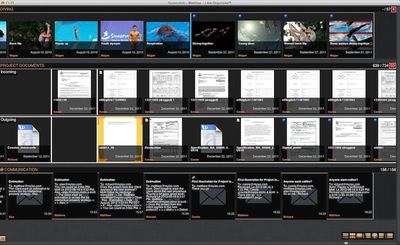
Canadian firm Maya-Systems today announced that it has sold a group of 18 user interface patents to Apple. The patents appear to be related to Maya-Systems' work with axis-based interfaces in which documents and other files can be automatically grouped into timelines based on tags or other attributes and made accessible via the cloud.

Maya-Systems' technology offers an intuitive way to display any virtual content in a superior manner. This transaction attests that Maya-Systems axis-based user interface is ahead of the growing demand for axis-based user interfaces.

"We dealt with a significant number of sophisticated buyers," noted Mathieu Audet, founder of Maya-Systems and patent agent. "We are pleased to have secured the transaction with Apple." "Our patents have been analyzed thoroughly by many potential buyers. We are confident that they are strong assets."
iamorganized
Maya-Systems' key product is I am Organized, a platform for organizing, viewing, and sharing files.

IamOrganized’s uniquely distinctive, patented feature is its axes-based interface. Intuitive and elegant, axes herald a new era in content management. They show and manage content more meaningfully than ever.

Unlike folder trees based on file location, axes group files by subject (any attribute, really) and display them along a timeline.
Scroll an axis to view more files. Zoom in. Zoom out. Navigate swiftly between projects by displaying several axes on your screen.

Attribute-based, orderly and relational, axes give users a meaningful and integrated view of their files.


It is not entirely clear exactly what aspect of Maya-Systems' patent portfolio Apple was interested in controlling, but Apple has been making a significant push into cloud-based document and file storage and sharing, including such features Documents in the Cloud and Photo Stream.

Popular Stories

maxresdefault

Apple Shows Off a Key Reason to Upgrade to the iPhone 17

Saturday February 7, 2026 9:26 am PST by
Apple today shared an ad that shows how the upgraded Center Stage front camera on the latest iPhones improves the process of taking a group selfie. "Watch how the new front facing camera on iPhone 17 Pro takes group selfies that automatically expand and rotate as more people come into frame," says Apple. While the ad is focused on the iPhone 17 Pro and iPhone 17 Pro Max, the regular iPhone...
wwdc sans text feature

Apple Rumored to Announce New Product on February 19

Thursday February 5, 2026 12:22 pm PST by
Apple plans to announce the iPhone 17e on Thursday, February 19, according to Macwelt, the German equivalent of Macworld. The report, citing industry sources, is available in English on Macworld. Apple announced the iPhone 16e on Wednesday, February 19 last year, so the iPhone 17e would be unveiled exactly one year later if this rumor is accurate. It is quite uncommon for Apple to unveil...
Apple Logo Zoomed

Tim Cook Teases Plans for Apple's Upcoming 50th Anniversary

Thursday February 5, 2026 12:54 pm PST by
Apple turns 50 this year, and its CEO Tim Cook has promised to celebrate the milestone. The big day falls on April 1, 2026. "I've been unusually reflective lately about Apple because we have been working on what do we do to mark this moment," Cook told employees today, according to Bloomberg's Mark Gurman. "When you really stop and pause and think about the last 50 years, it makes your heart ...
Finder Siri Feature

Why Apple's iOS 26.4 Siri Upgrade Will Be Bigger Than Originally Promised

Friday February 6, 2026 3:06 pm PST by
In the iOS 26.4 update that's coming this spring, Apple will introduce a new version of Siri that's going to overhaul how we interact with the personal assistant and what it's able to do. The iOS 26.4 version of Siri won't work like ChatGPT or Claude, but it will rely on large language models (LLMs) and has been updated from the ground up. Upgraded Architecture The next-generation...
iOS 26

iOS 26.3 and iOS 26.4 Will Add These New Features to Your iPhone

Tuesday February 3, 2026 7:47 am PST by
While the iOS 26.3 Release Candidate is now available ahead of a public release, the first iOS 26.4 beta is likely still at least a week away. Following beta testing, iOS 26.4 will likely be released to the general public in March or April. Below, we have recapped known or rumored iOS 26.3 and iOS 26.4 features so far. iOS 26.3 iPhone to Android Transfer Tool iOS 26.3 makes it easier...

Top Rated Comments

FSMBP Avatar
170 months ago
dropbox still rules the cloud
And always will. iCloud is awful and Apple apparently thinks users are too stupid to understand "files" and "folders" even though the metaphor was fine 30 years ago. However, in iOS, users are forced to remember which apps holds they document they're looking for... Ex. did I save that PDF into iBook or into DropBox?
Score: 15 Votes (Like | Disagree)
needfx Avatar
170 months ago
dropbox still rules the cloud
Score: 10 Votes (Like | Disagree)
MRU Avatar
170 months ago
So Adobe Bridge and Apple's coverflow have gotten into the sack and had some hot dirty GUI action.... [cue 70's porn music]
Score: 7 Votes (Like | Disagree)
shurcooL Avatar
170 months ago
This is eerily close to what I've been preaching for the last year, but no one is listening.

The best way to store your stuff is all in one synchronized (and backed up, version controlled) place, say Dropbox. But organizing files inside by JUST folders is bad.

Instead, there should be labels or tags, similar to Gmail's labels. You can apply them to files/folders, and get different views into your stuff:

-Files related to project A
-Photos
-Shared with person X
-Created within last 30 days
-Custom search queries?
-etc., etc.

Folders are very limiting cuz each file can only be in one folder. What if it's both a picture, and a part of project A? Do I put it in /Pictures or /ProjectA? Apply both labels, problem solved.

iCloud currently sucks for contents storage cuz you can't see all your files no matter what app they're in, so it's easy to forget what you have and where.

I really hope something good comes out of this.
Score: 6 Votes (Like | Disagree)
Peace Avatar
170 months ago
A potential new coverflow view for the finder ?
Score: 6 Votes (Like | Disagree)
Icaras Avatar
170 months ago
And always will. iCloud is awful and Apple apparently thinks users are too stupid to understand "files" and "folders" even though the metaphor was fine 30 years ago. However, in iOS, users are forced to remember which apps holds they document they're looking for... Ex. did I save that PDF into iBook or into DropBox?
30 years, yet some people still cannot grasp the concept of it or use it effectively. Ever see a person with a desktop full of icons? Great user-run file management there. I see this ALL the time at my office. Eventually for these people, it's going to be hell to find that file they were looking for. That's what I'm talking about.

Steve Jobs explained in either a keynote or one of the All Things Digital conferences: the learning curve for the average user goes way up once they hit the file system. And that's why Apple never implemented a user-run, traditional desktop file management system in iOS, and it's the right direction for iCloud still.

And I disagree that app driven file systems are more cumbersome. It's not in my opinion. A general user is going to remember more than he/she typed up that Pages document in Pages. The user is going to remember that he/she created that Garageband track in Garageband, etc. No need to drill down hierarchies of folders to find what you need.

But it isn't like Drop box is going away for power users that love to hang around forums and talk about this stuff. The choice is still there. But I strongly believe Apple was smart to simplify cloud services for the mass market. I doubt it would have reached this number of penetration if iCloud was just another Drop Box.
Score: 4 Votes (Like | Disagree)

















