
Apple Increases Account Security With Optional Two-Step Verification System for Apple IDs - GeekWebGuides
Skip to Content

Apple Increases Account Security With Optional Two-Step Verification System for Apple IDs

Apple has implemented a new two-step verification system for Apple IDs (via 9to5Mac), adding an additional layer of protection for Apple accounts with an extra security code and a "trusted" device.

Two-step verification will require you to verify your identity using one of your devices before you can make changes to your account or make an iTunes or App Store purchase from a new device. You will also get a Recovery Key for safekeeping which you can use to access your account if you ever forget your password or lose your device.

Once enabled, the new system replaces the standard security questions that are asked before users make purchases on a new device and password resets can only be done from the designated iPhone or iPad.
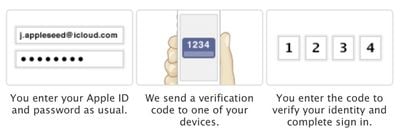
twostepverification
As the recovery key is used in place of security questions, keeping it secure is of the utmost importance. A lost or forgotten key can be recovered with a trusted device and a password, just as a password can be recovered with a trusted device and a recovery key.

The verification system will request a password that has one letter, one number, one capital letter, and at least eight characters. If such a password is not already in use, users will need to wait three days to fully enable two-step verification. Users with an already compliant password can move on immediately to the next step.

A security code will be sent through SMS or using the Find My iPhone app, and during setup, users can choose a single trusted device. To begin the process, users can visit the Apple ID website to implement two-step verification.


Popular Stories

M5 MacBook Pro

RIP, MacBook Ultra

Monday October 19, 2026 9:37 am PDT by
Apple today sent out invites for an experience in Los Angeles on Wednesday, October 28, and the "Pro and tell" tagline on the invitation likely means that the rumored MacBook models with touch-enabled OLED displays will stick with MacBook Pro branding instead of the once-rumored "MacBook Ultra" name. The long-rumored "iPhone Ultra" ended up being named iPhone Duo, so speculation that Apple...
iPhone Duo Trio

Here's What Apple's Apps Look Like on the iPhone Duo

Tuesday October 20, 2026 11:12 am PDT by
With just three days to go until the iPhone Duo is released, Apple is getting ready for the launch. Behind the scenes, the App Store now has screenshots of Apple's built-in apps running on the Duo. We've seen some apps in marketing materials, but images of the ones we haven't seen give us an idea of what it will be like using the iPhone Duo day to day. Many apps are shown in landscape...
apple pro tell logo

Apple Announcing New Products Next Week: 'Pro and Tell'

Monday October 19, 2026 9:05 am PDT by
Apple's Greg Joswiak today hinted at new product announcements coming next week, sharing a social media post that says "Can't wait to pro and tell next week." Rumors suggest Apple is planning to debut the new MacBook Pro with an OLED touchscreen display, an M6 entry-level MacBook Pro, an M6 iMac, an iPad mini with an OLED display. Can't wait to pro and tell next week....

Top Rated Comments

dannyyankou Avatar
177 months ago
Can apple make it anymore annoying...geeez

Perhaps you missed the part that it's optional?

:rolleyes:
Score: 19 Votes (Like | Disagree)
177 months ago
1234.....how did Apple know my security code!!???

John Appleseed? Is that really you?
Score: 17 Votes (Like | Disagree)
177 months ago
Can apple make it anymore annoying...geeez
Seriously? Google introduces (http://www.google.com/search?q=google+introduces+two+step+verification&hl=en&biw=1727&bih=1304&sa=X&ei=j2RLUd_cIauu2gXGuYHABQ&ved=0CB0QpwUoBg&source=lnt&tbs=cdr%3A1%2Ccd_min%3A2%2F1%2F2011%2Ccd_max%3A3%2F1%2F2011&tbm=#hl=en&tbs=cdr:1%2Ccd_min%3A2%2F1%2F2011%2Ccd_max%3A3%2F1%2F2011&sclient=psy-ab&q=google+two+step+verification&oq=google+two+step+verification&gs_l=serp.3...4165.4165.0.4334.1.1.0.0.0.0.0.0..0.0...0.0...1c.1.7.psy-ab.QFMX0pozUkw&pbx=1&bav=on.2,or.r_qf.&bvm=bv.44158598,d.b2I&fp=5055737f513ba032&biw=1727&bih=1304) two-step verification and everyone goes gaga.

Apple introduces two-step verification and people complain.

Really sick of the anti-Apple everything happening these days. Sheesh.
Score: 15 Votes (Like | Disagree)
177 months ago
1234.....how did Apple know my security code!!???
Score: 15 Votes (Like | Disagree)
rbrian Avatar
177 months ago
1234.....how did Apple know my security code!!???

That's the kind of code only an idiot would have on his luggage... https://www.youtube.com/watch?v=a6iW-8xPw3k :D
Score: 8 Votes (Like | Disagree)
177 months ago
Lot of confusion about Google Authenticator in this thread. It doesn't store anything on Google's servers, it gives you one time codes. You need this code AND your account password to login. Just read the Wikipedia article about it.

It works with other services like Dropbox, Lastpass, Amazon Web Services and Facebook because it is based on some standard method of creating codes. You don't even have to use the official Google Authenticator app, there are several others like Authenticator for Windows Phone and a version for so called Java dumb phones.

Someone asked about Facebook and Google Authenticator. They are telling you to use their own code generator but they are really just using the same method as Google and Dropbox. Just click the help button when you are setting it up and look for a 16 digit code (or something), this you type in Google Authenticator and it will give you one time codes back. I can confirm this is working. Also, nothing stops you from using several devices with Google Authenticator (or third-party alternatives) as long as you set them up at the same time.

You should of course have auto lock enabled on your phone if you are using a phone application like Google Authenticator to create codes. And it is still a good idea, even with 2 step activated, to use a password manager to create passwords for most accounts and Diceware for accounts where you have to remember the password.


Too bad Apple did not choose to support Google Authenticator.
Score: 4 Votes (Like | Disagree)
Latest Stories
iPhone Duo 24 Hours Later: Your Questions Answered
6 minutes ago
Apple's iWork Apps Get 'Intelligent Assistant' and iPhone Duo Support
1 hour ago
Apple is Apparently Considering a Slightly Larger iPhone Duo
1 hour ago
Giant iPhone Duo Displays Coming to Four Apple Stores
2 hours ago
Apple Pulls Keynote, Pages and Numbers From App Store [Update: Back]
3 hours ago
Apple Updates More Apps With iPhone Duo Support
4 hours ago
Apple Will Label Apps 'Made for iPhone Duo' in App Store
6 hours ago
Amazon Takes $49 Off iPad With Prices Starting at $399.99
7 hours ago
F1 on Apple TV Now Available in Dolby Atmos
7 hours ago
Apple Reveals More Than 50 Apps That Will Be Updated for iPhone Duo
8 hours ago
Apple Blocks Certificates That Could Help Attackers Fake Websites
9 hours ago
Giant iPhone Duo Installations Spotted at Apple Fifth Avenue
10 hours ago
iPhone Duo 2 Prototypes Include Under-Display Face ID
10 hours ago
Tesla App Gains iPad and iPhone Duo Support
14 hours ago
Apple Reportedly Boosts iPhone Duo Orders by 44%
15 hours ago
Fortnite Returning to Australian App Store After Court Ruling
15 hours ago
Apple Ordered to Open iPhone to Rival App Stores in Australia
15 hours ago
Apple Suppliers Face Hurdles Cutting Circuit Board Emissions
16 hours ago
Things Updated for iPhone Duo With Adaptive Layout
16 hours ago
Simplicity and Siri AI Are HomeView's Killer Features, Apple Says
17 hours ago
iPhone Duo Reviewers Really Miss Face ID
22 hours ago
Does the iPhone Duo Run Hot? Here's What Reviews Found
23 hours ago
Apple Music's New Look is Now Live on Apple's Website
1 day ago
Anthropic Launches Claude Duet, a Proactive AI Agent
1 day ago
What 32,000 Folds Did to the iPhone Duo's Hinge
1 day ago
iPhone Duo's Hidden FaceTime Camera Takes 'Trash' Photos
1 day ago
iPhone Duo Has 'Edge Light' Feature That Debuted on Macs Last Year
1 day ago
Apple Support App Updated for iPhone Duo's Larger Display
1 day ago
Amazon Sweetens the Deal on Entry-Level 16-Inch MacBook Pro With $570 Off
1 day ago
iPhone Duo Tips Over on MagSafe Stands When Unfolded
1 day ago









































