
Last month, Logitech launched its G series of gaming keyboards and mice. The devices feature numerous programmable buttons, custom color backlighting, and other features designed for MMORPG players.

The company has now announced that its Logitech Gaming Software is now available on OS X.
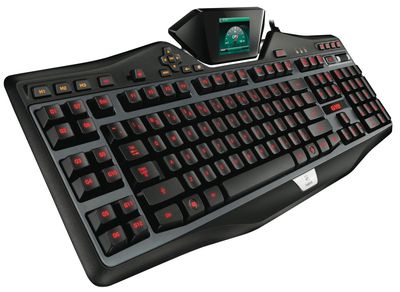
G19
The top of the line models are the $100 G700s Rechargeable Wireless Gaming Mouse and the $200 G19s LCD Gaming Keyboard.

Today, we are excited to share that Logitech Gaming Software (LGS) has been updated to support Mac OS for our full keyboard and mouse lineup. Now Mac gamers can enjoy the same great personalization and customized control our PC customers have come to reply on. You can download the latest version of LGS from the Logitech support page for each compatible product.

Several of us on the gaming team switch back and forth between Mac and PC, so we’re thrilled to have this support on both platforms. We can’t wait for you to now have the option to experience your favorite Logitech gaming accessories on Mac.

The G19s keyboard, for example, includes an LCD screen to monitor game statistics, custom-color backlighting for keys, and a number of custom programmable keys. The G700s mouse runs over a wireless connection, but can recharge batteries and continue working at the same time, with a number of programmable thumb controls on the side, and more.

Both are available from Logitech's online store and elsewhere.

Top Rated Comments

goodcow Avatar
167 months ago
That keyboard looks hideous.
Score: 10 Votes (Like | Disagree)
Yvan256 Avatar
167 months ago
The proper pointer device for using a Mac is a trackpad. I love my three and four finger gestures. It's downright fun to use (without even launching a game.)

I've tried these complicated mice - they suck.

I've never felt a need to have additional buttons on my keyboard... Why would I? In game the controls can all be mapped to the 60+ keys already on a standard keyboard.

In my opinion, a trackpad can't compare to a mouse in games where you control the camera, such as Left 4 Dead 2 or even World of Warcraft.
Score: 8 Votes (Like | Disagree)
class77 Avatar
167 months ago
All my mice are Logitech and I think they're the best/smoothest on the market
Score: 6 Votes (Like | Disagree)
MagnusVonMagnum Avatar
167 months ago
The proper pointer device for using a Mac is a trackpad.

Trackpads suck. Yes, even Mac ones. I hate my trackpad on my Macbook Pro. They're mostly miserable to use. I'll take my 5-button Intellimouse over that crap any day of the week. The only thing I like about a trackpad is side-to-side scrolling and a couple of gestures, but trying to do a right button click with two fingers is just awkward compared to a dedicated right mouse button, let alone the middle mouse button which is irreplaceable for most first person shooter games. I mean the very idea of trying to play a 1st person shooter with a trackpad is laughable. Frankly, it'd be better to have a touchscreen setup with the Mac than a trackpad. At least then a game like Bejeweled could be played quickly and easily like on the iPad/iPhone whereas it's slow going by comparison on a trackpad OR a mouse. And just try drawing and editing in Photoshop with a trackpad. It's miserable since it lacks precision trying to move and press the entire trackpad as a button or lift your finger up, etc. whereas you just glide and click with a mouse (drawing pads using stencils are different, of course).

Thus, in conclusion, the very idea that a trackpad is "proper" is such a joke it's unreal. Yes, notebooks come with trackpads. That doesn't make them "proper". Up until recently, all other Macs came with mice (admittedly Apple mice have always sucked since they could never admit that one button is stupid and always has been always will be and that hiding a second button just shows how much they refused to acknowledge the truth rather than any indication that yes, a second or even a 3rd button is needed. And frankly, I couldn't do without my roller wheel. Two finger scrolling is OK, but it's too easy to move your hand sideways a tad and the next thing you know you're off center on a large web page and that is irritating.
Score: 1 Votes (Like | Disagree)
724699 Avatar
167 months ago
The proper pointer device for using a Mac is a trackpad. I love my three and four finger gestures. It's downright fun to use (without even launching a game.)

I've tried these complicated mice - they suck.

I've never felt a need to have additional buttons on my keyboard... Why would I? In game the controls can all be mapped to the 60+ keys already on a standard keyboard.

The proper pointing device for anything other than casual surfing and consumption is a mouse. Doing any sort of real work, or any gaming requires the speed and accuracy of a mouse... clearly you're not much of a gamer either since you can definitely make use of a couple side buttons plus the usual right and left click.
Score: 1 Votes (Like | Disagree)
mrxak Avatar
167 months ago
I like the idea of these keyboards. Unfortunately I kind of hate their design. There is too much bulk around the keys, and the F-key groupings are bad. Also the escape key is too small and no command key.
Score: 1 Votes (Like | Disagree)

Popular Stories

maxresdefault

Apple Shows Off a Key Reason to Upgrade to the iPhone 17

Saturday February 7, 2026 9:26 am PST by
Apple today shared an ad that shows how the upgraded Center Stage front camera on the latest iPhones improves the process of taking a group selfie. "Watch how the new front facing camera on iPhone 17 Pro takes group selfies that automatically expand and rotate as more people come into frame," says Apple. While the ad is focused on the iPhone 17 Pro and iPhone 17 Pro Max, the regular iPhone...
wwdc sans text feature

Apple Rumored to Announce New Product on February 19

Thursday February 5, 2026 12:22 pm PST by
Apple plans to announce the iPhone 17e on Thursday, February 19, according to Macwelt, the German equivalent of Macworld. The report, citing industry sources, is available in English on Macworld. Apple announced the iPhone 16e on Wednesday, February 19 last year, so the iPhone 17e would be unveiled exactly one year later if this rumor is accurate. It is quite uncommon for Apple to unveil...
Apple Logo Zoomed

Tim Cook Teases Plans for Apple's Upcoming 50th Anniversary

Thursday February 5, 2026 12:54 pm PST by
Apple turns 50 this year, and its CEO Tim Cook has promised to celebrate the milestone. The big day falls on April 1, 2026. "I've been unusually reflective lately about Apple because we have been working on what do we do to mark this moment," Cook told employees today, according to Bloomberg's Mark Gurman. "When you really stop and pause and think about the last 50 years, it makes your heart ...
Finder Siri Feature

Why Apple's iOS 26.4 Siri Upgrade Will Be Bigger Than Originally Promised

Friday February 6, 2026 3:06 pm PST by
In the iOS 26.4 update that's coming this spring, Apple will introduce a new version of Siri that's going to overhaul how we interact with the personal assistant and what it's able to do. The iOS 26.4 version of Siri won't work like ChatGPT or Claude, but it will rely on large language models (LLMs) and has been updated from the ground up. Upgraded Architecture The next-generation...
iOS 26

iOS 26.3 and iOS 26.4 Will Add These New Features to Your iPhone

Tuesday February 3, 2026 7:47 am PST by
While the iOS 26.3 Release Candidate is now available ahead of a public release, the first iOS 26.4 beta is likely still at least a week away. Following beta testing, iOS 26.4 will likely be released to the general public in March or April. Below, we have recapped known or rumored iOS 26.3 and iOS 26.4 features so far. iOS 26.3 iPhone to Android Transfer Tool iOS 26.3 makes it easier...















