

At today's Worldwide Developers Conference in San Francisco, Apple unveiled the latest iteration of its mobile operating system. As expected, iOS 7 features a major design overhaul that removes many of the skeuomorphic elements found in previous versions of iOS, instead favoring a clean and gloss-less "flat" look. Demos of all of the apps can be found on Apple's iOS 7 website.
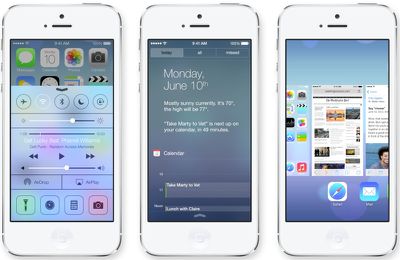
"It's the biggest change to iOS since the introduction of the iPhone," said Tim Cook. "It has a whole new structure that is coherent and that is applied across the entire system," said Jony Ive in a video showing off the new operating system. "We've considered the tiniest details like refining the typography to much larger ones like redesigning all the icons."
Design
iOS 7 features an entirely new color scheme, with translucency, to "create a sense of depth and vitality." The design is significantly different from before, with all new multitasking screens and a totally redesigned interface. The icons are "flat," as expected, with bright new colors. Apps like Game Center have been entirely overhauled, with the removal of the felt and wood elements in favor of a design that relies heavily on black and white with colored accents.
iOS 7 incorporates new motion tracking capabilities. As the device is moved in the hand, it actually tracks motion and the screen moves, which carries over across the system.
On the stage, Federighi demoed the new dynamic weather app, which incorporates some live weather elements. For example, if it is raining outside, the app will show rain. The weather app uses an all new font. Like the Weather app, the Calendar also features a minimalistic new design.
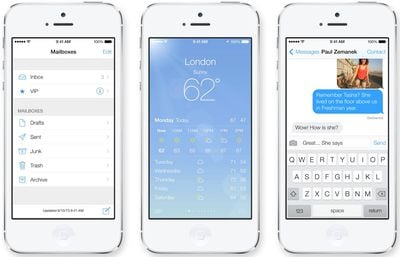
Messages has seen a major overhaul, with a blue and white interface that's removed the gloss from the chat bubbles. Swiping on the screen in messages allows users to go from individual messages to a messages overview. Mail has the same no-frills interface, focusing on text and photos. It incorporates full screen photos.
Notification Center
Notification Center looks entirely different as well, with new daily overviews that let users know about new mail, missed calls, to-dos, and more. Notification Center can be accessed from any screen, including the Lock Screen, with a downwards swipe. Notifications also now sync between devices, so clearing a notification on an iPhone will also clear it from a paired iPad or Mac, for example.
Control Center
Control Center offers new preference controls. Swipe up from the bottom of the screen (including the lockscreen) to find quick access to preferences. It has switches that allow users to access Wi-Fi, turn on Airplane Mode, toggle Do Not Disturb, adjust brightness, and control music, among other things. The Control Center also offers an all new flashlight functionality.
Multitasking
iOS 7 offers up a smarter way to multitask. When users tap the home button twice, it will display preview screens of apps that are open. Unlike before, the screens are previews of actual apps rather than just a small app icon. iOS 7 incorporates a learning algorithm that takes note of when users utilize certain apps and keeps those up to date with new content before they are launched. So, for example, if someone wakes up and checks Facebook, iOS 7 will learn that behavior and have Facebook updates ready to go in the background before the app is opened. The new mobile OS also uses intelligently scheduled updates and will update during power efficient times. For example, when the device is connected to WiFi. It's also able to respond to push notifications, updating apps that send out notifications.
Safari
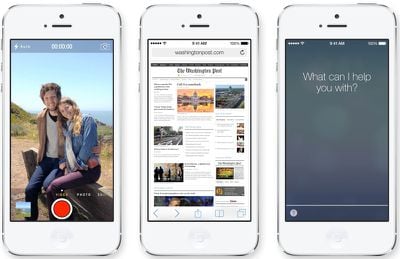
Safari will get a number of improvements in iOS 7, including a new full screen look and a smart search field. With this field, there's one tap access to favorites, and it also has a new tabbed interface along with parental controls and iCloud keychain integration. The new Safari eliminates the eight browser tab limit and tabs can now be closed with a quick sideways swipe. Safari also has a new view that displays URLs from a user's Twitter timeline and Reading List has received some performance enhancements. Safari incorporates the new iCloud Keychain functionality, remembering account names, passwords, and credit card numbers, as well as generating unique, hard-to-guess passwords.
AirDrop
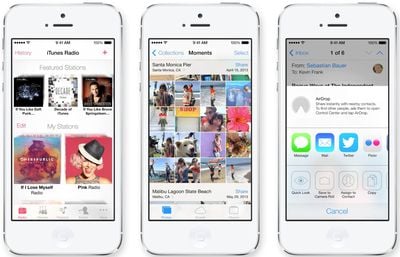
AirDrop will be included with iOS 7, making it easier for users to share photos, videos, contacts, and other content with other iPhone owners. This is system wide and can be used with any app that supports the API. Simply tapping the new "Share" will allow users to connect via WiFi or Bluetooth. Recipients can choose to save what is sent, and saved items will be saved in appropriate locations. For example, a shared contact ends up in the Contacts app, while a shared photo ends up in the Photos app. It will be available on Apple's newest devices, including the iPhone 5 and the fourth generation iPad, as well as the iPad mini.
Camera
iOS 7 introduces a redesigned camera app that includes photo filters, and incorporates a new "square" capture mode. There are now a total of four camera modes, including Video, Panorama, Still, and Square. The Photos app has been redesigned as well, offering an improved photo organization system. iOS knows when and where photos were taken and this information is used to organize photos into folders called "Moments." iCloud Photo Sharing has also been enhanced, allowing users to have fully shared photo streams that include both photos and videos.
Siri
Siri has been given a "gorgeous" new interface along with new voice options that include a male voice and voices for the French and German languages, with support for additional languages to come in the future. Siri has also gotten smarter, so it can now perform tasks like turning on Bluetooth or increasing device brightness, as well as playing voicemails and controlling iTunes Radio. New services have been integrated with Siri, such as web search results from Bing, Twitter, and Wikipedia.
iOS in the Car
iOS 7 is designed to provide enhanced integration with in-dash systems, displaying iOS on in-car monitors to make calls, get messages, and more. Vehicles that are equipped with iOS in the Car can connect to the iPhone 5 and interact with it using the car's built-in display.
App Store
The App Store has been entirely redesigned with the same black and white look featured in many of the apps in iOS 7. It is now easier to find apps than ever before. "Apps Near Me" allows users to find the apps that are in use nearby, and there are also new discovery tools for parents and children. The App Store will now update apps automatically, doing away with manual updates. Music, too, has been updated with support for iTunes Radio, Apple's new streaming music service. iTunes Radio is free, ad-supported (ad-free for iTunes Match subscribers), and available on iOS, Apple TV, and the Mac.
Activation Lock
Activation Lock is designed to be a theft deterrent. It adds a new feature that requires an Apple ID and password to access and turn off Find My iPhone or to wipe a device. That means if a device is stolen and a thief tries to wipe it, the phone will not be able to be reactivated without its accompanying iCloud login. Even after a device is erased, Find my iPhone will continue to display a custom message.
APIs
The SDK includes more than 1500 new APIs, including AirDrop support, iBeacons, MFi Game Controllers, UI Dynamics, New Multitasking APIs, SpriteKit, Barcode Scanning, and more.
iOS 7 is available for developers today on the iPhone, with iPad support coming at a later date. iOS 7 will be available for consumers this fall.
























![Apple Pulls Keynote, Pages and Numbers From App Store [Update: Back]](https://images.macrumors.com/t/Okb7kitB_gNr6qe5Pex9nQIysD8=/112x112/article-new/2026/01/Apple-Creator-Studio-iWork-suite.jpg)























