
Unibox, a new Messages-style email client that was first announced in August of 2012, is now available for download as part of a public beta test.

The app is designed to make email more "personal" by organizing emails into a contact-centric view. Unibox's interface is divided into two main panes, with the left side displaying contacts and the right side displaying all messages that have been received/exchanged with a particular person or website.
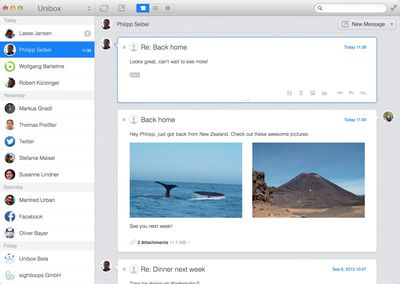
uniboxemail1
According to Unibox, this chat-like design significantly reduces email clutter by grouping incoming messages from contacts into a single list.

Composing emails with the app is done in a single window, which eliminates separate compose windows utilized by existing apps like Mail. All attachments sent to and received from contacts are readily available, and attached media is presented in a grid view.
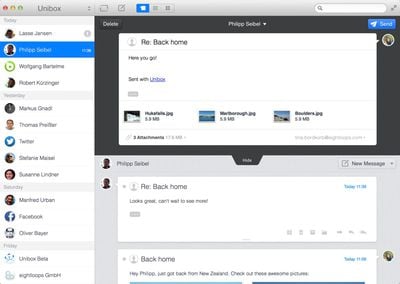
unibox2
Unibox supports all IMAP accounts and works with both Mountain Lion and Mavericks. The full Mac app is expected to be released at the end of September, and ahead of release, users can sign up for the beta on the company's website. Beta will last until the Mac app debuts.

Top Rated Comments

pgiguere1 Avatar
162 months ago
Seems like a weird timing considering personnal email addresses are getting less and less used for human-to-human communication, and more and more for advertising or various automatic notifications from websites.

Of course I can't speak for everyone but it seems to me that social networks and text messages are where most human-to-human communication is done nowadays. This could have been a good concept 10 years ago.
Score: 4 Votes (Like | Disagree)
Michael Goff Avatar
162 months ago
installed and used it for 1 minute. uninstalled and got back to airmail. email shouldn't be listed by contact, but by subject. sparrow died so airmail is the new king.

Am I the only one who just uses the mail.app?

What makes airmail so much better?
Score: 3 Votes (Like | Disagree)
seamer Avatar
162 months ago
It doesn't support Exchange
Google's IMAP is detected properly

I have two accounts configured in mine, and there's no way to quickly see which mailbox I'm looking at. There's a lack of folders... And I can't drag mail from one box to another
Score: 2 Votes (Like | Disagree)
vanc Avatar
162 months ago
Does it support mail threads? Without that, we cannot really use in a business environment as emails may have multiple people involved.

Anyway, mail.app is the only email client I'm using on Mac. It works fine for me since 2007 when I started using Mac. Just the vanilla app. No plugins.
Score: 1 Votes (Like | Disagree)
curmudgeon32 Avatar
162 months ago
Seems like a weird timing considering personnal email addresses are getting less and less used for human-to-human communication, and more and more for advertising or various automatic notifications from websites.

Of course I can't speak for everyone but it seems to me that social networks and text messages are where most human-to-human communication is done nowadays. This could have been a good concept 10 years ago.

Sometimes email is the right medium, sometimes not. I have conversations with people across various media (email, texts, Facebook messages, the occasional Twitter DM).

What I'd like is a single app or system or something that can work across multiple streams so that you click on a contact and see everything from that person, regardless of how it was sent.
Score: 1 Votes (Like | Disagree)
teejaysplace Avatar
162 months ago
Looks great for those with at most ~10-20 contacts.

It groups things by day first, then by contact. So you'll see all the emails that you received from John The Boss today, then the ones you received from him yesterday, etc. I suppose if you receive 500 emails from 200 different people each day, then this isn't the organizational system for you. But for those who work on small teams, I can definitely see the upside.

When I'm working on a project, I find I'm paying closest attention to the people directly involved, while others remain in the periphery. So I enjoy knowing right off the bat that I've received 5 emails from my boss and 3 emails from the Assistant Director. It's a lot easier than trying to read back over endless threads of text.

But I also need to file emails accordingly, beyond just the sender. Like if something is a receipt, it needs to go under purchasing, regardless of the sender. After using the program this morning, I didn't see an obvious way to do that. I also found I have to right click each time I want to delete a message (pressing the Delete key won't do it.) And if it's one thing busy office workers hate, it's extra clicks.

Overall, the idea has significant upside, but the execution isn't 100% there yet.
Score: 1 Votes (Like | Disagree)

Popular Stories

maxresdefault

Apple Shows Off a Key Reason to Upgrade to the iPhone 17

Saturday February 7, 2026 9:26 am PST by
Apple today shared an ad that shows how the upgraded Center Stage front camera on the latest iPhones improves the process of taking a group selfie. "Watch how the new front facing camera on iPhone 17 Pro takes group selfies that automatically expand and rotate as more people come into frame," says Apple. While the ad is focused on the iPhone 17 Pro and iPhone 17 Pro Max, the regular iPhone...
Finder Siri Feature

Why Apple's iOS 26.4 Siri Upgrade Will Be Bigger Than Originally Promised

Friday February 6, 2026 3:06 pm PST by
In the iOS 26.4 update that's coming this spring, Apple will introduce a new version of Siri that's going to overhaul how we interact with the personal assistant and what it's able to do. The iOS 26.4 version of Siri won't work like ChatGPT or Claude, but it will rely on large language models (LLMs) and has been updated from the ground up. Upgraded Architecture The next-generation...
wwdc sans text feature

Apple Rumored to Announce New Product on February 19

Thursday February 5, 2026 12:22 pm PST by
Apple plans to announce the iPhone 17e on Thursday, February 19, according to Macwelt, the German equivalent of Macworld. The report, citing industry sources, is available in English on Macworld. Apple announced the iPhone 16e on Wednesday, February 19 last year, so the iPhone 17e would be unveiled exactly one year later if this rumor is accurate. It is quite uncommon for Apple to unveil...
apple wallet drivers license feature iPhone 15 pro

Apple Says These 7 U.S. States Plan to Offer iPhone Driver's Licenses

Monday February 9, 2026 6:24 am PST by
In select U.S. states, residents can add their driver's license or state ID to the Apple Wallet app on the iPhone and Apple Watch, and then use it to display proof of identity or age at select airports and businesses, and in select apps. The feature is currently available in 13 U.S. states and Puerto Rico, and it is expected to launch in at least seven more in the future. To set up the...
14 inch MacBook Pro Keyboard

New MacBook Pros Could Now Arrive in March

Sunday February 8, 2026 6:02 am PST by
New MacBook Pro models with the M5 Pro and M5 Max chips could arrive as soon as Monday, March 2, according to Bloomberg's Mark Gurman. In today's "Power On" newsletter, Gurman said that the release of new MacBook Pro models is tied to the release of macOS Tahoe 26.3. The launch is said to be slated for as early as the week of March 2. He added that the M4 Pro and M4 Max models on sale today...















