OS X Yosemite Launch Brings Fully Functional iCloud Drive to Mac and iOS
With yesterday's launch of OS X Yosemite, Apple's iCloud Drive file storage system is now functional across the company's products. Many users were frustrated following the launch of iOS 8 last month by the incompatibility between the new iCloud Drive system used with that operating system and the previous Documents in the Cloud system used on OS X Mavericks. The difference in launch dates between iOS 8 and OS X Yosemite temporarily left some users unable to sync their documents between devices if they elected to upgrade to iCloud Drive on their iOS devices.
That issue is now fixed with OS X Yosemite launching to the public, and Craig Federighi gave a very brief walkthrough of the feature at yesterday's media event, outlining how Mac and iOS apps can automatically generate their own folders for file storage accessible across devices and platforms.
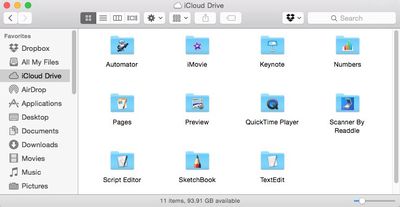
iCloud Drive can also be used in a similar manner to Dropbox, Box, and other cloud storage services in that any type of file can simply be dragged and dropped into the iCloud Drive folder on Mac or iCloud.com and be synced across devices. Access is a bit more limited on iOS where there is no iCloud Drive app allowing access to all files, but the service still allows users of iCloud Drive-enabled apps to view and save files related to that app that are stored and synced with iCloud Drive.
Apple's iWork updates yesterday extend compatibility beyond the core OS X and iOS apps, and APIs are available to allow third-party developers to offer iCloud Drive support for their apps.
iCloud Drive taps into users' general iCloud storage allotments, with all users receiving 5 GB of space free of charge. But with iOS device backups and the upcoming iCloud Photo Library potentially requiring significant amounts of space, many users will find themselves looking to upgrade to paid storage tiers, which begin at $0.99 per month for 20 GB of space and go up to $19.99 per month for 1 TB.
Popular Stories
Apple plans to announce the iPhone 17e on Thursday, February 19, according to Macwelt, the German equivalent of Macworld.
The report, citing industry sources, is available in English on Macworld.
Apple announced the iPhone 16e on Wednesday, February 19 last year, so the iPhone 17e would be unveiled exactly one year later if this rumor is accurate. It is quite uncommon for Apple to unveil...
Apple turns 50 this year, and its CEO Tim Cook has promised to celebrate the milestone. The big day falls on April 1, 2026.
"I've been unusually reflective lately about Apple because we have been working on what do we do to mark this moment," Cook told employees today, according to Bloomberg's Mark Gurman. "When you really stop and pause and think about the last 50 years, it makes your heart ...
Apple today shared an ad that shows how the upgraded Center Stage front camera on the latest iPhones improves the process of taking a group selfie.
"Watch how the new front facing camera on iPhone 17 Pro takes group selfies that automatically expand and rotate as more people come into frame," says Apple. While the ad is focused on the iPhone 17 Pro and iPhone 17 Pro Max, the regular iPhone...
In the iOS 26.4 update that's coming this spring, Apple will introduce a new version of Siri that's going to overhaul how we interact with the personal assistant and what it's able to do.
The iOS 26.4 version of Siri won't work like ChatGPT or Claude, but it will rely on large language models (LLMs) and has been updated from the ground up.
Upgraded Architecture
The next-generation...
While the iOS 26.3 Release Candidate is now available ahead of a public release, the first iOS 26.4 beta is likely still at least a week away. Following beta testing, iOS 26.4 will likely be released to the general public in March or April.
Below, we have recapped known or rumored iOS 26.3 and iOS 26.4 features so far.
iOS 26.3
iPhone to Android Transfer Tool
iOS 26.3 makes it easier...






















