
A List of OS X Yosemite Apps With Notification Center Widgets, Share Support, and More - GeekWebGuides
Skip to Content

A List of OS X Yosemite Apps With Notification Center Widgets, Share Support, and More

Yesterday, Apple launched OS X Yosemite which brought a complete redesign to the OS and a number of features like Continuity, an enhanced Notification Center with widget support, iCloud Drive, and more. A number of developers have updated their apps to take advantage of those new features, and we've rounded up some of the most notable apps for Yosemite below.

1Password ($34.99 for a limited time, usually $49.99) [Direct Link]

Popular password manager 1Password has received a number of new features that integrate with OS X Yosemite including support for Dark Mode, iCloud Drive compatibility for enhanced syncing between devices, and Wi-Fi sync which now works with attachments. The 1Password mini menubar attachment has also been refined, bringing faster access and new shortcuts.
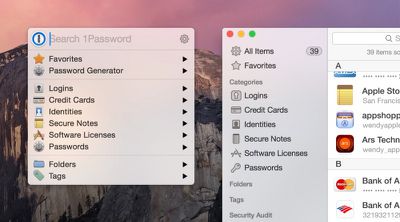
1passwordyosemite
Coinverter (Free public beta) [Direct Link]

Daft Logic Studio brings its iOS currency converter to the Mac with a flat look that is in line with the rest of OS X Yosemite and a Notification Center widget that can display multiple conversions at once. The full version of Coinverter for Mac will launch soon, and interested users can participate in a free public beta.

Wunderlist (Free) [Direct Link]

To-do app Wunderlist for Mac has received an update to 3.1.0 and brings a number of new features for OS Yosemite, including a custom Today widget in the Notification Center, a custom Share extension that works in Safari, and full Handoff support which allows users to edit lists between devices. The app has also received a redesign that allows for quicker access to list elements.
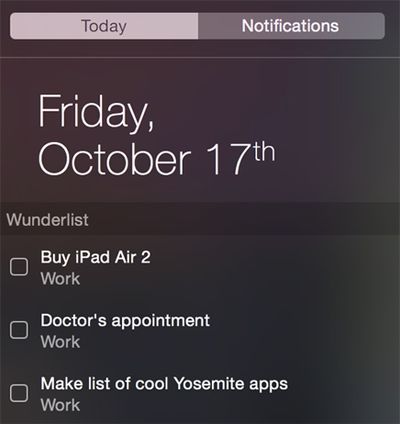
wunderlistosxyosemite2
Pocket (Free) [Direct Link]

Read-it-later service Pocket has received an update that now features its own share extension that allows users to save content in a number of apps, and a new design that gives a flat look. The service has also now integrated some of its premium features like full text search and suggested tags, along with a number of improvements like a dark mode for reading.

Deliveries ($4.99) [Direct Link]

Developer Junecloud has launched a Mac version of its popular Delivery Status touch app, and features its own Notification Center widget that allows users to track their packages along with the ability to share a shipment over email, iMessage, or AirDrop.
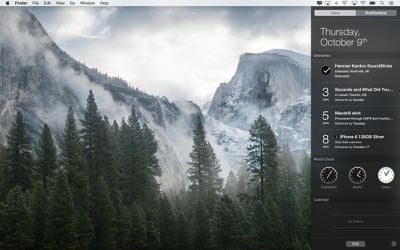
deliveriesyosemite
PCalc ($9.99) [Direct Link]

Advanced calculator PCalc is now compatible with OS X Yosemite and includes its own Notification Center Widget to perform calculations, Handoff support, and the ability to import custom calculator layouts created on iOS via iCloud. The newest version of the app also includes new themes, preferences, bug fixes, and more.
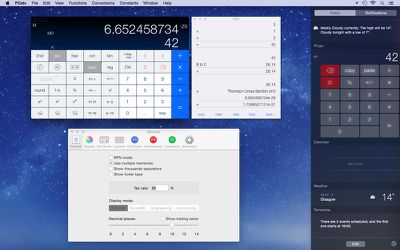
pcalcyosemite
Monity ($0.99 until October 19) [Direct Link]

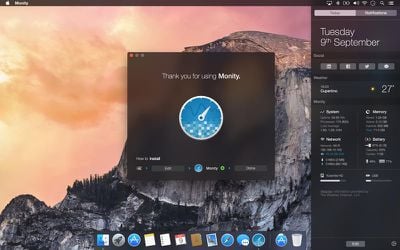
Monity is a system monitoring widget made for OS X Yosemite which can be accessed in the Today view inside of Notification Center. The widget can monitor a number of OS X statistics including system uptime, app processes, memory usage, battery life, network activity, and more.
monityyosemite
CloudApp (Free) [Direct Link]

File and screenshot sharing app CloudApp has received a new update for OS X Yosemite which allows users to record their screen at 60 frames a second and a share extension that allows users to share content from their Mac to the service. CloudApp also supports Dark Mode and contains a number of performance improvements.


Related Forum: OS X Yosemite

Popular Stories

M5 MacBook Pro

RIP, MacBook Ultra

Monday October 19, 2026 9:37 am PDT by
Apple today sent out invites for an experience in Los Angeles on Wednesday, October 28, and the "Pro and tell" tagline on the invitation likely means that the rumored MacBook models with touch-enabled OLED displays will stick with MacBook Pro branding instead of the once-rumored "MacBook Ultra" name. The long-rumored "iPhone Ultra" ended up being named iPhone Duo, so speculation that Apple...
iPhone Duo Trio

Here's What Apple's Apps Look Like on the iPhone Duo

Tuesday October 20, 2026 11:12 am PDT by
With just three days to go until the iPhone Duo is released, Apple is getting ready for the launch. Behind the scenes, the App Store now has screenshots of Apple's built-in apps running on the Duo. We've seen some apps in marketing materials, but images of the ones we haven't seen give us an idea of what it will be like using the iPhone Duo day to day. Many apps are shown in landscape...
apple pro tell logo

Apple Announcing New Products Next Week: 'Pro and Tell'

Monday October 19, 2026 9:05 am PDT by
Apple's Greg Joswiak today hinted at new product announcements coming next week, sharing a social media post that says "Can't wait to pro and tell next week." Rumors suggest Apple is planning to debut the new MacBook Pro with an OLED touchscreen display, an M6 entry-level MacBook Pro, an M6 iMac, an iPad mini with an OLED display. Can't wait to pro and tell next week....

Top Rated Comments

Parasprite Avatar
157 months ago
Apple creates widgets.
Microsoft copies and makes gadgets.
Apple copies and makes notification center widgets.

my mind is blown
Your mind is pretty simple.

The Gadgets on Vista were pretty horrible though, no gesture support, heck, I couldn't even find keyboard shortcuts for them so hiding/showing them was a pain, and they just looked ugly.
Also the whole bit about them being questionable security-wise.
Score: 6 Votes (Like | Disagree)
Watabou Avatar
157 months ago
Apple creates widgets.
Microsoft copies and makes gadgets.
Apple copies and makes notification center widgets.

my mind is blown
The Gadgets on Vista were pretty horrible though, no gesture support, heck, I couldn't even find keyboard shortcuts for them so hiding/showing them was a pain, and they just looked ugly.
Score: 4 Votes (Like | Disagree)
Abazigal Avatar
157 months ago
Anyone wishing for a control centre equivalent where we can easily toggle music controls from the notifications panel?
Score: 3 Votes (Like | Disagree)
157 months ago
Taking the functionality of Dashboard and cramming everything into a thin vertical strip of screen ranks up there as one of the worse UX ideas Apple has come up with in the past few years. It's a good thing Dashboard still exists in Yosemite. One key-press gives me tons of relevant information at a glance. Notification Center is a square peg shoved into a round hole.
Score: 3 Votes (Like | Disagree)
Watabou Avatar
157 months ago
Not sure if I'm allowed to advertise here, but Lyrical is also a Notification Center widget that lets you control iTunes, and shows you song information/lyrics. I just uploaded v1.0.1 with some UI fixes and v1.1 will have Last.fm support, and a much better icon. The current one is a bit ugly I know, I sort of rushed it when Apple announced I can submit my app. :)

Check out the Link to it in my sig.

Oh and also, it's pretty helpful to set a keyboard shortcut for the Notification Center, (I like Option + Space, similar to Command+Space for Spotlight) if you don't want to move your hands away from the keyboard. It's quicker than moving your hand to perform the gesture, imo.
Score: 3 Votes (Like | Disagree)
157 months ago
Disagree. Found myself never using Dashboard but I'm rather enjoying Notification Center. Primarily because it doesn't move me out of whatever app Im using.

You don't HAVE to leave your existing app to use Dashboard.
Go to Settings/Mission Control, find the Dashboard Popup menu (about halfway down the window) and choose As Overlay (rather than the default of As Space).

This will give you a Dashboard which
- appears on top of your existing apps (it zooms in and zooms out rather than sliding/pushing)
- cannot be accessed via the 3-fingers swipe on a trackpad (because it's no longer a space) but
- CAN be accessed via F12

I don't know if this is the right sort of setting for you, but I find it helpful.
I agree with the original complainer that I tend to have so much stuff displayed in Dashboard that I don't want it all (can't fit it) in a small sidebar, and I don't look at it often, but I do want it all to be there when I do access it.
Score: 2 Votes (Like | Disagree)
Latest Stories
Apple's iWork Apps Get 'Intelligent Assistant' and iPhone Duo Support
10 minutes ago
Apple is Apparently Considering a Slightly Larger iPhone Duo
14 minutes ago
Giant iPhone Duo Displays Coming to Four Apple Stores
1 hour ago
Apple Pulls Keynote, Pages and Numbers From App Store [Update: Back]
2 hours ago
Apple Updates More Apps With iPhone Duo Support
3 hours ago
Apple Will Label Apps 'Made for iPhone Duo' in App Store
6 hours ago
Amazon Takes $49 Off iPad With Prices Starting at $399.99
6 hours ago
F1 on Apple TV Now Available in Dolby Atmos
7 hours ago
Apple Reveals More Than 50 Apps That Will Be Updated for iPhone Duo
7 hours ago
Apple Blocks Certificates That Could Help Attackers Fake Websites
8 hours ago
Giant iPhone Duo Installations Spotted at Apple Fifth Avenue
9 hours ago
iPhone Duo 2 Prototypes Include Under-Display Face ID
9 hours ago
Tesla App Gains iPad and iPhone Duo Support
13 hours ago
Apple Reportedly Boosts iPhone Duo Orders by 44%
14 hours ago
Fortnite Returning to Australian App Store After Court Ruling
14 hours ago
Apple Ordered to Open iPhone to Rival App Stores in Australia
15 hours ago
Apple Suppliers Face Hurdles Cutting Circuit Board Emissions
15 hours ago
Things Updated for iPhone Duo With Adaptive Layout
15 hours ago
Simplicity and Siri AI Are HomeView's Killer Features, Apple Says
16 hours ago
iPhone Duo Reviewers Really Miss Face ID
21 hours ago
Does the iPhone Duo Run Hot? Here's What Reviews Found
22 hours ago
Apple Music's New Look is Now Live on Apple's Website
23 hours ago
Anthropic Launches Claude Duet, a Proactive AI Agent
23 hours ago
What 32,000 Folds Did to the iPhone Duo's Hinge
1 day ago
iPhone Duo's Hidden FaceTime Camera Takes 'Trash' Photos
1 day ago
iPhone Duo Has 'Edge Light' Feature That Debuted on Macs Last Year
1 day ago
Apple Support App Updated for iPhone Duo's Larger Display
1 day ago
Amazon Sweetens the Deal on Entry-Level 16-Inch MacBook Pro With $570 Off
1 day ago
iPhone Duo Tips Over on MagSafe Stands When Unfolded
1 day ago
Apple Music's New Look Officially Announced
1 day ago









































