
How to Use AirDrop to Share Files Between Macs and iOS Devices - GeekWebGuides
Skip to Content

How to Use AirDrop to Share Files Between Macs and iOS Devices

by

Apple's AirDrop file-sharing feature debuted with the release of OS X Lion and allowed users to transfer files from one Mac to another without using email or an external storage device. The feature made its way to iOS devices with the release of iOS 7, and offered a simple way for users to share files like photos between iOS devices. Now, with the release OS X Yosemite, users can use AirDrop to transfer files between the Mac and an iOS device for the first time.

This video shows you how it works:


Prior to the release of OS X Yosemite, users looking to transfer files between a Mac and iOS device usually had to resort to a third-party service like Dropbox or use an iCloud-connected app like Messages. AirDrop on OS X Yosemite and iOS 8 provides an easy-to-use solution for transferring files, as users can either drag and drop files from the Mac to iOS or move files from iOS to the Mac using the Share feature.

On the Mac, a number of apps like Safari, Preview, Pages, and Contacts support the Share feature. Third-party Mac apps like Deliveries, Ember, and Notability also feature Share support, allowing content to be transferred via AirDrop. On iOS, most of Apple's stock apps including Photos, Safari, Notes, and Maps feature Share support. Third-party apps including Camera+, Evernote, and eBay also support the feature.

Before you Start

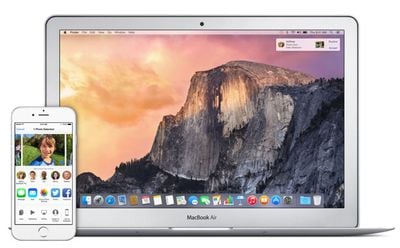
You will need iOS 7 or later and OS X Yosemite in order to use AirDrop to transfer files between a Mac and an iOS device. Using AirDrop to move files between iOS and Mac is supported by all Mac models released in 2012 and later running OS X Yosemite. You can confirm that your Mac is compatible with AirDrop by clicking the Finder icon in the Dock and clicking the "Go" icon in the Menu Bar. If AirDrop is not listed as an option, then your Mac is not compatible with the feature. AirDrop between a Mac and an iOS device also requires an iPhone 5 or later, iPad 4 or later, iPad mini, or fifth-generation iPod touch.
airdrop ios mac
Apple notes that AirDrop users should ensure that devices being used are within 30 feet of each other. If you have a firewall enabled on your Mac, navigate to Menu Bar -> Apple -> System Preferences -> General -> Security & Privacy -> Firewall -> Firewall Options and ensure that "Block all incoming connections" is not checked.

Keep in mind that it is not required for both devices to log into the same iCloud account to use AirDrop, but doing so offers the benefit of transferring files through AirDrop automatically without the need to approve each transfer. Files transferred between devices logged into different iCloud accounts will need permission to accept file transfers. Both iOS devices and Macs must be powered on and not locked in order to make AirDrop file transfers.

Steps

1. Turn on Wi-Fi on your iPhone (Settings -> Wi-Fi) and Mac (Menu Bar -> Wi-Fi -> Turn Wi-Fi On. AirDrop will still work between the Mac and an iOS device even if both are using different Wi-Fi networks.

2. Turn on Bluetooth on your iPhone (Settings -> Bluetooth) and Mac (Menu Bar -> Apple -> System Preferences -> Bluetooth -> Turn Bluetooth On).

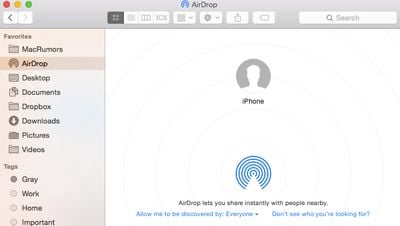
3. Turn on AirDrop on your iPhone (Slide up to access Control Center -> AirDrop -> Choose "Contacts Only" or "Everyone") and Mac (Finder -> Menu Bar -> Go -> AirDrop -> Click "Allow me to be discovered by:" -> Choose "Contacts Only" or "Everyone").
airdropht1
4. You may now begin using AirDrop to transfer files between a Mac and an iOS device. To test it out, go to the AirDrop menu in Finder and notice that your iOS device is represented by circle. Drag and drop a file onto the circle, and your iOS device will prompt you to accept the file.

airdropht2
You can also transfer files from the Mac to an iOS device using apps that have Share feature built-in. The Share menu can be accessed in the upper right corner of an app and is represented by a square with an upward facing arrow.

sharebar

The iOS share icon (middle) as seen in Safari

Selecting the AirDrop option from the Share menu brings up a list of devices that can receive files.

airdropht3
5. Transferring a file from an iOS device to the Mac can be done in any app that supports the Share functionality. Like on the Mac, the Share button brings up a list of options for transfers including AirDrop. For example, sending an image to the Mac from the Photos app can be done by tapping the Share button, tapping AirDrop, and selecting the desired Mac. A prompt to accept the file should then appear on the Mac.

airdropht4

Troubleshooting

Some users have had trouble with AirDrop functionality between the Mac and iOS devices since it launched with OS X Yosemite. Members on our forums and on Apple's support forums have reported that restarting both devices fixed their problems. If the devices aren't recognizing each other, make sure AirDrop is set to "Everyone" instead of "Contacts Only," as the latter setting has caused some problems for users. A number of users have also realized their Macs are too old to support AirDrop functionality between OS X and iOS after attempting to try out the feature, so ensure that your Mac is a 2012 model or newer by going to Menu Bar -> Apple -> About This Mac.


Related Forums: iOS 8, OS X Yosemite

Top Rated Comments

156 months ago
Airdrop DOES NOT work reliably when I try to share photos on my iPhone with my 2013 Mac Pro.

Every once in a while it works, but most of the time the Mac icon does not show up on the iPhone's Airdrop dock.

Airdrop does work reliably when going from Mac to iPhone, but that's not useful because I'm always snapping pictures on the phone that I want to share with my Mac.


I wish Apple's passion for quality control matched its new-found passion for diversity, LQBG rights, women freezing their eggs, children's education. etc. Tim talks a lot about those issues, but can I get a statement about all the bugs I'm increasingly finding in Mac products? No.

I miss the old Apple, which didn't carry the Progressive torch quite so high, but could launch products that Just Worked.
Score: 7 Votes (Like | Disagree)
156 months ago
I have to say, I'm more than a little perturbed at the gimping of older Macs with regard to this feature. This isn't the BT LE issue that limits other continuity features to newer machines. This is a WiFi file transfer that was already supported between Macs built before 2012, and separately, iPhones. If I can't have ecosystem features on my 3 year old computer, maybe I need to find another ecosystem.

I know Apple has played this type of game before, as do other manufacturers, but in recent memory they struck a good balance between planned obsolescence and backward compatibility that endeared them to me. I think that balance is off now. If I can't use ecosystem features after such a short amont of time (computers are usually depreciated over 5 years), I don't see why I need to pay the "Apple Tax" when it's time for a new computer.
Score: 5 Votes (Like | Disagree)
janderson0719 Avatar
156 months ago
Wait, is this GeekWebGuides or OSX Daily?
Score: 5 Votes (Like | Disagree)
jackzig Avatar
156 months ago
A Right-Wing Apple?


I wish Apple's passion for quality control matched its new-found passion for diversity, LQBG rights, women freezing their eggs, children's education. etc. Tim talks a lot about those issues, but can I get a statement about all the bugs I'm increasingly finding in Mac products? No.

I miss the old Apple, which didn't carry the Progressive torch quite so high, but could launch products that Just Worked.

So I guess if Apple didn't support Gay Rights, Women's Rights, or Children's Education one of two things would take place: 1) Air Drop would work 100%, all the time, or 2) It wouldn't bother you because Apple would not have nasty Progressive tendencies.

I guess Tim Cook is just fixated about being a decent human being and doesn't give a damn about quality products like he would if he were a Neanderthal.
Score: 2 Votes (Like | Disagree)
156 months ago
One Of These Things Is Not Like the Other

Airdrop DOES NOT work reliably when I try to share photos on my iPhone with my 2013 Mac Pro.

Every once in a while it works, but most of the time the Mac icon does not show up on the iPhone's Airdrop dock.

Airdrop does work reliably when going from Mac to iPhone, but that's not useful because I'm always snapping pictures on the phone that I want to share with my Mac.


I wish Apple's passion for quality control matched its new-found passion for diversity, LQBG rights, women freezing their eggs, children's education. etc. Tim talks a lot about those issues, but can I get a statement about all the bugs I'm increasingly finding in Mac products? No.

I miss the old Apple, which didn't carry the Progressive torch quite so high, but could launch products that Just Worked.

OOOOOKaaaay. We can now infer your position on a variety of issues. But why you link Apple's concern with those issues and Airdrop is unfathomable to me. They are not related in any way.
Score: 2 Votes (Like | Disagree)
156 months ago
AirDrop is extremely unreliable.

Across my many devices, there are certain transfers, like from my iPad Air to my iMac, that work every time.

But there will be others such as iMac to iPhone 6 Plus that fail every time. By fail, I mean I will try to transfer the file, the icon on the Mac will say "Waiting..." and nothing will ever appear on the iPhone. If I cancel the transfer and initiate it again, usually it will work.
Score: 2 Votes (Like | Disagree)

Popular Stories

M5 MacBook Pro

RIP, MacBook Ultra

Monday October 19, 2026 9:37 am PDT by
Apple today sent out invites for an experience in Los Angeles on Wednesday, October 28, and the "Pro and tell" tagline on the invitation likely means that the rumored MacBook models with touch-enabled OLED displays will stick with MacBook Pro branding instead of the once-rumored "MacBook Ultra" name. The long-rumored "iPhone Ultra" ended up being named iPhone Duo, so speculation that Apple...
iPhone Duo Trio

Here's What Apple's Apps Look Like on the iPhone Duo

Tuesday October 20, 2026 11:12 am PDT by
With just three days to go until the iPhone Duo is released, Apple is getting ready for the launch. Behind the scenes, the App Store now has screenshots of Apple's built-in apps running on the Duo. We've seen some apps in marketing materials, but images of the ones we haven't seen give us an idea of what it will be like using the iPhone Duo day to day. Many apps are shown in landscape...
apple pro tell logo

Apple Announcing New Products Next Week: 'Pro and Tell'

Monday October 19, 2026 9:05 am PDT by
Apple's Greg Joswiak today hinted at new product announcements coming next week, sharing a social media post that says "Can't wait to pro and tell next week." Rumors suggest Apple is planning to debut the new MacBook Pro with an OLED touchscreen display, an M6 entry-level MacBook Pro, an M6 iMac, an iPad mini with an OLED display. Can't wait to pro and tell next week....
Latest Stories
Apple's iWork Apps Get 'Intelligent Assistant' and iPhone Duo Support
8 minutes ago
Apple is Apparently Considering a Slightly Larger iPhone Duo
12 minutes ago
Giant iPhone Duo Displays Coming to Four Apple Stores
1 hour ago
Apple Pulls Keynote, Pages and Numbers From App Store [Update: Back]
2 hours ago
Apple Updates More Apps With iPhone Duo Support
3 hours ago
Apple Will Label Apps 'Made for iPhone Duo' in App Store
6 hours ago
Amazon Takes $49 Off iPad With Prices Starting at $399.99
6 hours ago
F1 on Apple TV Now Available in Dolby Atmos
7 hours ago
Apple Reveals More Than 50 Apps That Will Be Updated for iPhone Duo
7 hours ago
Apple Blocks Certificates That Could Help Attackers Fake Websites
8 hours ago
Giant iPhone Duo Installations Spotted at Apple Fifth Avenue
9 hours ago
iPhone Duo 2 Prototypes Include Under-Display Face ID
9 hours ago
Tesla App Gains iPad and iPhone Duo Support
13 hours ago
Apple Reportedly Boosts iPhone Duo Orders by 44%
14 hours ago
Fortnite Returning to Australian App Store After Court Ruling
14 hours ago
Apple Ordered to Open iPhone to Rival App Stores in Australia
14 hours ago
Apple Suppliers Face Hurdles Cutting Circuit Board Emissions
15 hours ago
Things Updated for iPhone Duo With Adaptive Layout
15 hours ago
Simplicity and Siri AI Are HomeView's Killer Features, Apple Says
16 hours ago
iPhone Duo Reviewers Really Miss Face ID
21 hours ago
Does the iPhone Duo Run Hot? Here's What Reviews Found
22 hours ago
Apple Music's New Look is Now Live on Apple's Website
23 hours ago
Anthropic Launches Claude Duet, a Proactive AI Agent
23 hours ago
What 32,000 Folds Did to the iPhone Duo's Hinge
1 day ago
iPhone Duo's Hidden FaceTime Camera Takes 'Trash' Photos
1 day ago
iPhone Duo Has 'Edge Light' Feature That Debuted on Macs Last Year
1 day ago
Apple Support App Updated for iPhone Duo's Larger Display
1 day ago
Amazon Sweetens the Deal on Entry-Level 16-Inch MacBook Pro With $570 Off
1 day ago
iPhone Duo Tips Over on MagSafe Stands When Unfolded
1 day ago
Apple Music's New Look Officially Announced
1 day ago









































