
DockPhone, a newly released Mac app, fixes a problem many OS X Yosemite users have faced in the months since the release of the new operating system: the inconvenience of opening FaceTime or Contacts to make a phone call on a Mac. With DockPhone app, users can now search for contacts or directly enter a number within the app, bypassing the need of opening FaceTime altogether.

Though it was one of the major new Continuity features included in OS X Yosemite when it launched earlier this year, many users lamented needing to open FaceTime or Contacts to place phone calls from their desktops or laptops. Receiving calls was simple, but making them through the video chat app designed for a different purpose or cluttered Contacts app felt unintuitive.
Screenshot (45)
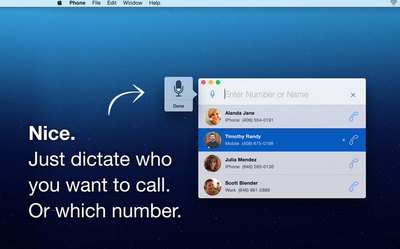
DockPhone lets users skip that step, offering a streamlined experience allowing users to easily enter a contact's name or specific phone number to start a phone call. The app interacts with FaceTime behind the scenes to connect with your iPhone, and finally get the call out to the person you dialed. As with making normal phone calls on a Mac, users still need OS X Yosemite on their Mac, an iPhone with iOS 8 or later, and both devices on the same Wi-Fi and iCloud accounts.

While DockPhone is not the first app to offer such functionality, with others such as Keypad having launched some time ago, DockPhone uniquely allows users to also use their voice to begin phone calls. After clicking the microphone button, simply saying the name of a contact or reciting a phone number will begin a call. Recent contacts also appear in widget form in the Notification Center sidebar of your Mac screen, with quick-access prompts to contact them again.

DockPhone is available for download from the Mac App Store for $0.99. [Direct Link]

Top Rated Comments

n-evo Avatar
145 months ago
You know something's wrong when a third party app fixes a first party problem.
Of course it's extremely uncommon for third-parties to extend functionality of first-party products. We definitely didn't see that happening much throughout history.
Score: 4 Votes (Like | Disagree)
newagemac Avatar
145 months ago
Can't you already do this with Spotlight?
Score: 4 Votes (Like | Disagree)
Fondaparinux Avatar
145 months ago
You know something's wrong when a third party app fixes a first party problem.
Score: 3 Votes (Like | Disagree)
Alon1 Avatar
145 months ago
What do I have to do? I tried typing in "Call phone number" or just the phone number but neither showed up any results to make phone calls.
What I think he meant was (at least that's what I immediately thought when I saw this app, as well) is that you can open spotlight and type the contact's name. Their contact card will then pop up and you can hover over the phone number and click the phone symbol to dial. That's how I've been doing this for a while now.

Doesn't solve the lack of dialer problem but at least you don't have to launch any app when you're dialing a contact.
Score: 2 Votes (Like | Disagree)
WildCowboy Avatar
145 months ago
This doesn't have a dial pad either? One reviewer said that and another can't get it to work like you.

Do MacRumors test apps they post about?

I've tested it and it worked fine for me. It does not have a dial pad, which may be an issue for some people. Voice search is handy and worked for me as well.

Continuity's phone call stuff can be buggy, so it may be hard to tell whether failures are due to DockPhone or Continuity. But calls have gone through ok for me in limited testing.
Score: 2 Votes (Like | Disagree)
Alon1 Avatar
145 months ago
Just cmd+space to open spotlight and then type in the contact's name. Easy Peezy.

----------


Yep, exactly what I meant. Why bother with a dialer? Spotlight is easier. Another really nice benefit of Yosemite. Not sure about Mavericks or earlier.

My only gripe is that you can't enter phone numbers. Besides the convenience of being able to dial new numbers, it's also an issue when I call a number with an automated directory (for English press 1, etc. ). Gotta carry on the entire convo on your phone from that point on.

Unless I'm missing something.
Score: 1 Votes (Like | Disagree)

Popular Stories

maxresdefault

Apple Shows Off a Key Reason to Upgrade to the iPhone 17

Saturday February 7, 2026 9:26 am PST by
Apple today shared an ad that shows how the upgraded Center Stage front camera on the latest iPhones improves the process of taking a group selfie. "Watch how the new front facing camera on iPhone 17 Pro takes group selfies that automatically expand and rotate as more people come into frame," says Apple. While the ad is focused on the iPhone 17 Pro and iPhone 17 Pro Max, the regular iPhone...
wwdc sans text feature

Apple Rumored to Announce New Product on February 19

Thursday February 5, 2026 12:22 pm PST by
Apple plans to announce the iPhone 17e on Thursday, February 19, according to Macwelt, the German equivalent of Macworld. The report, citing industry sources, is available in English on Macworld. Apple announced the iPhone 16e on Wednesday, February 19 last year, so the iPhone 17e would be unveiled exactly one year later if this rumor is accurate. It is quite uncommon for Apple to unveil...
Apple Logo Zoomed

Tim Cook Teases Plans for Apple's Upcoming 50th Anniversary

Thursday February 5, 2026 12:54 pm PST by
Apple turns 50 this year, and its CEO Tim Cook has promised to celebrate the milestone. The big day falls on April 1, 2026. "I've been unusually reflective lately about Apple because we have been working on what do we do to mark this moment," Cook told employees today, according to Bloomberg's Mark Gurman. "When you really stop and pause and think about the last 50 years, it makes your heart ...
Finder Siri Feature

Why Apple's iOS 26.4 Siri Upgrade Will Be Bigger Than Originally Promised

Friday February 6, 2026 3:06 pm PST by
In the iOS 26.4 update that's coming this spring, Apple will introduce a new version of Siri that's going to overhaul how we interact with the personal assistant and what it's able to do. The iOS 26.4 version of Siri won't work like ChatGPT or Claude, but it will rely on large language models (LLMs) and has been updated from the ground up. Upgraded Architecture The next-generation...
iOS 26

iOS 26.3 and iOS 26.4 Will Add These New Features to Your iPhone

Tuesday February 3, 2026 7:47 am PST by
While the iOS 26.3 Release Candidate is now available ahead of a public release, the first iOS 26.4 beta is likely still at least a week away. Following beta testing, iOS 26.4 will likely be released to the general public in March or April. Below, we have recapped known or rumored iOS 26.3 and iOS 26.4 features so far. iOS 26.3 iPhone to Android Transfer Tool iOS 26.3 makes it easier...















