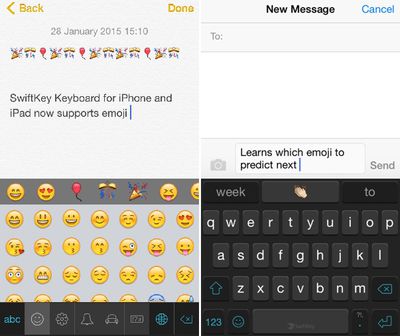
SwiftKey is one of the most popular third-party keyboard options on iOS, and today it received a major update adding a highly requested feature -- emoji. Emoji can be accessed by tapping on the smiley at the bottom of the keyboard, and there's also a new predictive emoji tool that learns the most frequently used emoji and suggests them while typing.
swiftkeykeyboard

We've built emoji right into SwiftKey Keyboard so you can now express yourself when words don't quite cut it. Just as it learns the words and phrases that matter to you, SwiftKey also learns and predicts which emoji you use most often so you can spend less time looking for that perfect smiley (or slice of pizza -- whatever you're into).

Using a lot of emoji in text will cause emoji to pop up more frequently in the word prediction box, making it easier to insert fun characters into text.

Today's update also includes SwiftKey Flow for the iPad, a feature that was previously limited to the iPhone. With SwiftKey Flow, it's possible to type faster via swiping on the screen. Finally, there are also 11 new languages available in SwiftKey, including Bulgarian, Croatian, Greek, Hinglish, Icelandic, Indonesian, Latvian, Russian, Serbian, Slovak, and Turkish.

SwiftKey Keyboard for iOS can be downloaded from the App Store for free. [Direct Link]

Top Rated Comments

CrAkD Avatar
144 months ago
I'm all done with 3rd party keyboards until apple fixes the implementation. I want to smash my 6+ in s million pieces everytime I need to type something and the keyboard doesn't pop out.
Score: 6 Votes (Like | Disagree)
Traverse Avatar
144 months ago
I'ved tried several third party keyboards (my favorite being Flesky), but I always end up back with the default Apple keyboard. 3rd party implementation is still buggy, still poses a privacy concern (albeit mild), and I've honestly never had an issues using the stock keyboard.
Score: 5 Votes (Like | Disagree)
joshuaclinton Avatar
144 months ago
Now just needs dictation and I'll be all set!
Score: 3 Votes (Like | Disagree)
avanpelt Avatar
144 months ago
Apple's implementation of third-party keyboard support has been sloppy, at best.

It's almost like Apple is being passive-aggressive with their users:

"You want third-party keyboards? We told you that we make the best keyboard and now we're going to prove it to you! Want to use dictation with third-party keyboards? Sorry, you can't do that. Want the third-party keyboard to pop up reliably every time you tap a text field? Not gonna happen. Want the text input from the third-party keyboard to be able to reliably fill out web forms? Not a chance in hell. Here, users, are the third-party keyboards you've whined about for years. But guess what? The experience sucks just like we told you it would; but hey, at least you got what you wanted!"

Of course, we didn't get what we wanted. I'm cautiously optimistic that iOS 9 will fix the third-party keyboard issues and finally let us modify which apps are the defaults for certain tasks. We'll see...
Score: 2 Votes (Like | Disagree)
Jessica Lares Avatar
144 months ago
I am enjoying the emoji bar I have in Nintype. Yes, it is crazy complicated to setup, but once you do it, it's a blast to use. I have one bar for numbers, then one bar for my favorite emoji, then another for markdown shortcuts. I'm also using the globe button to automatically insert the date, and have some other shortcuts within the shift key. I moved a lot of my TextExpander shortcuts to be within the letters too. There is a specific bit that you can write so it moves to the next line in a shortcut, but I haven't messed with that yet.

Needless to say, it replaced the majority of the keyboards I was interested in using.

I wish it had iCloud syncing and had a library of little pictures to represent shortcuts though. But that's not really an issue in general.

I have used SwiftKey on Android. I wish the iOS version was more like it. That's why I ended up deleting it when it first came out.
Score: 1 Votes (Like | Disagree)
mattopotamus Avatar
144 months ago
Would prefer SwiftKey over Swype, but SwiftKey doesn't automatically place a space after a comma or period. Heaven knows why not ...

Are you sure it is not in the settings? For android phones it is in the swiftkey settings.
Score: 1 Votes (Like | Disagree)

Popular Stories

Apple Logo Zoomed

Tim Cook Teases Plans for Apple's Upcoming 50th Anniversary

Thursday February 5, 2026 12:54 pm PST by
Apple turns 50 this year, and its CEO Tim Cook has promised to celebrate the milestone. The big day falls on April 1, 2026. "I've been unusually reflective lately about Apple because we have been working on what do we do to mark this moment," Cook told employees today, according to Bloomberg's Mark Gurman. "When you really stop and pause and think about the last 50 years, it makes your heart ...
wwdc sans text feature

Apple Rumored to Announce New Product on February 19

Thursday February 5, 2026 12:22 pm PST by
Apple plans to announce the iPhone 17e on Thursday, February 19, according to Macwelt, the German equivalent of Macworld. The report, citing industry sources, is available in English on Macworld. Apple announced the iPhone 16e on Wednesday, February 19 last year, so the iPhone 17e would be unveiled exactly one year later if this rumor is accurate. It is quite uncommon for Apple to unveil...
Finder Siri Feature

Why Apple's iOS 26.4 Siri Upgrade Will Be Bigger Than Originally Promised

Friday February 6, 2026 3:06 pm PST by
In the iOS 26.4 update that's coming this spring, Apple will introduce a new version of Siri that's going to overhaul how we interact with the personal assistant and what it's able to do. The iOS 26.4 version of Siri won't work like ChatGPT or Claude, but it will rely on large language models (LLMs) and has been updated from the ground up. Upgraded Architecture The next-generation...
iOS 26

iOS 26.3 and iOS 26.4 Will Add These New Features to Your iPhone

Tuesday February 3, 2026 7:47 am PST by
While the iOS 26.3 Release Candidate is now available ahead of a public release, the first iOS 26.4 beta is likely still at least a week away. Following beta testing, iOS 26.4 will likely be released to the general public in March or April. Below, we have recapped known or rumored iOS 26.3 and iOS 26.4 features so far. iOS 26.3 iPhone to Android Transfer Tool iOS 26.3 makes it easier...
maxresdefault

Apple Shows Off a Key Reason to Upgrade to the iPhone 17

Saturday February 7, 2026 9:26 am PST by
Apple today shared an ad that shows how the upgraded Center Stage front camera on the latest iPhones improves the process of taking a group selfie. "Watch how the new front facing camera on iPhone 17 Pro takes group selfies that automatically expand and rotate as more people come into frame," says Apple. While the ad is focused on the iPhone 17 Pro and iPhone 17 Pro Max, the regular iPhone...