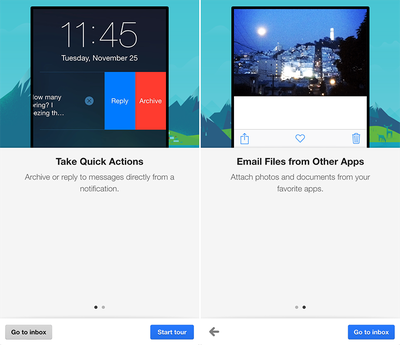
Google on Thursday updated Gmail for iOS with a trio of notable new features: quick actions, the ability to email files from other apps and a new attachment viewer. Gmail users on iPhone and iPad can now attach photos and documents to Gmail from other apps such as Instagram using the updated in-app share sheet, and open attachments from Gmail into any app.
Gmail for iOS 4.0
Taking advantage of Apple's addition of interactive notifications in iOS 8, quick actions enable Gmail users to archive or reply to emails directly from a notification without leaving the app. The functionality also works for notifications in Notification Center and on the Lock screen. The latest release of Gmail for iOS pushes the app to version 4.0 on the App Store.

What's New in Version 4.0
• Take quick actions - Archive or reply to messages directly from a notification
• Email files from other apps - Attach photos and documents to Gmail right from your favorite apps
• New attachment viewer - Open attachments from Gmail into any app

Gmail for iOS [Direct Link] is free on the App Store for iPhone and iPad.

Top Rated Comments

gmintz09 Avatar
143 months ago
Nice update, but why archive and not delete? I never have understood archive as an action in email. It doesn't get rid of it, it throws it to my "All Mail" section but still stays in my inbox. I would have preferred "Reply" and "Delete" as options.

Furthermore, these actions really don't work on the lock screen if you have a passcode/TouchID...I have to unlock my phone to complete the action. I also still have to leave the app I'm in to reply to an email. Not sure why it says I can do it right from the notification. Disappointing.
Score: 5 Votes (Like | Disagree)
coolfactor Avatar
143 months ago
Nice update, but why archive and not delete? I never have understood archive as an action in email. It doesn't get rid of it, it throws it to my "All Mail" section but still stays in my inbox. I would have preferred "Reply" and "Delete" as options.

With Gmail, you are the product. Google wants you to retain as much email as possible so that they can profile you for adverting campaigns. Regarding "All Mail" messages staying in your inbox, you just need to adjust some settings. Archived messages don't stay in your Inbox when configured properly.
Score: 2 Votes (Like | Disagree)
mpavilion Avatar
143 months ago
I recently switched from using the Gmail app to accessing Gmail via the Outlook app. I love it -- you can do almost everything that you can do via the Gmail app (except for "Labeling" messages while leaving them in the Inbox), plus a lot more... without the hassles and annoyances of the Gmail app (poor design, notifications that don't clear when you view the message in the app, account sign-in issues, etc.).
Score: 2 Votes (Like | Disagree)
technosix Avatar
143 months ago
I've been using all the Google iOS apps. They enhance the iPhone experience a lot. Very enjoyable.

Perhaps best of all is how rapidly Google Innovates without fear. They just do it and do it well.
Score: 2 Votes (Like | Disagree)
mms13 Avatar
143 months ago
Nice update, but why archive and not delete? I never have understood archive as an action in email. It doesn't get rid of it, it throws it to my "All Mail" section but still stays in my inbox. I would have preferred "Reply" and "Delete" as options.

You aren't using Gmail correctly.
Score: 1 Votes (Like | Disagree)
bozzykid Avatar
143 months ago
With Gmail, you are the product. Google wants you to retain as much email as possible so that they can profile you for adverting campaigns.
That simply isn't true. Deleting email will not have any affect on advertising campaigns shown to you. Google uses an automated process to scan emails when they arrive. Once you delete the email, nothing will change. So there is no incentive for Google to want you to archive the email. To be fair, Apple scans emails (incoming and outgoing) as well. They just choose to not retain the data for advertising purposes.
Score: 1 Votes (Like | Disagree)

Popular Stories

Apple Logo Zoomed

Tim Cook Teases Plans for Apple's Upcoming 50th Anniversary

Thursday February 5, 2026 12:54 pm PST by
Apple turns 50 this year, and its CEO Tim Cook has promised to celebrate the milestone. The big day falls on April 1, 2026. "I've been unusually reflective lately about Apple because we have been working on what do we do to mark this moment," Cook told employees today, according to Bloomberg's Mark Gurman. "When you really stop and pause and think about the last 50 years, it makes your heart ...
wwdc sans text feature

Apple Rumored to Announce New Product on February 19

Thursday February 5, 2026 12:22 pm PST by
Apple plans to announce the iPhone 17e on Thursday, February 19, according to Macwelt, the German equivalent of Macworld. The report, citing industry sources, is available in English on Macworld. Apple announced the iPhone 16e on Wednesday, February 19 last year, so the iPhone 17e would be unveiled exactly one year later if this rumor is accurate. It is quite uncommon for Apple to unveil...
Finder Siri Feature

Why Apple's iOS 26.4 Siri Upgrade Will Be Bigger Than Originally Promised

Friday February 6, 2026 3:06 pm PST by
In the iOS 26.4 update that's coming this spring, Apple will introduce a new version of Siri that's going to overhaul how we interact with the personal assistant and what it's able to do. The iOS 26.4 version of Siri won't work like ChatGPT or Claude, but it will rely on large language models (LLMs) and has been updated from the ground up. Upgraded Architecture The next-generation...
iOS 26

iOS 26.3 and iOS 26.4 Will Add These New Features to Your iPhone

Tuesday February 3, 2026 7:47 am PST by
While the iOS 26.3 Release Candidate is now available ahead of a public release, the first iOS 26.4 beta is likely still at least a week away. Following beta testing, iOS 26.4 will likely be released to the general public in March or April. Below, we have recapped known or rumored iOS 26.3 and iOS 26.4 features so far. iOS 26.3 iPhone to Android Transfer Tool iOS 26.3 makes it easier...
iphone 17 pro dark blue 1

iPhone 18 Pro Max Rumored to Deliver Next-Level Battery Life

Friday February 6, 2026 5:14 am PST by
The iPhone 18 Pro Max will feature a bigger battery for continued best-in-class battery life, according to a known Weibo leaker. Citing supply chain information, the Weibo user known as "Digital Chat Station" said that the iPhone 18 Pro Max will have a battery capacity of 5,100 to 5,200 mAh. Combined with the efficiency improvements of the A20 Pro chip, made with TSMC's 2nm process, the...