
'Workflow' for Apple Watch Brings Automated Tasks to Your Wrist

Popular iOS app Workflow was today updated with support for the upcoming Apple Watch, bringing its highly useful task automation capabilities to the wrist-worn device.

For those of you unfamiliar with Workflow, it's a powerful automation app that was first launched on iOS last December. Workflow lets users create actions and connect apps to automatically perform a huge range of tasks on the iPad or the iPhone.
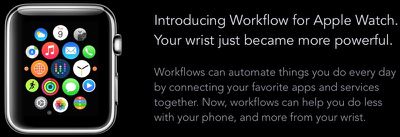
workflowapplewatch
Workflows can be built from a series of actions to perform tasks like making GIFs from a series of photos, creating PDFs from websites, appending content or recordings to Evernote, seeing older versions of websites, getting images from websites, and translating text on the clipboard. There are hundreds of actions that can be combined for an endless number of different workflows.

On the Apple Watch, Workflow will work in the same way, giving users one-tap access to a wide range of different timesaving actions. For example, it'll be possible to pull up a map to the nearest coffee shop or call an Uber using Workflow. These type of quick-access actions may be particularly valuable on the Apple Watch, given its limited input methods.
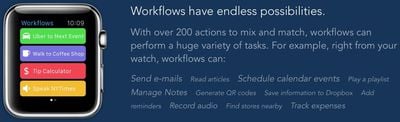
workflowactions
One of the best features about Workflow for iOS is its included Workflow Gallery, which makes it easy for even those new to the app to download actions that are immediately useful. The same gallery feature will be available on the Apple Watch for fast access to workflows.
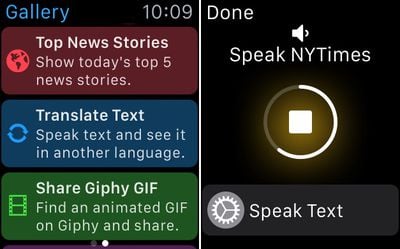
workflowgallery

Workflow's Gallery and a workflow in action

Workflows can be executed by raising the Apple Watch on the wrist to turn it on and swiping up at the bottom of the screen to get to the Workflow Glance. Workflows can be run directly from the Glance portion of the Apple Watch, so accessing them will be similar to accessing an app in the Notification Center on iOS. As a reminder, Glances are quick snippets of information that are meant to be easy to access.

Third-party Glances on the Apple Watch are not interactive and do not support buttons or scrolling, so launching a workflow through the Apple Watch's Glance view is done in a unique way. The Glance automatically scrolls through the different workflows that are available and selecting one is done by tapping on the screen.

Scrolling through workflows can be sped up with a rather unique interaction -- knocking the Apple Watch against the iPhone in a pants pocket. This causes the built-in scrolling mechanism to shift to the next available workflow in the list.

Workflows from the iPhone are automatically available on the Apple Watch, including all custom-created workflows constructed from the available actions in the Workflow app. Many Apple Watch apps are somewhat limited in function due to the restricted access developers have to Apple APIs, and the same goes for Workflow.

Apple Watch workflows aren't as full-featured as those on the iPhone -- it's not possible to run workflows that open other apps -- but Handoff is supported to allow users to transfer a workflow on the Apple Watch to the iPhone.
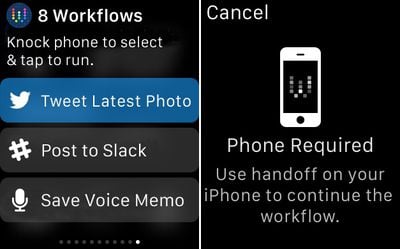
workflowhandoffandglanceview

Workflow's Glance menu and Handoff message

Workflows that involve opening apps, sending messages, or placing phone calls will all require the iPhone because developers cannot use these functions. Workflows that are not supported on the Apple Watch will direct users to use Handoff to swap over to the iPhone.

Though Apple Watch workflows can't open apps (aside from getting directions within Maps) they can still take advantage of the same data available to many iOS apps, like calendar info, contacts, Twitter, Facebook, and more. Currently, 163 out of 226 of available actions within the Workflow app are able to run natively on the Apple Watch, so there's still quite a lot that can be done directly on the device.

Workflow for the Apple Watch is available through an update to the Workflow app as of today, so it'll be accessible on the Apple Watch as soon as the first devices arrive in customers' hands.

Workflow can be downloaded from the App Store for the sale price of $2.99. [Direct Link]

Popular Stories

maxresdefault

Apple Shows Off a Key Reason to Upgrade to the iPhone 17

Saturday February 7, 2026 9:26 am PST by
Apple today shared an ad that shows how the upgraded Center Stage front camera on the latest iPhones improves the process of taking a group selfie. "Watch how the new front facing camera on iPhone 17 Pro takes group selfies that automatically expand and rotate as more people come into frame," says Apple. While the ad is focused on the iPhone 17 Pro and iPhone 17 Pro Max, the regular iPhone...
Finder Siri Feature

Why Apple's iOS 26.4 Siri Upgrade Will Be Bigger Than Originally Promised

Friday February 6, 2026 3:06 pm PST by
In the iOS 26.4 update that's coming this spring, Apple will introduce a new version of Siri that's going to overhaul how we interact with the personal assistant and what it's able to do. The iOS 26.4 version of Siri won't work like ChatGPT or Claude, but it will rely on large language models (LLMs) and has been updated from the ground up. Upgraded Architecture The next-generation...
wwdc sans text feature

Apple Rumored to Announce New Product on February 19

Thursday February 5, 2026 12:22 pm PST by
Apple plans to announce the iPhone 17e on Thursday, February 19, according to Macwelt, the German equivalent of Macworld. The report, citing industry sources, is available in English on Macworld. Apple announced the iPhone 16e on Wednesday, February 19 last year, so the iPhone 17e would be unveiled exactly one year later if this rumor is accurate. It is quite uncommon for Apple to unveil...
apple wallet drivers license feature iPhone 15 pro

Apple Says These 7 U.S. States Plan to Offer iPhone Driver's Licenses

Monday February 9, 2026 6:24 am PST by
In select U.S. states, residents can add their driver's license or state ID to the Apple Wallet app on the iPhone and Apple Watch, and then use it to display proof of identity or age at select airports and businesses, and in select apps. The feature is currently available in 13 U.S. states and Puerto Rico, and it is expected to launch in at least seven more in the future. To set up the...
14 inch MacBook Pro Keyboard

New MacBook Pros Could Now Arrive in March

Sunday February 8, 2026 6:02 am PST by
New MacBook Pro models with the M5 Pro and M5 Max chips could arrive as soon as Monday, March 2, according to Bloomberg's Mark Gurman. In today's "Power On" newsletter, Gurman said that the release of new MacBook Pro models is tied to the release of macOS Tahoe 26.3. The launch is said to be slated for as early as the week of March 2. He added that the M4 Pro and M4 Max models on sale today...

Top Rated Comments

jacobj Avatar
141 months ago
Can't wait!

I'll definetely use this app.

The saddest thing I have seen today: either you ordered this and then cancelled it just so you could do a screen grab, or you have the money, but are empty inside and therefore need people to validate your worth through their equally shallow admiration, or you want to annoy people like me for fun which has no satircal value and is equally sad.

Then to post it first just wreaks of a "look at me, look at me" complex.

Let's just hope it's a phase. Good luck in the future. I hope you resolve it all to your benefit.
Score: 20 Votes (Like | Disagree)
elmateo487 Avatar
141 months ago
"Scrolling through workflows can be sped up with a rather unique interaction -- knocking the Apple Watch against the iPhone in a pants pocket"

Wait what? So if the watch is on my left hand, and my phone is in my right pocket, I have to do some kind of Macarena dance move to speed up the scrolling? I have read this sentence 10 times.... Nothing about it makes sense.
Score: 13 Votes (Like | Disagree)
iSlave Avatar
141 months ago
Thanks to xhamster, my wrist is already powerful enough thanks.
Score: 12 Votes (Like | Disagree)
darkslide29 Avatar
141 months ago
Every time I come across this app, I think about grabbing it but none of the examples given seem useful or relevant to me. I'm either not looking at enough examples, or perhaps I am a boring person. People seem to swear by this app and think it would make a good Apple purchase. :cool:
Score: 7 Votes (Like | Disagree)
DrJohnnyN Avatar
141 months ago
Can't wait!

I'll definetely use this app.
Score: 6 Votes (Like | Disagree)
kalex Avatar
141 months ago
Can't wait!

I'll definetely use this app.

Opulence You has it
Score: 5 Votes (Like | Disagree)















