Adobe Lightroom Updated With HDR and Panorama Merge, Facial Recognition and Filter Brushes

Adobe today announced a major update to Lightroom CC (and the launch of the standalone Lightroom 6), its professional photo editing software for Mac users. The new update brings significant performance improvements and several new features like HDR merge, Panorama merge, facial recognition, improved slideshows, a filter brush, and more.

One of the most impressive new organizational features in the updated version of Lightroom is facial recognition, which lets Lightroom users organize their photos by subject for the first time, in addition to organizing with tags, flags, and star ratings. Once a face in a single photo is named, the software is able to find more images that feature that person for quick tagging by face. A new "People" view lets users sort photos by person.
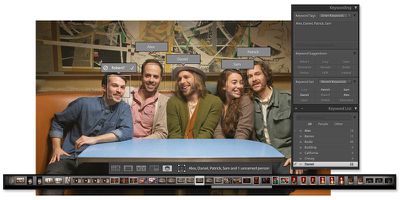
adobefacialrecognition
Panorama Merge, another new feature, lets photographers stitch together multiple images, including RAW and JPG files to create ultra high-quality panoramic shots. It has built in tools for automatically cropping non-matching edges and changing perspectives. With Lightroom's graphical performance improvements, even huge panorama files can be edited in real time with little lag.

adobepanoramamerge
With HDR Merge, it's possible to combine several different photos with different exposure settings into a single HDR image. Unlike other photo editing apps, Adobe's HDR Merge works directly with both JPG and RAW images. Because it works with RAW files, a high-quality HDR image can be created from as few as two photos. Other HDR options typically require more photos at different exposure levels to create a suitable image.
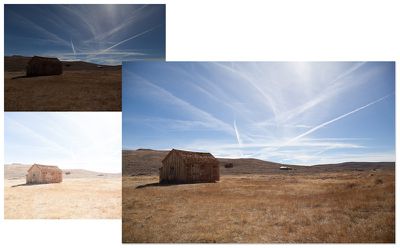
adobehdr
Lightroom's new filter brush, a popular request from Adobe customers, works with graduated and radial filter affects, letting a filter mask be reshaped with a brush tool so filter effects can be added and subtracted from specific parts of images for better precision. The last major feature update, which adds advanced slideshow tools, lets users put pan and zoom effects into their slideshows to add a motion effect. There's also a tool for syncing slideshows to multiple audio clips, and it's possible to add up to 10 songs to a slideshow.

Today's update to Lightroom CC may be of particular interest to Mac users who previously used the now-defunct Aperture photo editing software, as Apple no longer offers a professional-level photo editing app since discontinuing Aperture in favor of Photos for OS X. Lightroom has many professional-level features that are missing from the Photos for OS X app, and it also offers the same cross-platform syncing of all images with a Creative Cloud subscription. Adobe has promised to continue adding new features and more advanced tools to Lightroom in the future.

Adobe is also updating its Lightroom apps for the iPad and the iPhone, which connect to Lightroom CC and allow for photos and edits to be synced between all devices using Adobe's cloud service. The apps are gaining features like improved cropping tools, with the updated versions available for download today.

Lightroom CC is available through Adobe's Creative Cloud Photography plan, which bundles Photoshop and Lightroom together for $9.99 per month, or through Adobe's complete Creative Cloud plan, featuring all Adobe software for $49.99 per month.

Adobe is also selling the new Lightroom update on a standalone basis, branded as Lightroom 6 and priced at $149 (or $79 upgrade pricing). The standalone version of Lightroom does not include cloud integration with Adobe's mobile Lightroom apps and Lightroom on the web.

Lightroom for iPhone can be downloaded from the App Store for free. [Direct Link]

Lightroom for iPad can be downloaded from the App Store for free. [Direct Link]

Popular Stories

Apple Logo Zoomed

Tim Cook Teases Plans for Apple's Upcoming 50th Anniversary

Thursday February 5, 2026 12:54 pm PST by
Apple turns 50 this year, and its CEO Tim Cook has promised to celebrate the milestone. The big day falls on April 1, 2026. "I've been unusually reflective lately about Apple because we have been working on what do we do to mark this moment," Cook told employees today, according to Bloomberg's Mark Gurman. "When you really stop and pause and think about the last 50 years, it makes your heart ...
wwdc sans text feature

Apple Rumored to Announce New Product on February 19

Thursday February 5, 2026 12:22 pm PST by
Apple plans to announce the iPhone 17e on Thursday, February 19, according to Macwelt, the German equivalent of Macworld. The report, citing industry sources, is available in English on Macworld. Apple announced the iPhone 16e on Wednesday, February 19 last year, so the iPhone 17e would be unveiled exactly one year later if this rumor is accurate. It is quite uncommon for Apple to unveil...
Finder Siri Feature

Why Apple's iOS 26.4 Siri Upgrade Will Be Bigger Than Originally Promised

Friday February 6, 2026 3:06 pm PST by
In the iOS 26.4 update that's coming this spring, Apple will introduce a new version of Siri that's going to overhaul how we interact with the personal assistant and what it's able to do. The iOS 26.4 version of Siri won't work like ChatGPT or Claude, but it will rely on large language models (LLMs) and has been updated from the ground up. Upgraded Architecture The next-generation...
iOS 26

iOS 26.3 and iOS 26.4 Will Add These New Features to Your iPhone

Tuesday February 3, 2026 7:47 am PST by
While the iOS 26.3 Release Candidate is now available ahead of a public release, the first iOS 26.4 beta is likely still at least a week away. Following beta testing, iOS 26.4 will likely be released to the general public in March or April. Below, we have recapped known or rumored iOS 26.3 and iOS 26.4 features so far. iOS 26.3 iPhone to Android Transfer Tool iOS 26.3 makes it easier...
maxresdefault

Apple Shows Off a Key Reason to Upgrade to the iPhone 17

Saturday February 7, 2026 9:26 am PST by
Apple today shared an ad that shows how the upgraded Center Stage front camera on the latest iPhones improves the process of taking a group selfie. "Watch how the new front facing camera on iPhone 17 Pro takes group selfies that automatically expand and rotate as more people come into frame," says Apple. While the ad is focused on the iPhone 17 Pro and iPhone 17 Pro Max, the regular iPhone...

Top Rated Comments

Col4bin Avatar
141 months ago
Excited for the new updates to Lightroom, but NOT a fan of Adobe's creative cloud-based pay model where these applications must be rented—especially when extra/new features are bundled into these specific releases.
Score: 18 Votes (Like | Disagree)
jayducharme Avatar
141 months ago
I think I'll stick with Aperture.

Oh, wait....
Score: 14 Votes (Like | Disagree)
orbital~debris Avatar
141 months ago
So they still only offer subscription models? That's a shame, considering I'd actually pay for a one time fee. Not a fan of renting software, then again I guess that's a business model that should work in certain circumstances/environments.

Did you not read the full MacRumors article?
Hint: subscription and standalone versions are available.
Score: 10 Votes (Like | Disagree)
GuitarDTO Avatar
141 months ago
I'm on the CC subscription plan so looking forward to picking up the update. I still haven't fully bought into Lightroom yet though and I've been using it for over a year now. Functionally it is just fine and as easy to use as Aperture was. But visually, I was able to dial in on my desired look much quicker in Aperture. I loved how Aperture rendered Canon RAW files, and just haven't been able to replicate the exact look in Lightroom. Frustrating.

----------

They're still douchebags for not making it a free update to LR 5

I know right? Friggin software companies, trying to make money and stuff....
Score: 4 Votes (Like | Disagree)
gugy Avatar
141 months ago
I might consider it.
I am not too fond of the Photos app. I missed the old iPhoto for casual stuff and Aperture for more in depth editing.
Score: 4 Votes (Like | Disagree)
maflynn Avatar
141 months ago
I updated to Lightroom CC on my Surface, but the Mac version for my Macbook Pro, where my other license is installed, is still saying Lightroom 5. Adobe, on the ball as usual :rolleyes:

Sign out and back in on the creative cloud app (don't close/restart it). That worked for me.
Score: 3 Votes (Like | Disagree)