Hands-On Walkthrough of Apple Music and Beats 1 Radio - GeekWebGuides
Skip to Content

Hands-On Walkthrough of Apple Music and Beats 1 Radio

Apple's much-anticipated music service, Apple Music, launched this morning as part of iOS 8.4, bringing on-demand streaming music, the Beats 1 radio station, and Apple Connect, Apple's new social network aimed at letting artists connect with fans in new and unique ways.

We went hands-on with Apple Music in iOS 8.4 to give you a look at how the new service works, what it looks like, what it costs, and how to use it. Check out the video below to get a thorough overview of all three Apple Music components.


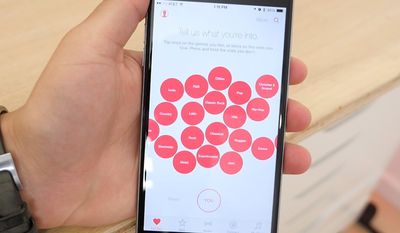
Apple Music's main streaming feature is a "For You" section within the Music app that offers up on-demand music recommendations based on preferences you've entered and music you've listed to previously. "For You" is able to offer more refined, tailored recommendations as you listen to more and more music.
applemusicforyou
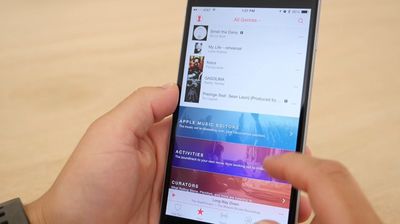
The "New" tab, also part of the on-demand streaming service, displays a variety of music that's new and popular, organized into songs and albums. This section also includes music picks from Apple Music editors.
curatedmusicnew
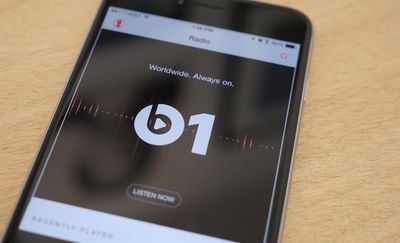
Much of the content in these two Music app features requires a subscription to Apple Music, which is free for three months, after which it's priced at $9.99 or $14.99 for a family. A third "Radio" tab in the app houses the new 24/7 live Beats 1 radio station and other radio offerings, and radio content will always be free to access.
beats1radio
Apple Connect, the artist-centric social network, is also available through a tab in the Music app, and it displays status updates, photos, videos, and more from artists you follow. The final section is focused on "My Music," housing music you've added from Apple Music, songs you've purchased from iTunes, and playlists you've created, all in one spot.
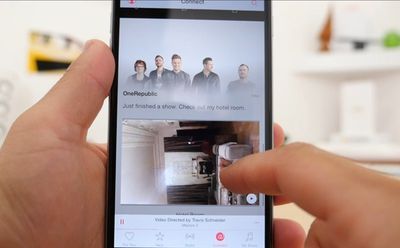
applemusicconnect
All of these features that are available in iOS 8.4's new Music app are also available in iTunes 12.2, which was just released this afternoon. iTunes 12.2 offers up all of the same tabs and access to music, radio stations, and curated playlists.

Because Apple Music is free for the first three months, all iTunes users can download it and check it out for themselves without having to shell out cash. If you haven't downloaded Apple Music yet, it's well worth giving it a look.

To read more about setting up Apple Music, make sure to check out our guide on Getting Started with Apple Music and Beats 1 on iOS, Mac, and PC.

Popular Stories

Apple Music New Branding

Apple Music's New Look Officially Announced

Wednesday October 21, 2026 9:06 am PDT by
Following the introduction of a new Apple Music logo and app icon earlier this month, Apple today officially introduced Apple Music's new brand identity. In a YouTube video shared today, Apple said the new Apple Music visuals were "made by sound." More specifically, Apple said it played a sound through a container of water, resulting in the liquid moving at the frequency of the notes. Apple...
apple music new logo red

Apple Music Is Getting a New Logo

Tuesday October 6, 2026 4:06 am PDT by
Apple appears to be rolling out a new logo for Apple Music in its upcoming set of software updates. The logo has been spotted in both macOS 27.2 beta 3 and iOS 27.2 beta 3, and it's identical to the one that Apple used in its Apple Music Hall announcement last month. When Apple used the logo in the venue's press materials and on its new official website, it wasn't clear if this was a one-off ...
Apple Music New Logo on Website

Apple Music's New Look is Now Live on Apple's Website

Wednesday October 21, 2026 2:24 pm PDT by
As spotted by Hidde Collee, the Apple Music page on Apple's website now has the updated branding that Apple officially introduced earlier today. Apple Music has a new black-and-white logo and app icon, with Apple doing away with the red color scheme that it previously used for the streaming music service. In a YouTube video released earlier today, Apple showed how the new Apple Music...

Top Rated Comments

BoxerGT2.5 Avatar
148 months ago
Settings > iCloud > Family planning
Proceed to put phone in pocket and let the radiation kill all your sperm. iSterilization
Score: 12 Votes (Like | Disagree)
148 months ago
The new UI is a step back. Clicking through artists > albums > then having to go through each album to find a song doesn't make sense. The old way of listing songs under the albums was so much easier- especially while driving. Why remove this and require more work and clicks? I don't understand the reasoning.
In my mind this is a huge step "forward" to the old glory days. I hated, hated, having to scroll though hundreds of songs (when you have an artist with lots of albums) that came with iOS7 and above. Now it looks like if there's more than 2 albums in an artist, it shows you the album view. Thank you Apple!!
Score: 8 Votes (Like | Disagree)
Dilster3k Avatar
148 months ago
This service is top notch! Eat your heart out Spotify!
Score: 6 Votes (Like | Disagree)
AngerDanger Avatar
148 months ago
I totally hate the new Apple "My Music" UI. It requires too many clicks for basic things. Can't enjoy my purchased music on my iPhone no more, need to go back to an iPod. :(
If anything on iOS requires clicks, you're doing something wrong. :p
Score: 4 Votes (Like | Disagree)
iapplelove Avatar
148 months ago
I don't stream anything, gave up on Netflix don't do spotify don't even use the free pandora. Had no interest in apple music but I signed up for it anyway and to be honest I have yet to stop using it. Love it.
Score: 3 Votes (Like | Disagree)
MacrumoursUser Avatar
148 months ago
Well so far it's very convoluted. Too much stuff in there. Doesn't really work as i expect it to. For example i wanted to add few albums i like to my music and then make them available offline - nothing happens. I can see them in my music, but they are in the cloud.

I have some songs i have purchased and if i use the option to show only songs available offline they are all there since i have downloaded them, but if i go to iTunes store app to the purchased section it shows them with a cloud icon on the right as if they are in the cloud, but not downloaded.


It takes some skill to make it so convoluted and unintuitive.
Score: 3 Votes (Like | Disagree)
Latest Stories
MacBook Neo Helps Apple Outpace Rivals as Market Declines
26 minutes ago
Happy 25th Anniversary, iPod
56 minutes ago
iPhone Duo Demand Reportedly Exceeds Apple's Expectations
4 hours ago
iPhone Duo Launch Begins as First Orders Reach Customers
10 hours ago
1Password for Agents Keeps Your Passwords Hidden From AI
10 hours ago
iPhone Duo 24 Hours Later: Your Questions Answered
11 hours ago
Apple's iWork Apps Get 'Intelligent Assistant' and iPhone Duo Support
12 hours ago
Apple is Apparently Considering a Slightly Larger iPhone Duo
12 hours ago
Giant iPhone Duo Displays Coming to Four Apple Stores
13 hours ago
Apple Pulls Keynote, Pages and Numbers From App Store [Update: Back]
14 hours ago
Apple Updates More Apps With iPhone Duo Support
14 hours ago
Apple Will Label Apps 'Made for iPhone Duo' in App Store
17 hours ago
Amazon Takes $49 Off iPad With Prices Starting at $399.99
18 hours ago
F1 on Apple TV Now Available in Dolby Atmos
18 hours ago
Apple Reveals More Than 50 Apps That Will Be Updated for iPhone Duo
19 hours ago
Apple Blocks Certificates That Could Help Attackers Fake Websites
20 hours ago
Giant iPhone Duo Installations Spotted at Apple Fifth Avenue
21 hours ago
iPhone Duo 2 Prototypes Include Under-Display Face ID
21 hours ago
Tesla App Gains iPad and iPhone Duo Support
1 day ago
Apple Reportedly Boosts iPhone Duo Orders by 44%
1 day ago
Fortnite Returning to Australian App Store After Court Ruling
1 day ago
Apple Ordered to Open iPhone to Rival App Stores in Australia
1 day ago
Apple Suppliers Face Hurdles Cutting Circuit Board Emissions
1 day ago
Things Updated for iPhone Duo With Adaptive Layout
1 day ago
Simplicity and Siri AI Are HomeView's Killer Features, Apple Says
1 day ago
iPhone Duo Reviewers Really Miss Face ID
1 day ago
Does the iPhone Duo Run Hot? Here's What Reviews Found
1 day ago
Apple Music's New Look is Now Live on Apple's Website
1 day ago
Anthropic Launches Claude Duet, a Proactive AI Agent
1 day ago
What 32,000 Folds Did to the iPhone Duo's Hinge
2 days ago