
Inside iOS 9: Split-Screen Multitasking for the iPad - GeekWebGuides
Skip to Content

Inside iOS 9: Split-Screen Multitasking for the iPad

by

iOS 9 brings a long-awaited Split-Screen multitasking feature to the iPad for the first time, letting users operate two apps simultaneously and bolstering the productivity capabilities of Apple's tablet lineup. There are three different multitasking features that are available on various iPad models: Slide Over, Split View, and Picture in Picture.
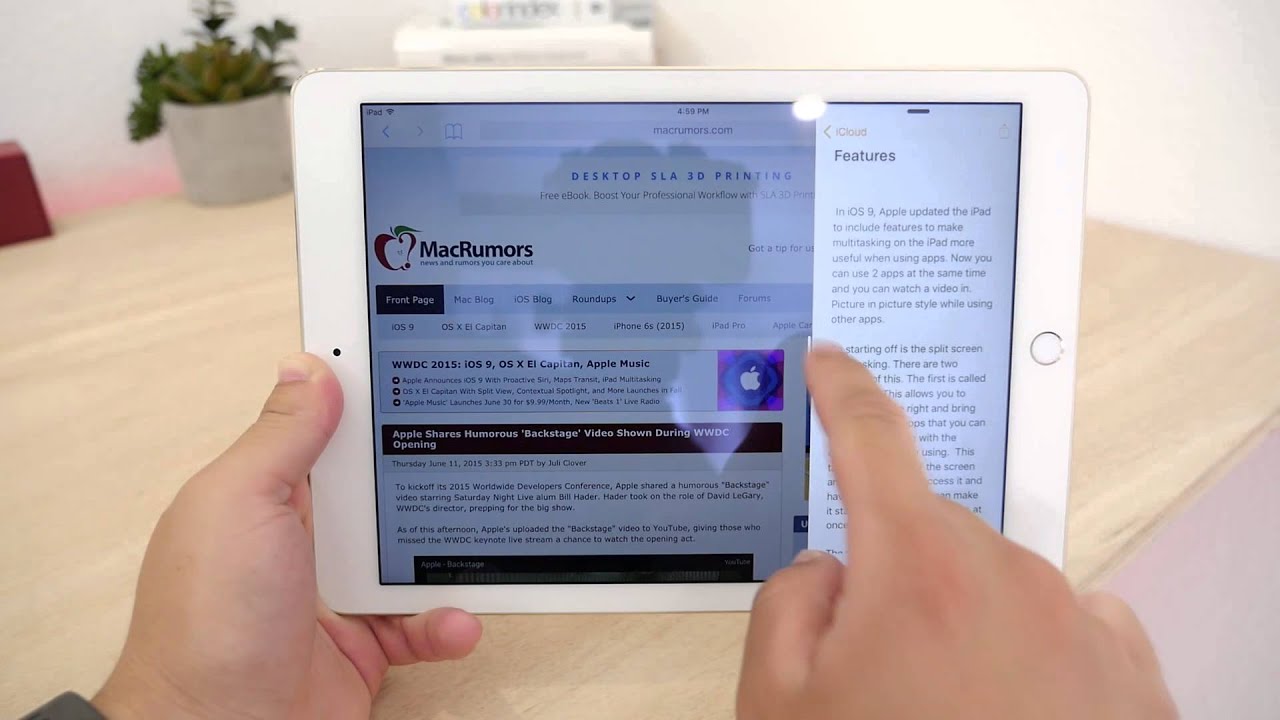

Slide Over can be activated within any app by swiping left from the right side of the iPad to bring up a small side pane that displays a secondary app alongside the first app. Slide Over takes up 1/3 of the space, and any app that has built-in multitasking support will appear in the side pane. Swiping downwards on the Slide Over window from the top of the iPad screen will allow you to switch between apps.
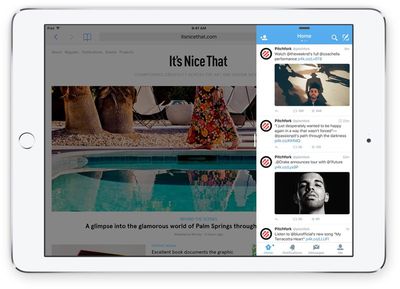
ipadmultitaskingslideview
Slide Over is not a full multitasking experience because both apps are not active at once. When the side pane is open, the app that's taking up most of the screen is paused and relegated to the background. Slide Over can be used in portrait or landscape mode and is useful for answering a quick message or looking something up in Safari while using another app.

Pulling the Slide Over window further towards the middle of the screen in landscape mode on an iPad Air 2 or an iPad mini 4 will activate Split View. Split View displays two apps side-by-side, with each app taking up half of the screen. With Split View, both apps can be used at the same time and controlled independently, so you can do things like copy and paste content from one app to another while both are open on the screen.
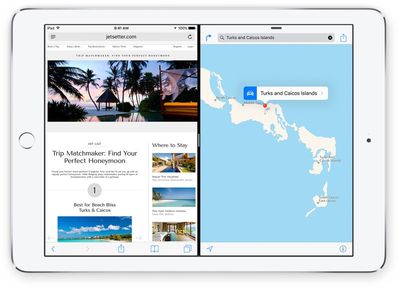
ipadmultitaskingsplitscreen
Picture in Picture, the third multitasking feature, lets you watch videos or participate in FaceTime video calls while using other apps. When on a FaceTime call or when watching a movie, tapping on the Home button sends the video to a corner of the iPad's display. From there, you're able to use other apps while you watch the movie or carry on with the FaceTime conversation.
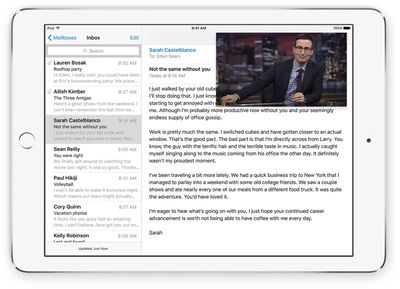
pictureinpicture
If you have an iPad Air 2 or an iPad mini 4, you can use all three of the different multi-tasking features. Both the iPad Air 2 and iPad mini 4 have A8 or better processors and 2GB RAM to support full multitasking. The upcoming iPad Pro will also support all three multitasking features.

If you have an iPad Air, iPad mini 2, or iPad mini 3, you can use Slide Over and Picture in Picture, but you can't use Split View because those older iPad models are not powerful enough to reliably support two apps at once. If you have an older iPad, like an iPad 2, an older Retina model, or an original iPad mini, none of the multitasking features will be available.

Apple's built-in apps support the new multitasking features, but third-party developers need to build multitasking support into their apps. We'll be seeing the first crop of iOS 9 apps with multitasking beginning today, but it may take some time for all apps to be updated with the APIs required to work with Slide Over, Picture in Picture, and Split View.


Related Forum: iOS 9

Top Rated Comments

dweezle3 Avatar
145 months ago
I'd like to have a stern talk with whoever it is at Apple that decided that an iPhone 6 Plus wasn't big enough for this feature :mad:
Score: 8 Votes (Like | Disagree)
Glassed Silver Avatar
145 months ago
Hmm, I'd love to hide certain apps from that app drawer and also manually sort them maybe.

I don't need the Find my iPhone app to sit in there. Maybe relegate these "hidden" apps to a "more" folder or something.
So I can still access them, but they don't clog up my day-to-day user experience.

Glassed Silver:mac
Score: 4 Votes (Like | Disagree)
macduke Avatar
145 months ago
Hmm, I'd love to hide certain apps from that app drawer and also manually sort them maybe.

I don't need the Find my iPhone to sit in there. Maybe relegate these "hidden" apps to a "more" folder or something.
So I can still access them, but they don't clog up my day-to-day user experience.

Glassed Silver:mac
As someone who has been using this all summer, this definitely needs to be a thing. It's only going to get worse as more third party apps are updated. On the one hand I'm really excited to finally have some third party apps to do split view with, but on the other hand it's going to make my launcher really cumbersome. For me that's the clunky part of the whole deal. What about when nearly every app gets updated? You'll have to scroll through a huge list that has no organization. I know PCalc is in my office folder. But where will it fall in this huge list? It sorts them by last used, which helps, but still.

A more elegant solution might be to show your home screens in a way that makes it obvious you aren't actually on your home screen (so it doesn't confuse users) and have all of your app icons in their places. Apps that don't support multitasking will be very translucent and disabled, making the available apps stand out. Perhaps this sidebar thing will work for now but over time it could get clunky. Or perhaps so few apps will actually update for multitasking (because why would you need to multitask games, certain utilities, etc.) that this won't ever become a problem. After all, we GeekWebGuides readers are in the minority when it comes to how many apps we use.

Ninja edit: Just thought of another solution that might really help: Folders for this sidebar switcher. That would bring some much-needed organization, and any apps you don't use would be put in a folder at the top that doesn't ever get used, so doesn't stay near the bottom of the recently used list. Done!
Score: 3 Votes (Like | Disagree)
Radeon85 Avatar
145 months ago
On my iPad Air, Picture in Picture doesn't works, and it wouldn't be some reason for it. Maybe one of the first problems with IOS9
Lack of ram would be the cause. 1GB RAM is just not enough.
Score: 2 Votes (Like | Disagree)
69Mustang Avatar
145 months ago
won't work in portrait mode. all apps so far have been tested against a minimum of 320 points width. width of iPhone 6 plus is 414 points. doing split screen means apps would look weird at 207 points width because it's never been tested before.
Couldn't it work in a vertical stack?
Score: 2 Votes (Like | Disagree)
flur Avatar
145 months ago
We need the ability to exclude apps from the app switcher in the sidebar. My entire "Crapple" folder is in there.
Score: 1 Votes (Like | Disagree)

Popular Stories

iPhone Duo Trio

Here's What Apple's Apps Look Like on the iPhone Duo

Tuesday October 20, 2026 11:12 am PDT by
With just three days to go until the iPhone Duo is released, Apple is getting ready for the launch. Behind the scenes, the App Store now has screenshots of Apple's built-in apps running on the Duo. We've seen some apps in marketing materials, but images of the ones we haven't seen give us an idea of what it will be like using the iPhone Duo day to day. Many apps are shown in landscape...
Apple Creator Studio iWork suite

Apple Pulls Keynote, Pages and Numbers From App Store [Update: Back]

Thursday October 22, 2026 11:01 am PDT by
Apple has temporarily removed Keynote, Pages, and Numbers from the App Store, just after releasing an update that added iPhone Duo support and a new Intelligent Assistant. It is not clear if the apps were removed intentionally, or if it is a bug. Apple has not said when the apps will be reinstated, but if it was in error, they should return soon. Update: The Mac versions are back without...
M5 MacBook Pro

RIP, MacBook Ultra

Monday October 19, 2026 9:37 am PDT by
Apple today sent out invites for an experience in Los Angeles on Wednesday, October 28, and the "Pro and tell" tagline on the invitation likely means that the rumored MacBook models with touch-enabled OLED displays will stick with MacBook Pro branding instead of the once-rumored "MacBook Ultra" name. The long-rumored "iPhone Ultra" ended up being named iPhone Duo, so speculation that Apple...
Latest Stories
MacBook Neo Helps Apple Outpace Rivals as Market Declines
20 minutes ago
Happy 25th Anniversary, iPod
50 minutes ago
iPhone Duo Demand Reportedly Exceeds Apple's Expectations
3 hours ago
iPhone Duo Launch Begins as First Orders Reach Customers
10 hours ago
1Password for Agents Keeps Your Passwords Hidden From AI
10 hours ago
iPhone Duo 24 Hours Later: Your Questions Answered
11 hours ago
Apple's iWork Apps Get 'Intelligent Assistant' and iPhone Duo Support
12 hours ago
Apple is Apparently Considering a Slightly Larger iPhone Duo
12 hours ago
Giant iPhone Duo Displays Coming to Four Apple Stores
13 hours ago
Apple Pulls Keynote, Pages and Numbers From App Store [Update: Back]
14 hours ago
Apple Updates More Apps With iPhone Duo Support
14 hours ago
Apple Will Label Apps 'Made for iPhone Duo' in App Store
17 hours ago
Amazon Takes $49 Off iPad With Prices Starting at $399.99
18 hours ago
F1 on Apple TV Now Available in Dolby Atmos
18 hours ago
Apple Reveals More Than 50 Apps That Will Be Updated for iPhone Duo
19 hours ago
Apple Blocks Certificates That Could Help Attackers Fake Websites
20 hours ago
Giant iPhone Duo Installations Spotted at Apple Fifth Avenue
21 hours ago
iPhone Duo 2 Prototypes Include Under-Display Face ID
21 hours ago
Tesla App Gains iPad and iPhone Duo Support
1 day ago
Apple Reportedly Boosts iPhone Duo Orders by 44%
1 day ago
Fortnite Returning to Australian App Store After Court Ruling
1 day ago
Apple Ordered to Open iPhone to Rival App Stores in Australia
1 day ago
Apple Suppliers Face Hurdles Cutting Circuit Board Emissions
1 day ago
Things Updated for iPhone Duo With Adaptive Layout
1 day ago
Simplicity and Siri AI Are HomeView's Killer Features, Apple Says
1 day ago
iPhone Duo Reviewers Really Miss Face ID
1 day ago
Does the iPhone Duo Run Hot? Here's What Reviews Found
1 day ago
Apple Music's New Look is Now Live on Apple's Website
1 day ago
Anthropic Launches Claude Duet, a Proactive AI Agent
1 day ago
What 32,000 Folds Did to the iPhone Duo's Hinge
2 days ago








































