
Lightroom for iOS Now Available to All Users, No Longer Requires Creative Cloud Subscription - MacRumors
Skip to Content

Lightroom for iOS Now Available to All Users, No Longer Requires Creative Cloud Subscription

by

Adobe updated its lineup of mobile apps earlier this week, and among those updates was a new version of Lightroom, the company's iOS-based photo editing app. As part of the recent update to Lightroom, Adobe quietly made the app available to all users, removing the need for a subscription to Creative Cloud.

Prior to this week, the free Lightroom app was dependent on the desktop version of Lightroom and it required users to have one of Adobe's Creative Cloud subscription plans. Signing up first on Lightroom used to activate a trial Creative Cloud account, giving iOS users only a limited amount of time to use the app. Now restriction free, Lightroom can be downloaded by all iOS users at no cost and used to manage and edit photos on iOS indefinitely.
adobelightroom
The Next Web was the first to highlight the change to Lightroom, and the site spoke to Adobe's director of product management for digital imaging Tom Hogarty who said Lightroom has been a popular choice for mobile users. Adobe is likely hoping the change will draw potential subscribers to Adobe's other apps.

We're seeing alot of people come in first on Lightroom mobile, so now we're allowing people to use it locally on their local assets, their local photos and videos on their phone and tablet for as long as they like.

More and more people are adopting the phone as their primary camera, taking the DSLR out less and less, and we're seeing the same thing with the use of Lightroom. Some users are creative pros who are aiming for efficiency, but many others are just consumers who love photography.

Lightroom for mobile devices has many of the same capabilities that are available for the desktop and it's a powerful editing tool on iOS devices. It includes one-touch improvement tools and more advanced adjustments for fixing problems like insufficient lighting or unwanted objects.

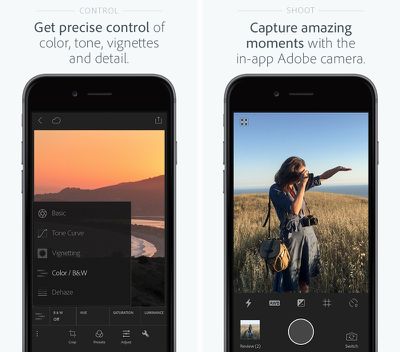
The recent update to the app adds a new haze removal feature that's useful for removing haze in landscaping photos, and it includes a targeted adjustment to that allows colors in a specific area to be tuned. It also offers an in-app Adobe camera, integration with Photoshop Fix, and better organizational tools.

Adobe Photoshop Lightroom for iPhone is available for free from the App Store. [Direct Link]

Adobe Photoshop Lightroom for iPad is available for free from the App Store. [Direct Link]

Top Rated Comments

Glassed Silver Avatar
144 months ago
False. No need for ANY sign in or subscription fees like this article states.
You're right, another article I read didn't highlight this.

Still need to sign in and subscribe for sync though. So, pass. (for me, frankly)

Glassed Silver:mac
Score: 4 Votes (Like | Disagree)
144 months ago
Yes, it can handle RAW images just fine.
??? No, Lightroom for IOS does not even recognize RAW files.
Which actually makes it useless for me.

My ideal workflow would be: import RAWs from shooting into iPad, do some quick adjustments and rate them in Lightroom IOS, then later import the good ones onto my Macbook. Does not work, as Lightroom does not import the RAWs.
Score: 2 Votes (Like | Disagree)
nunes013 Avatar
144 months ago
Hmmmm I downloaded it and it prompted me to sign in. Once signing in with my Adobe ID it started a 30 day free trial of creative cloud. There was no option to bypass sign in...
Score: 2 Votes (Like | Disagree)
144 months ago
Beg to differ. U cannot use the app if you don't sign up or sign in. The app is unusable as that's as far as you get without signing in.

And yes I have the trial at the top of my page as well and I downloaded Lightroom the day of the announcements.
I didn't have to sign it. I just hit Get Started and I could import photos from my Camera Roll or any other album from my Phone. You need to sign in and have a CC account for syncing with Lightroom desktop. I Just deleted the app and redownloaded to test again and all you have to choose "Get Started" when you launch the app for the first time.
Score: 1 Votes (Like | Disagree)
AllergyDoc Avatar
144 months ago
I just downloaded it, tapped Get Started and started using it immediately. It's a nice app.

Attachment Image
Score: 1 Votes (Like | Disagree)
dearfriendx Avatar
144 months ago
The way I understood is that you still need to sign in, but you don't need the subscription for basic use.

Glassed Silver:mac
False. No need for ANY sign in or subscription fees like this article states.
Score: 1 Votes (Like | Disagree)

Popular Stories

M5 MacBook Pro

RIP, MacBook Ultra

Monday October 19, 2026 9:37 am PDT by
Apple today sent out invites for an experience in Los Angeles on Wednesday, October 28, and the "Pro and tell" tagline on the invitation likely means that the rumored MacBook models with touch-enabled OLED displays will stick with MacBook Pro branding instead of the once-rumored "MacBook Ultra" name. The long-rumored "iPhone Ultra" ended up being named iPhone Duo, so speculation that Apple...
iPhone Duo Trio

Here's What Apple's Apps Look Like on the iPhone Duo

Tuesday October 20, 2026 11:12 am PDT by
With just three days to go until the iPhone Duo is released, Apple is getting ready for the launch. Behind the scenes, the App Store now has screenshots of Apple's built-in apps running on the Duo. We've seen some apps in marketing materials, but images of the ones we haven't seen give us an idea of what it will be like using the iPhone Duo day to day. Many apps are shown in landscape...
apple pro tell logo

Apple Announcing New Products Next Week: 'Pro and Tell'

Monday October 19, 2026 9:05 am PDT by
Apple's Greg Joswiak today hinted at new product announcements coming next week, sharing a social media post that says "Can't wait to pro and tell next week." Rumors suggest Apple is planning to debut the new MacBook Pro with an OLED touchscreen display, an M6 entry-level MacBook Pro, an M6 iMac, an iPad mini with an OLED display. Can't wait to pro and tell next week....
Latest Stories
Tesla App Gains iPad and iPhone Duo Support
52 minutes ago
Apple Reportedly Boosts iPhone Duo Orders by 44%
1 hour ago
Fortnite Returning to Australian App Store After Court Ruling
2 hours ago
Apple Ordered to Open iPhone to Rival App Stores in Australia
2 hours ago
Apple Suppliers Face Hurdles Cutting Circuit Board Emissions
2 hours ago
Things Updated for iPhone Duo With Adaptive Layout
3 hours ago
Simplicity and Siri AI Are HomeView's Killer Features, Apple Says
3 hours ago
iPhone Duo Reviewers Really Miss Face ID
8 hours ago
Does the iPhone Duo Run Hot? Here's What Reviews Found
10 hours ago
Apple Music's New Look is Now Live on Apple's Website
10 hours ago
Anthropic Launches Claude Duet, a Proactive AI Agent
11 hours ago
What 32,000 Folds Did to the iPhone Duo's Hinge
12 hours ago
iPhone Duo's Hidden FaceTime Camera Takes 'Trash' Photos
13 hours ago
iPhone Duo Has 'Edge Light' Feature That Debuted on Macs Last Year
14 hours ago
Apple Support App Updated for iPhone Duo's Larger Display
14 hours ago
Amazon Sweetens the Deal on Entry-Level 16-Inch MacBook Pro With $570 Off
14 hours ago
iPhone Duo Tips Over on MagSafe Stands When Unfolded
14 hours ago
Apple Music's New Look Officially Announced
16 hours ago
iPhone Duo Supports Apple Pencil Starting With iOS 27.2
16 hours ago
iPhone Duo Accessories Roundup: Cases and Screen Protectors From OtterBox, ZAGG, and More
17 hours ago
Apple Stores Will Have 'Limited' Availability of iPhone Duo for Walk-In Customers
18 hours ago
iPhone Duo Reviews Explain Why Device is Both 'Fun' and 'Frustrating'
18 hours ago
Apple Says 'Reachability' Feature Coming to iPhone Duo Later This Year
19 hours ago
Loop Capital Cuts Apple Rating Over iPhone Sales Outlook
23 hours ago
Apple Stores in Bordeaux and Lille Looted During French Protests
23 hours ago
Bluesound Adds Native Apple Music Support
1 day ago
Apple CEO John Ternus Explains What Makes Good Product Design
1 day ago
UK Proposes New Ways to Help Apple Pay Rivals
1 day ago
WhatsApp Developing In-App Browser for All Chat Links on iPhone
1 day ago
Apple's App Store Chief Explains Its Push for Premium Games
1 day ago











































