CarPlay at WWDC: Rearrange or Hide Apps, Apple Music Makeover, Alternate Routing, and More - MacRumors
Skip to Content

CarPlay at WWDC: Rearrange or Hide Apps, Apple Music Makeover, Alternate Routing, and More

While most of the WWDC 2016 keynote was focused on iOS 10, macOS Sierra, and new versions of tvOS and watchOS, Apple also made a number of CarPlay-related announcements during the two-hour presentation.
CarPlay-new
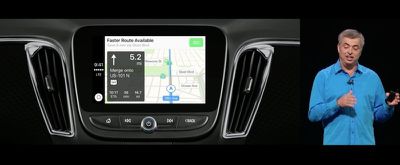
First, the new Apple Maps appearance on iOS 10 and some new features extend to the dashboard. If there is a lot of traffic ahead, for example, CarPlay will now proactively provide you with alternate routes and estimate how much time you saved compared to your original route.

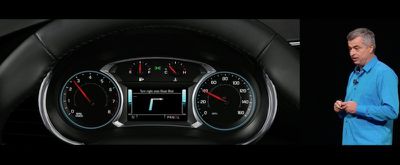
Additionally, CarPlay turn-by-turn directions will now be available directly in your instrument cluster in vehicles equipped with a driver-side peripheral screen for a safer driving experience.
CarPlay-instrument
Another feature that should make CarPlay safer is the Siri SDK. Apple is opening Siri up to developers, enabling third-party apps for VoIP calling and more to work seamlessly with the virtual assistant, and the functionality extends to CarPlay.
CarPlay-skype

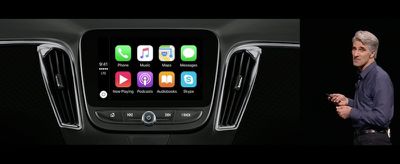
Siri on CarPlay will support VoIP calls like Skype, which is not yet available in the car

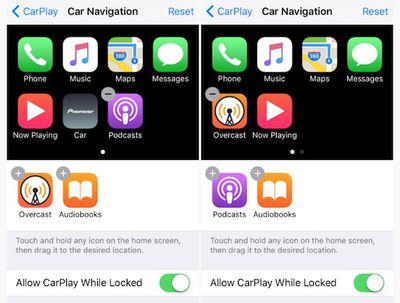
CarPlay apps can now be rearranged or hidden on iOS 10 by tapping on Settings > General > CarPlay > Your Vehicle. Simply tap the add or subtract button on the stock or third-party apps that you want to add or remove. Phone, Music, Maps, Messages, Car, and Now Playing cannot be removed.
CarPlay-apps-removed

CarPlay apps can now be rearranged or hidden on iOS 10 (Image: 9to5Mac)

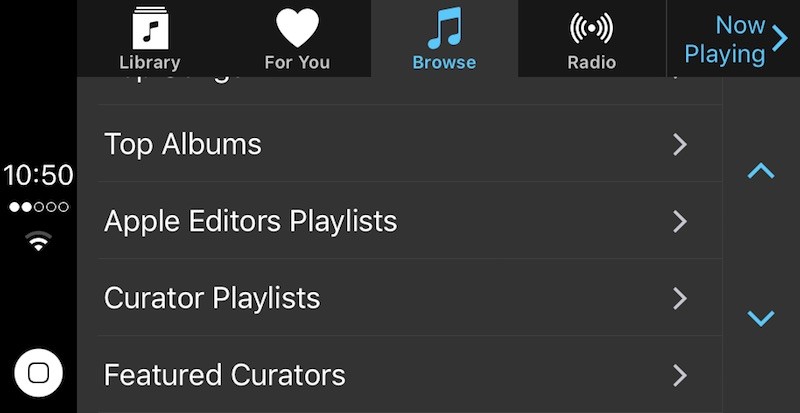
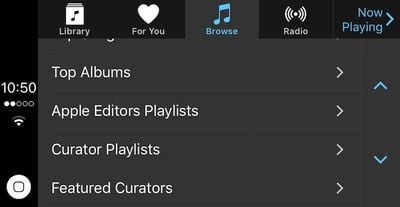
Just like on iOS 10, Apple Music has received a makeover on CarPlay that makes it easier to browse and discover music. The top menu options have changed from For You, New, Radio, Playlists, My Music, and Now Playing to Library, For You, Browse, Radio, and Now Playing. Curated playlists have also been added.
Apple-Music-CarPlay-iOS-10

Apple Music has received a makeover on CarPlay (Image: 9to5Mac)

CarPlay is also now supported on ultra-wide screens. The new features and improvements will require pairing an iPhone 5 or later on iOS 10.

Many automakers in the U.S. and abroad now support CarPlay, including Acura, Audi, BMW, Buick, Cadillac, Chevrolet, Ferrari, Ford, GMC, Honda, Hyundai, Kia, Lamborghini, Lincoln, Mercedes-Benz, Mitsubishi, Nissan, Opel, Porsche, Peugeot, Seat, Škoda, Subaru, Suzuki, Volkswagen, Volvo, and others.

Aftermarket systems are available from Alpine, JBL, JVC, Kenwood, and Pioneer.

Related Roundups: CarPlay, WWDC 2026

Popular Stories

wwdc 2026 horizontal

WWDC 2026 Graphic Teases Major iOS 27 Feature

Sunday April 19, 2026 3:02 pm PDT by
Apple's WWDC 2026 graphic provides "a glimpse of the revamped Siri interface coming in iOS 27," according to Bloomberg's Mark Gurman. In his Power On newsletter today, Gurman said iOS 27 will include a new Siri interface in the Dynamic Island. When you trigger Siri, he said the Dynamic Island will show a "Search or Ask" prompt, and this will apparently be accompanied by a "glowing cursor"...
wwdc 2026 horizontal

WWDC 2026 is a Month Away: Apple Highlights 'Distinguished Winners'

Thursday May 7, 2026 7:35 am PDT by
Apple today highlighted four Distinguished Winners of this year's Swift Student Challenge, ahead of the WWDC 2026 developers conference next month. The annual Swift Student Challenge gives eligible student developers around the world the opportunity to showcase their coding capabilities by using the Swift Playground or Xcode apps to create an interactive "app playground." Apple said this...
MacBook Pro Low Angle Wide Lens

macOS 27: Two More Changes Leaked Ahead of WWDC Next Month

Sunday May 10, 2026 9:45 am PDT by
macOS 27 will have a "slight redesign" compared to macOS Tahoe, according to the latest word from Bloomberg's Mark Gurman. In his Power On newsletter today, Gurman said the design changes will help to improve the readability of macOS Tahoe's Liquid Glass interface:If you've used Tahoe, you're likely familiar with some of the quirks — particularly the transparency effects and shadows that...

Top Rated Comments

caliguy Avatar
129 months ago
Give us Waze support!
Score: 17 Votes (Like | Disagree)
Mac21ND Avatar
129 months ago
Why is it that I just want to punch Eddy Cue?
Score: 8 Votes (Like | Disagree)
129 months ago
Why is it that I just want to punch Eddy Cue?
Perhaps you weren't loved enough as a child, or frustrated with your life and want to be able to take it out on someone who is successful and happy? It's hard to know without more detail, but most likely this isn't the best location for you to find help and resolution on your anger issues. Sending you best wishes!
Score: 5 Votes (Like | Disagree)
129 months ago
I recently bought a new car with CarPlay and for the most part I really like it. But every time I use it I have a decision to make - am I going to run Apple Maps through CarPlay or just use Waze on my phone (I still have a vent clip)? If I try to run Waze through the phone, CarPlay actually makes things more convoluted because what's on the car screen has to be on the phone screen. This actually makes for a more dangerous experience. Apple needs to open CarPlay up to 3rd party nav apps.
Score: 5 Votes (Like | Disagree)
129 months ago
No thank you.


Am I the only person in the world that thinks this UI is ugly? There's nothing here but icons and text. And why the hell did they transfer the ugly home button of a phone into a digital icon at the bottom left of a car entertainment deck?
Simple UI = easy to read in moving vehicles. Do you really need to stare at fancy fonts and icons while driving?
Score: 5 Votes (Like | Disagree)
routine_analyst Avatar
129 months ago
No thank you.


Am I the only person in the world that thinks this UI is ugly? There's nothing here but icons and text. And why the hell did they transfer the ugly home button of a phone into a digital icon at the bottom left of a car entertainment deck?
Score: 4 Votes (Like | Disagree)