Apple Offers $5 Photo-to-Painting App 'Brushstroke' for Free Through the Apple Store App - MacRumors
Skip to Content

Apple Offers $5 Photo-to-Painting App 'Brushstroke' for Free Through the Apple Store App

by

While yesterday's update to the Apple Store iOS app introduced some significant alterations to the interface, one thing Apple didn't change is its tradition of occasionally offering select paid apps for free through the Store for a limited time.

Right now, users who scroll down the Discover tab can find an option to download photo painting app Brushstroke for free, instead of paying $4.99 when downloaded in the typical way through the App Store.
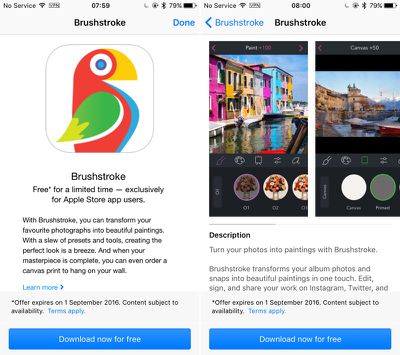
Brushstroke

With Brushstroke, you can transform your favorite photographs into beautiful paintings. With a slew of presets and tools, creating the perfect look is a breeze. And when your masterpiece is complete, you can even order a canvas print to hang on your wall.

Users of Brushtroke can choose photos to convert into 'paintings' from their Camera Roll and other albums, or shoot pictures and then edit them from within the app.

A number of color palettes and canvases are on offer to experiment with, and finished paintings can be signed and then shared over social media. Users can also pick a frame and size for their painting, and order a canvas print from CanvasPop for home delivery.

The offer to download Brushstroke for free through the Apple Store iOS app expires on September 1, 2016. You can download the new update for the Apple Store app from the iOS App Store for free. [Direct Link]

MacRumors went hands-on with Apple's new Apple Store app to show off all the new features. Make sure to check out the video below.


Top Rated Comments

OllyW Avatar
126 months ago
Go through the APPLE STORE app (you'll have to download it from the App Store).
I got there in the end but even that was confusing as it asks you to scan a code with the built in camera. The code is already filled in so you don't need to do anything but it's not immediately obvious when it first pops up.
Score: 5 Votes (Like | Disagree)
Porco Avatar
126 months ago
Nice enough app.

Here's one I made earlier:
Score: 3 Votes (Like | Disagree)
Northgrove Avatar
126 months ago
Yup, worked fine here in Sweden. :)

Not all steps are super obvious, so:

1. Open the new Apple Store app.
2. Swipe down in the Discovery (first) tab until it shows up.
3. Tap to download it.
4. When the code appears, ignore all that about camera scanning, but tap on the link in the upper right corner.
5. The download should begin. Unlike with App Store purchases, nothing shows in Home Screen until it's done.
Score: 3 Votes (Like | Disagree)
keysofanxiety Avatar
126 months ago
Go through the APPLE STORE app (you'll have to download it from the App Store).
Download an app so you can download an app :D
Score: 3 Votes (Like | Disagree)
126 months ago
I'm on the US store and it shows me $4.99
Go through the APPLE STORE app (you'll have to download it from the App Store).
Score: 2 Votes (Like | Disagree)
126 months ago
Still £3.99 in the UK App Store so I guess it's a US only offer.
As long as you go through the Apple Store App it'll give you a code to redeem.

I downloaded it last night for free via the Apple Store App; I'm in the UK and using the UK App Store.
Score: 2 Votes (Like | Disagree)

Popular Stories

Apple Event Logo

Apple to Launch These 15+ New Products Later This Year

Friday March 27, 2026 2:03 pm PDT by
March has been an incredibly busy month for Apple, with the company unveiling more than 10 new products and accessories. We said hello to the MacBook Neo at the start of the month, and we bid farewell to the Mac Pro at the end of it. Nevertheless, there is still a lot more to come this year. Beyond the usual annual updates to iPhones and Apple Watches, Apple's all-new smart home hub is...
iOS 26

iOS 26.4 Adds Two New Features to CarPlay

Tuesday March 24, 2026 1:55 pm PDT by
iOS 26.4 was released today, and it includes a couple of new features for CarPlay: an Ambient Music widget and support for voice-based chatbot apps. To update your iPhone 11 or newer to iOS 26.4, open the Settings app and tap on General → Software Update. CarPlay will automatically offer the new features so long as the iPhone connected to your vehicle is running iOS 26.4 or later....
Mac Pro Feature Teal

Apple Confirms Mac Pro Is Dead, No Future Models Planned

Thursday March 26, 2026 2:04 pm PDT by
Apple has discontinued the Mac Pro and has removed the machine from its website, reports 9to5Mac. Apple said it does not plan to design a new version of the Mac Pro, and no new model will be coming in the future. The Mac Pro was last updated in 2023, which was when Apple added an M2 Ultra Apple silicon chip, but the chassis has not been refreshed since 2019. Apple redesigned the Mac Pro to...