macOS Sierra, available today, includes a built-in storage optimization feature that's designed to free up storage space on a Mac by storing rarely used files in iCloud, regularly emptying the trash, removing unnecessary files, and more.

It's a handy feature that can give you a good amount of additional storage space with a set of tools that you normally had to download a third-party storage optimization app to use. Here's how to take advantage of Sierra's Optimize Storage feature:

  1. Click on the Apple logo at the top of the menubar and select "About This Mac" from the list of options.
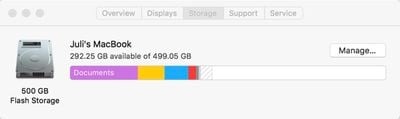
  2. Choose the "Storage" tab at the top to see an overview of how much storage you're using on your Mac.
    optimizestoragemanage

  3. Click on "Manage" to open up the optimization options.

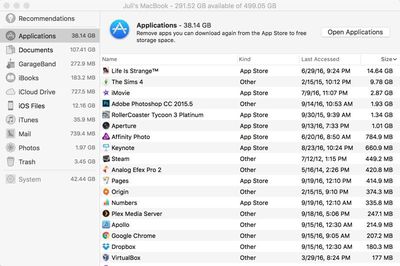
When you open up Optimize Storage, there's a breakdown of where your files are stored and a list of recommended actions you can take to free up space, all of which is new.
appsizeoptimizestorage
File storage on the Mac is broken down into the following categories: Applications, Documents, GarageBand, iBooks, iCloud Drive, iOS Files, iTunes, Mail, Photos, and Trash. Files can be organized by date, size, and type, so it's easy to see what's taking up a lot of space. Clicking on any file in a list will let you open the folder it's located in on the Mac, so it can be deleted.

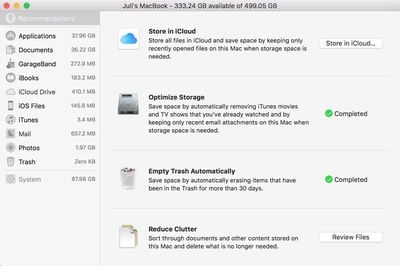
In the "Recommendations" section of the Optimize Storage feature, there are a list of actions Apple thinks you should take to preserve space. For me, these recommendations suggested storing my files in iCloud, optimizing photo sizes, keeping only recent email attachments and removing iTunes movies and shows I've watched, emptying the trash automatically, and reducing clutter by finding files that don't need to be stored on my Mac. Depending on your usage habits, recommendations may vary.
optimizestoragerecommendations
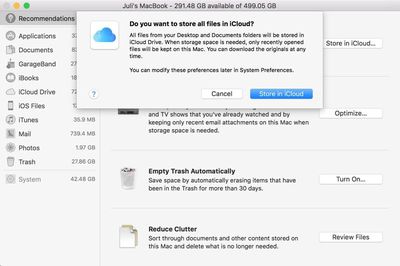
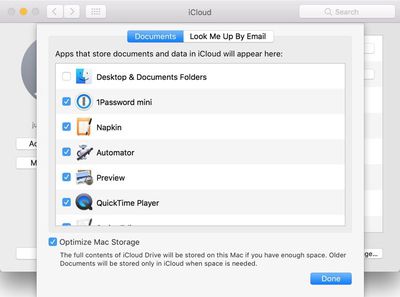
The "Store in iCloud" feature is linked to another new macOS Sierra function, which makes all documents stored on the desktop or in the Documents folder available across all devices. This can take up a lot of iCloud storage space (more than 50GB in my case) so it should be used with caution.
storeallfilesinicloud
"Optimize Storage" offers preferences for automatically removing watched iTunes movies and TV shows (they're still available via iCloud) and downloading only recent attachments in Mail, features Apple said would save me a few hundred megabytes of space.

"Reduce Clutter" is a review of all documents on the Mac sorted by size, while "Empty Trash Automatically" is self-explanatory. An unmentioned feature makes sure there's space for all documents stored in iCloud Drive before downloading them onto a Mac. If there's not, older files will be kept in iCloud, while only the most recent files will be stored on the Mac itself.
icloudoptions
A quick run through all of the storage optimization features netted me more than 40GB of space, but your mileage may vary based on how often you delete older files and empty the trash. It's fast, easy to use, and has some good storage saving tips that weren't previously available, so it's definitely worth checking out Optimize Storage after you install Sierra.


Related Forum: macOS Sierra

Top Rated Comments

Paradoxally Avatar
123 months ago
Such a feature is laughable when you only are provided 5 GB of iCloud storage.
It's a dollar a month for 10x that capacity. Don't be cheap.
Score: 13 Votes (Like | Disagree)
kcamfork Avatar
123 months ago
Such a feature is laughable when you only are provided 5 GB of iCloud storage.
Score: 10 Votes (Like | Disagree)
CaptOblivious Avatar
123 months ago
Such a feature is laughable when you only are provided 5 GB of iCloud storage.
*for free
Score: 8 Votes (Like | Disagree)
cube Avatar
123 months ago
I don't want iCloud. I need a 3TB SSD.
Score: 6 Votes (Like | Disagree)
MacsRgr8 Avatar
123 months ago
Cool this.

But, can someone explain what this "Purgeable Storage" is...?
I understand what it means literally, but what does macOS Sierra believe is "Purgeable"?
Score: 4 Votes (Like | Disagree)
8281 Avatar
123 months ago
It's a dollar a month for 10x that capacity. Don't be cheap.
Presumably this person owns an apple device, and is therefore not cheap.
Score: 4 Votes (Like | Disagree)

Popular Stories

Apple Logo Zoomed

Tim Cook Teases Plans for Apple's Upcoming 50th Anniversary

Thursday February 5, 2026 12:54 pm PST by
Apple turns 50 this year, and its CEO Tim Cook has promised to celebrate the milestone. The big day falls on April 1, 2026. "I've been unusually reflective lately about Apple because we have been working on what do we do to mark this moment," Cook told employees today, according to Bloomberg's Mark Gurman. "When you really stop and pause and think about the last 50 years, it makes your heart ...
wwdc sans text feature

Apple Rumored to Announce New Product on February 19

Thursday February 5, 2026 12:22 pm PST by
Apple plans to announce the iPhone 17e on Thursday, February 19, according to Macwelt, the German equivalent of Macworld. The report, citing industry sources, is available in English on Macworld. Apple announced the iPhone 16e on Wednesday, February 19 last year, so the iPhone 17e would be unveiled exactly one year later if this rumor is accurate. It is quite uncommon for Apple to unveil...
Finder Siri Feature

Why Apple's iOS 26.4 Siri Upgrade Will Be Bigger Than Originally Promised

Friday February 6, 2026 3:06 pm PST by
In the iOS 26.4 update that's coming this spring, Apple will introduce a new version of Siri that's going to overhaul how we interact with the personal assistant and what it's able to do. The iOS 26.4 version of Siri won't work like ChatGPT or Claude, but it will rely on large language models (LLMs) and has been updated from the ground up. Upgraded Architecture The next-generation...
iOS 26

iOS 26.3 and iOS 26.4 Will Add These New Features to Your iPhone

Tuesday February 3, 2026 7:47 am PST by
While the iOS 26.3 Release Candidate is now available ahead of a public release, the first iOS 26.4 beta is likely still at least a week away. Following beta testing, iOS 26.4 will likely be released to the general public in March or April. Below, we have recapped known or rumored iOS 26.3 and iOS 26.4 features so far. iOS 26.3 iPhone to Android Transfer Tool iOS 26.3 makes it easier...
iphone 17 pro dark blue 1

iPhone 18 Pro Max Rumored to Deliver Next-Level Battery Life

Friday February 6, 2026 5:14 am PST by
The iPhone 18 Pro Max will feature a bigger battery for continued best-in-class battery life, according to a known Weibo leaker. Citing supply chain information, the Weibo user known as "Digital Chat Station" said that the iPhone 18 Pro Max will have a battery capacity of 5,100 to 5,200 mAh. Combined with the efficiency improvements of the A20 Pro chip, made with TSMC's 2nm process, the...