
Pixelmator Gains Support for macOS Sierra Features, MacBook Pro Touch Bar - MacRumors
Skip to Content

Pixelmator Gains Support for macOS Sierra Features, MacBook Pro Touch Bar

by

Popular Mac image editing app Pixelmator today received a major update that incorporates many features included in macOS Sierra and introduces support for the Touch Bar on the new MacBook Pro.

With macOS Sierra compatibility, Pixelmator supports tabs, so multiple windows can be combined for easier management, and it includes the Universal Clipboard feature introduced in Sierra, allowing for cross-device copy paste.

Pixelmator now works with P3 wide color gamut, so you'll see brighter, more vibrant colors when using the app with the new MacBook Pro or one of the new LG 4K or 5K displays. Most importantly, this version of Pixelmator includes support for the MacBook Pro's Touch Bar.
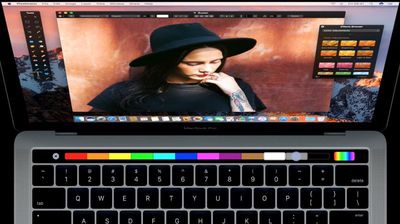
pixelmatortouchbar
End users won't be able to access Touch Bar features until the first MacBook Pro orders begin arriving next week, but Pixelmator is launching it early. The Touch Bar keeps the most useful Pixelmator tools right at your fingertips for quicker editing and streamlined workflows. It automatically changes based on what you're doing within the app, and it can be customized to suit your individual needs.

Touch Bar:
- Set the most useful tool options for your selected tool right in the Touch Bar.
- The Touch Bar is customizable, so you can choose exactly which tools you'd like to keep in it.
- Use the Touch Bar to change color, alignment, and other text properties.
- When previewing effects or adjustments, a Show Original button lets you take a peek at the original image.
- Use Rotate and Scale sliders to transform layers.
- And do a lot more!

Pixelmator also now includes a new content-aware Smart Refine feature that's designed to make selecting content quicker and more accurate. Smart Refine is able to detect object edges in an image to automatically refine a selection outline. It naturally smooths the edges of a selection for easier blending, and there's a new workflow for making quick edits to a selection through painting.

Pixelmator can be downloaded from the Mac App Store for $29.99. [Direct Link]

Top Rated Comments

TMRJIJ Avatar
124 months ago
Love this app!
Score: 6 Votes (Like | Disagree)
124 months ago
End users won't be able to access Touch Bar features until the first MacBook Pro orders begin arriving next week, but Pixelmator is launching it early.
I thought you'd already reported on end users who'd had their MBPs delivered? Is this a scripted press release that got held back? :/
Score: 3 Votes (Like | Disagree)
ILikeAllOS Avatar
124 months ago
Thank god Apple added the Touch Bar to replace the F keys that nobody ever uses!
Now apps like this can become even more powerful. :cool:
Score: 3 Votes (Like | Disagree)
netwalker Avatar
124 months ago
Also Affinity Designer just got TouchBar support.
Score: 2 Votes (Like | Disagree)
124 months ago
My favorite app! Glad to see this update go live.
Score: 2 Votes (Like | Disagree)
124 months ago
I've been using Pixelmator for years. While it is a great app and well worth the money, one thing has always bugged me. I hate the floating tool palettes. I've been wishing for an update that would give users the option to have fixed palettes on the sides. Getting tired of waiting for it. More tempted than ever to give Affinity Photo a try.
Score: 1 Votes (Like | Disagree)

Popular Stories

Apple Event Logo

Apple's Next Era Begins September 1

Thursday May 7, 2026 10:36 am PDT by
Apple recently announced that Tim Cook will be stepping down as CEO later this year, after 15 years of leading the company. Effective September 1, Apple's hardware engineering chief John Ternus will become the company's next CEO, while Cook will become executive chairman of Apple's board of directors. In his new role, Apple said Cook will assist with "certain aspects" of the company,...
Instagram Feature 2

PSA: Instagram Encrypted Messaging Ends on Friday, May 8

Tuesday May 5, 2026 8:24 am PDT by
Instagram will remove end-to-end encryption for direct messages between users from May 8, 2026. When the date comes around, Meta will potentially be able to see the contents of all messages between users on the social media platform. Encrypting messages has been an optional feature in Instagram since 2023, but in March of this year the social media platform quietly updated a help page to say ...
Apple Event Logo

Apple Just Released a New Accessory

Monday May 4, 2026 8:13 am PDT by
Apple today released a new Pride Edition Sport Loop for the Apple Watch. The band features a rainbow design with 11 colors of woven nylon yarns. The new Pride Edition Sport Loop is available to order now on Apple.com and in the Apple Store app in 40mm, 42mm, and 46mm sizes, and it will be available at Apple Store locations starting later this week. In the U.S., the band costs $49. There...














