
Twitter today introduced Snapchat-style QR codes, which are designed to make it easier to find and follow friends on the social network. Each Twitter QR code is unique to an individual Twitter user, so when scanned, it'll bring up the person's account.

To access your Twitter QR code, you'll need the official Twitter app for iOS. In the app, go to your profile, tap on the gear icon, and select the "QR Code" option to generate your own personal QR code or scan someone else's code.
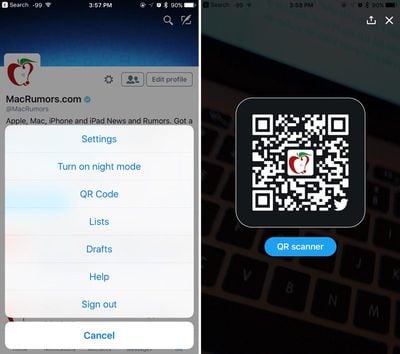
twitterqrcode
Scanning a QR code is as simple as using the iPhone's camera to either scan from a secondary screen or an image you've saved to the camera roll. You can follow MacRumors on Twitter by scanning the below code with your iPhone and the Twitter app.

macrumorsqrcode
QR codes were first made popular by Snapchat as a quick way to find your friends without having to search for them, but they may not be as popular on Twitter because the QR code settings are buried so deeply within the app.

Twitter's QR codes are currently rolling out to users and may not be immediately available for everyone.

Twitter for iOS can be downloaded from the App Store for free. [Direct Link]

Tag: Twitter

Top Rated Comments

Slix Avatar
121 months ago
Because sending an @ handle or a link is too difficult these days. *eye roll*
Score: 4 Votes (Like | Disagree)
vjl323 Avatar
121 months ago
Because sending an @ handle or a link is too difficult these days. *eye roll*
There's one very good use of QR codes that do make this useful - "IRL" use. Eg: Follow Us on (insert social media name and URL here). Having a sign with a Facebook/Instagram/Pinterest/Twitter/etc links - people with smart phones will look at it, and maybe they will stop to type the URL out. But if they see a QR code, they can simply snap a shot of it and later use the social media app to load that QR code in and 'friend' or 'follow' the business.

Yes, they could take a pic of the URL, but then you have the whole "look at the URL, type part of it in a browser, visit the photo again to make sure i didn't make typos, etc" and that's a bit of a pain when you're trying to do something quickly.

For online - yeah, QR codes are harder, but if you've got a business and have cards or signs up, that's a very quick way to send people your profile info w/o having to make them type a URL.

Bonus points for making the QR codes slightly different if using it to send a customer to one's own website - you can have the URL embedded in the QR code lead to a different URL (which redirects to the home page) and analyze the logs later to see which QR codes people are scanning when in a store/business (each sign with the QR code would be tracked, so if a customer scans it on the front door sign, you'd know vs the sign in a different part of the building - same with printing it on a biz card - this way you can track an "offline referer" of sorts - so you know the person used a biz card, or a front door sign to discover your website).
Score: 3 Votes (Like | Disagree)
Michael Scrip Avatar
121 months ago
Random question about QR codes in general (not about Twitter):

When you see QR codes printed on a poster or something in the real world... what are you supposed to scan them with? Does it need a special app? How is this not built into the OS ?

If I have this question... will the average person know what to do with them?
Score: 2 Votes (Like | Disagree)
vjl323 Avatar
121 months ago
Random question about QR codes in general (not about Twitter):

When you see QR codes printed on a poster or something in the real world... what are you supposed to scan them with? Does it need a special app? How is this not built into the OS ?

If I have this question... will the average person know what to do with them?
Good question; Apple embraced QR codes with iOS 7, but has kept them limited to the Wallet app; many 3rd party camera apps, however, recognize QR codes automatically and will open up a browser when viewing the code. But you're correct in that most folks who just use the native camera app and don't use the Wallet app, will not know what they need to download to use it.

I do see a lot [a lot!] of Android folks using their phone to scan QR codes on items in stores - I have never looked close enough to see what kind of app they were using, but Android too lacks native QR scanning for this kind of purpose.

You can see how quick Apple's QR reading is by scanning a QR code with Wallet [add a Pass to get to the QR reading screen].

That said, paper business cards that have my QR code are used daily [the biz card's QR code goes to a specialized link, so I can see in my logs that they came via the biz card]. Granted, those who have my biz card tend to be more into technology for technology's sake, so my experience with that is a bit skewed.
Score: 2 Votes (Like | Disagree)
macduke Avatar
121 months ago
We did some research when I was studying marketing in college in early 2012 (I minored in that and photography in addition to my design degree) and not many people actually use QR codes. We found the same thing when I got a job at another university on the marketing and communications team. Students weren't engaging with them IRL and our survey showed only a fraction knew how to use them. I also think they're ugly, have poor UX, and as there is no native support for them on iOS, I recommended that we stop using them and my boss agreed. They were a trendy marketing thing that was popular for a while because it made you seem tech-savvy to your middle aged boss who doesn't understand digital marketing, and somehow it still hasn't completely died off.

It kind of works for Snapchat because they invented their own system in the iconic shape of their app icon and the ability to scan is built into the app itself. This is yet another example of Twitter throwing everything at the wall to see what sticks because nobody wants to buy them. At least they could have made them more unique to their own the brand rather than just sticking a tiny avatar in the center and a small bird in one corner.
Score: 2 Votes (Like | Disagree)
tennisproha Avatar
120 months ago
By using them in the Wallet app - as my post said. :) Open Wallet and then tap the "+" for adding a new pass. You'll then be able to use Apple's QR reader to add a pass into your Wallet. Works very well, and because this tends to be a one-time thing [unlike ApplePay competitors who use QR codes which is a complete waste of time], it is a very fast way to get a pass into your wallet app.

Using QR codes for transactions [eg: what ApplePay competitors tend to do] is foolish and wasteful; but using QR codes to save typing out a long string of characters that auto correct could "fix" and slow down the process even further, is a good thing. No fear of typos, and it is a lot faster than typing a URL out [not everyone has short domain names nor wants to create a short URL from another company to print on their signs/biz cards/marketing material] or typing a long string of numbers and letters for adding a Wallet Pass.
I didn't know you could do that. Thanks for explaining. And I agree with your reasoning. It makes sense.

I'm also a big fan of Apple Pay. Works great.
Score: 1 Votes (Like | Disagree)

Popular Stories

Apple Logo Zoomed

Tim Cook Teases Plans for Apple's Upcoming 50th Anniversary

Thursday February 5, 2026 12:54 pm PST by
Apple turns 50 this year, and its CEO Tim Cook has promised to celebrate the milestone. The big day falls on April 1, 2026. "I've been unusually reflective lately about Apple because we have been working on what do we do to mark this moment," Cook told employees today, according to Bloomberg's Mark Gurman. "When you really stop and pause and think about the last 50 years, it makes your heart ...
iOS 26

iOS 26.3 and iOS 26.4 Will Add These New Features to Your iPhone

Tuesday February 3, 2026 7:47 am PST by
While the iOS 26.3 Release Candidate is now available ahead of a public release, the first iOS 26.4 beta is likely still at least a week away. Following beta testing, iOS 26.4 will likely be released to the general public in March or April. Below, we have recapped known or rumored iOS 26.3 and iOS 26.4 features so far. iOS 26.3 iPhone to Android Transfer Tool iOS 26.3 makes it easier...
imac video apple feature

Apple Makes Its Second-Biggest Acquisition Ever

Tuesday February 3, 2026 12:45 pm PST by
Apple recently acquired Israeli startup Q.ai for close to $2 billion, according to Financial Times sources. That would make this Apple's second-biggest acquisition ever, after it paid $3 billion for the popular headphone maker Beats in 2014. This is also the largest known Apple acquisition since the company purchased Intel's smartphone modem business and patents for $1 billion in 2019....
wwdc sans text feature

Apple Rumored to Announce New Product on February 19

Thursday February 5, 2026 12:22 pm PST by
Apple plans to announce the iPhone 17e on Thursday, February 19, according to Macwelt, the German equivalent of Macworld. The report, citing industry sources, is available in English on Macworld. Apple announced the iPhone 16e on Wednesday, February 19 last year, so the iPhone 17e would be unveiled exactly one year later if this rumor is accurate. It is quite uncommon for Apple to unveil...
Finder Siri Feature

Why Apple's iOS 26.4 Siri Upgrade Will Be Bigger Than Originally Promised

Friday February 6, 2026 3:06 pm PST by
In the iOS 26.4 update that's coming this spring, Apple will introduce a new version of Siri that's going to overhaul how we interact with the personal assistant and what it's able to do. The iOS 26.4 version of Siri won't work like ChatGPT or Claude, but it will rely on large language models (LLMs) and has been updated from the ground up. Upgraded Architecture The next-generation...