Adobe today announced a new update out now for its Lightroom iOS and Android apps, bringing an all-new photo editing experience to mobile that improves the app's ease of use thanks to a new one-handed interface. To create an improved editing experience Adobe talked to professional and casual photographers, who helped hone Lightroom's new toolset.

First, the company has organized similar tools into relevant categories so it's faster and easier to find tools that are normally used together. The company's biggest priority was to introduce a system that was functional to operate with just one hand. As such, users can now see the entire image while editing it and have access to "often used tools," such as viewing before and after iterations of a photo, without needing a second hand.
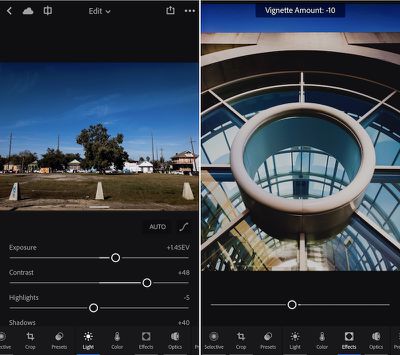
lightroom-ios-update

Lightroom mobile 2.6 represents a significant evolution of editing on mobile devices. We wanted to improve the ability to quickly find and access tools and ensure the fastest way to enhance and edit images on a phone. Our design team reached out to photographers of all skill levels to help us figure out how people edit with Lightroom mobile, what’s missing, and how we could make it even better. This update represents our first release taking advantage of this research.

Lightroom for iPhone is also gaining a new info section so users can add in titles, captions, and copyright onto an image. A "professional mode" within the app's capture interface will let users set more granular controls over an image's exposure and focus so it's easier "to capture the shot you want." Lightroom for iPad is getting all of the iPhone app's updates except the new editing and info sections, but the company hopes to update the tablet app with these features "soon."

On the Mac, Lightroom is gaining a "reference view" in the Develop Module that makes it simpler to compare two images side-by-side so you can make them visually consistent with one another. The company said this should help when trying to make a large amount of images from a single event aesthetically similar, or could help with "setting the white balance appropriately in mixed lighting conditions."

Adobe Photoshop Lightroom for iPhone is available to download from the iOS App Store for free [Direct Link]. Users can find the update for Lightroom on the Mac in the Help > Updates section of Adobe's Creative Cloud app.


Top Rated Comments

Jeff Flowerday Avatar
120 months ago
Can you geotag photos with this app or do I need to keep using the Desktop app?
No way to update location from the mobile app.
Score: 1 Votes (Like | Disagree)
Scottsoapbox Avatar
120 months ago
Arg. It's still syncing on LTE - what does the 'Sync only over WiFi' toggle actually do Adobe?! :mad::mad::mad:

Something just lost data privileges in Apple Settings.
Score: 1 Votes (Like | Disagree)
adamjackson Avatar
120 months ago
It's the world we live in now but I edit thousands of photos a year in Lightroom on my iMac and MacBook Pro opting to buy a license for Lightroom instead of a recurring monthly fee to Adobe which means Lightroom Mobile is basically useless as I miss out on photo sync features only available to Creative Cloud members....

and I had to read through 4 paragraphs about iOS improvements and only one about Mac improvements.

How many Lightroom customers actually have iOS as a part of their workflow? Case in point, I have a 256GB iPhone 7 w/ iCloud Photo Library turned on. I export all of my Canon RAW images from the 5DMIII from my Lightroom library to full-size JPEG and upload to iCloud on my Mac (I have the 1TB iCloud plan).

Loading photos on iOS or within Lightroom or Instagram takes 30 seconds just to bring up the photos viewer. To actually retrieve the JPEG to edit / post it takes another 90 seconds on my WiFi connection. I'm a casual amateur photographer. Guys shooting thousands of wedding images, are they even installing Lightroom Mobile? The phone is not powerful enough for a professional's workflow yet.
Score: 1 Votes (Like | Disagree)
dannys1 Avatar
120 months ago
I was thinking iPhone only. I could imagine a 12.9" iPad Pro w/ Pencil and a keyboard would be perfectly competent at basic review & deletion of photos on the train / plane home from an on-location shoot. Eventually, pros will have to use LR + PS for Mac.

On an iPhone, I still don't see a use case.
i guess not, but you know if they didn't do an iPhone app, everyone would ask for one.
Score: 1 Votes (Like | Disagree)

Popular Stories

Apple Logo Zoomed

Tim Cook Teases Plans for Apple's Upcoming 50th Anniversary

Thursday February 5, 2026 12:54 pm PST by
Apple turns 50 this year, and its CEO Tim Cook has promised to celebrate the milestone. The big day falls on April 1, 2026. "I've been unusually reflective lately about Apple because we have been working on what do we do to mark this moment," Cook told employees today, according to Bloomberg's Mark Gurman. "When you really stop and pause and think about the last 50 years, it makes your heart ...
wwdc sans text feature

Apple Rumored to Announce New Product on February 19

Thursday February 5, 2026 12:22 pm PST by
Apple plans to announce the iPhone 17e on Thursday, February 19, according to Macwelt, the German equivalent of Macworld. The report, citing industry sources, is available in English on Macworld. Apple announced the iPhone 16e on Wednesday, February 19 last year, so the iPhone 17e would be unveiled exactly one year later if this rumor is accurate. It is quite uncommon for Apple to unveil...
Finder Siri Feature

Why Apple's iOS 26.4 Siri Upgrade Will Be Bigger Than Originally Promised

Friday February 6, 2026 3:06 pm PST by
In the iOS 26.4 update that's coming this spring, Apple will introduce a new version of Siri that's going to overhaul how we interact with the personal assistant and what it's able to do. The iOS 26.4 version of Siri won't work like ChatGPT or Claude, but it will rely on large language models (LLMs) and has been updated from the ground up. Upgraded Architecture The next-generation...
iOS 26

iOS 26.3 and iOS 26.4 Will Add These New Features to Your iPhone

Tuesday February 3, 2026 7:47 am PST by
While the iOS 26.3 Release Candidate is now available ahead of a public release, the first iOS 26.4 beta is likely still at least a week away. Following beta testing, iOS 26.4 will likely be released to the general public in March or April. Below, we have recapped known or rumored iOS 26.3 and iOS 26.4 features so far. iOS 26.3 iPhone to Android Transfer Tool iOS 26.3 makes it easier...
maxresdefault

Apple Shows Off a Key Reason to Upgrade to the iPhone 17

Saturday February 7, 2026 9:26 am PST by
Apple today shared an ad that shows how the upgraded Center Stage front camera on the latest iPhones improves the process of taking a group selfie. "Watch how the new front facing camera on iPhone 17 Pro takes group selfies that automatically expand and rotate as more people come into frame," says Apple. While the ad is focused on the iPhone 17 Pro and iPhone 17 Pro Max, the regular iPhone...