
'Finder for AirPods' App Can Help You Track Down a Missing AirPod [Update: App Removed From App Store]

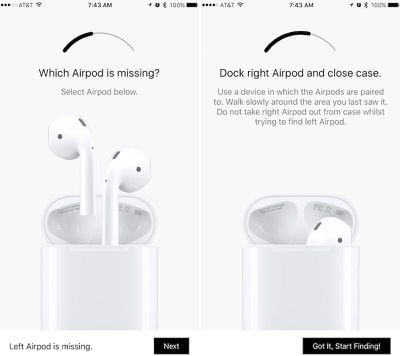
The lightweight nature and small size of Apple's AirPods have caused concerns for current and future owners of the Bluetooth headphones, centering around how easy it could be to lose them. iOS developer Deucks has made an effort to alleviate some of that worry for owners with a new app called "Finder for AirPods," [$3.99 Direct Link] which measures Bluetooth signal strength from a lost AirPod to guide the user in a hot-or-cold guidance system.
find-airpods-1
Similar in interface to Bluetooth trackers like Tile, Finder for AirPods uses an arc to assist users in finding a lost AirPod nearby. To begin the process users must choose which AirPod is missing, place the available AirPod in the Charging Case, and use an iOS device that's already been paired with the AirPods to begin searching for the missing headphone. Deucks said he lost one of his AirPods immediately after buying them, resulting in the inspiration for Finder for AirPods.

I actually lost one of my AirPods on the first day, I spent hours looking for it and then thought of making an app that will help me find them, which it did.

MacRumors has tested out Finder for AirPods over the last few days, and as a general indicator of where the small AirPod is hiding the app has the potential to be helpful for users afraid of having to pay $69 for a replacement AirPod. There are some shortcomings, however, namely the possibility for obstructing environmental factors that play around with the Bluetooth signal to the app's detriment.
find-airpods-3
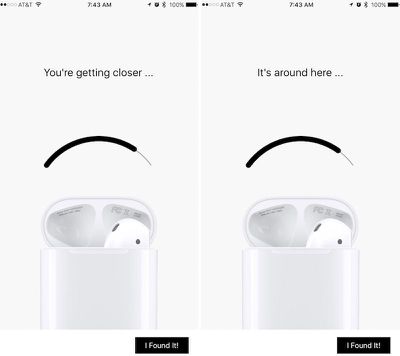
In multi-story homes, Finder for AirPods' signal can be unstable when the user is on one floor and the hidden AirPod is on another. Similarly, the app's two sentence help phrases -- "You're getting closer" and "It's around here" -- fluctuate far too often to be successful guidelines. On the bright side, an unstable signal can have a positive aspect: once users know what to look for, they can eliminate certain locations in an area where the signal is reacting poorly and move to somewhere until the bar becomes stable, bringing them closer to their lost AirPod.

Otherwise, when near an AirPod that's on the same floor, the meter is useful as an indicator of getting hotter or colder in the search. Users will have to already be near the lost AirPod due to the close proximity required for Bluetooth tracking between the paired iOS device and the missing headphone. For this reason, the tracking reliability also depends on the battery level of the missing AirPod -- if it's completely dead, users will be out of luck when trying to use Finder for AirPods.

Finder for AirPods is available on the App Store for $3.99 [Direct Link]. MacRumors was given a free code to test out the app.

Update: Finder for AirPods has been removed from the App Store by Apple. According to the creator of the app, Apple reportedly did not like the idea of people locating their AirPods and thus the app was deemed "not appropriate for the App Store."

Apple has not confirmed the reason why the app was removed from the store, and the app's developer recommends people ask for refunds via iTunes.


Related Roundup: AirPods 4
Buyer's Guide: AirPods (Neutral)
Related Forum: AirPods

Popular Stories

maxresdefault

Apple Shows Off a Key Reason to Upgrade to the iPhone 17

Saturday February 7, 2026 9:26 am PST by
Apple today shared an ad that shows how the upgraded Center Stage front camera on the latest iPhones improves the process of taking a group selfie. "Watch how the new front facing camera on iPhone 17 Pro takes group selfies that automatically expand and rotate as more people come into frame," says Apple. While the ad is focused on the iPhone 17 Pro and iPhone 17 Pro Max, the regular iPhone...
wwdc sans text feature

Apple Rumored to Announce New Product on February 19

Thursday February 5, 2026 12:22 pm PST by
Apple plans to announce the iPhone 17e on Thursday, February 19, according to Macwelt, the German equivalent of Macworld. The report, citing industry sources, is available in English on Macworld. Apple announced the iPhone 16e on Wednesday, February 19 last year, so the iPhone 17e would be unveiled exactly one year later if this rumor is accurate. It is quite uncommon for Apple to unveil...
Apple Logo Zoomed

Tim Cook Teases Plans for Apple's Upcoming 50th Anniversary

Thursday February 5, 2026 12:54 pm PST by
Apple turns 50 this year, and its CEO Tim Cook has promised to celebrate the milestone. The big day falls on April 1, 2026. "I've been unusually reflective lately about Apple because we have been working on what do we do to mark this moment," Cook told employees today, according to Bloomberg's Mark Gurman. "When you really stop and pause and think about the last 50 years, it makes your heart ...
Finder Siri Feature

Why Apple's iOS 26.4 Siri Upgrade Will Be Bigger Than Originally Promised

Friday February 6, 2026 3:06 pm PST by
In the iOS 26.4 update that's coming this spring, Apple will introduce a new version of Siri that's going to overhaul how we interact with the personal assistant and what it's able to do. The iOS 26.4 version of Siri won't work like ChatGPT or Claude, but it will rely on large language models (LLMs) and has been updated from the ground up. Upgraded Architecture The next-generation...
iOS 26

iOS 26.3 and iOS 26.4 Will Add These New Features to Your iPhone

Tuesday February 3, 2026 7:47 am PST by
While the iOS 26.3 Release Candidate is now available ahead of a public release, the first iOS 26.4 beta is likely still at least a week away. Following beta testing, iOS 26.4 will likely be released to the general public in March or April. Below, we have recapped known or rumored iOS 26.3 and iOS 26.4 features so far. iOS 26.3 iPhone to Android Transfer Tool iOS 26.3 makes it easier...

Top Rated Comments

Quu Avatar
119 months ago
Thought I lost mine the other day, turned out they were in my ears. I forgot I turned my music off and kept working in a quiet environment then I was like wait where are my Airpods?!

Felt stupid but it's a testament to how light and comfortable they are in my ears.
Score: 29 Votes (Like | Disagree)
mceolsen Avatar
119 months ago
Where is this feature for the Apple TV remote?!
Score: 14 Votes (Like | Disagree)
vertsix Avatar
119 months ago
It's quite shocking how some random third-party developer thought of this when some multi-billion dollar company didn't.

It's a pretty good concept and better than nothing.
[doublepost=1483718525][/doublepost]
Because then they would lose money if people could find their AirPods instead of buying new ones.
We need to get Tim Crook out of Apple.

Make
Apple
Great
Again!
Score: 10 Votes (Like | Disagree)
dan110 Avatar
119 months ago
How do you lose the Apple TV remote? Is it under the couch pillow? There's no reason why that thing should be leaving the room in which the Apple TV is running :p
You must live alone.
Score: 8 Votes (Like | Disagree)
BaccaBossMC Avatar
119 months ago
why doesnt apple make this app for free or have it under find my phone?
Because then they would lose money if people could find their AirPods instead of buying new ones.
Score: 8 Votes (Like | Disagree)
Shredliotti Avatar
119 months ago
Bookmarked for when I inevitably lose an AirPod. I mean, it's gonna happen.
A free alternative is to use a BLE test app and walk around while paying attention to the signal strength. An app like LightBlue | Explorer did the trick for me.
Score: 7 Votes (Like | Disagree)














