
Apple Warns You When Your Display is Using Significant Energy in Latest macOS Beta

Apple advertises that the latest MacBook Pro models provide up to 10 hours of battery life on a single charge for web browsing and iTunes movie playback, but a user's mileage may vary based upon factors such as display brightness, which apps are running, and external devices connected.

For this reason, Apple lists apps using a significant amount of energy under the battery menu in the macOS menu bar. The feature enables users to monitor which apps are drawing a lot of power and impacting battery life, whether it be the built-in Spotlight tool or a power-hungry web browser with several tabs open.
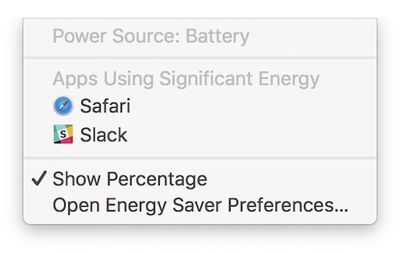
mac-apps-using-significant-energy
Now, Apple has gone one step further and expanded the feature to include display brightness. On the latest macOS Sierra beta, when a Mac's display is set above 75% brightness—or at least 13 out of 16 notches—a new item called "Display Brightness" is listed under the battery menu.

Clicking on "Display Brightness" lowers the Mac's brightness to 75%. Likewise, when we updated a new MacBook Pro to the fourth beta of macOS Sierra 10.12.3, the display's brightness was automatically lowered to 75%. This is the same brightness level as Apple used during its latest MacBook Pro battery tests.
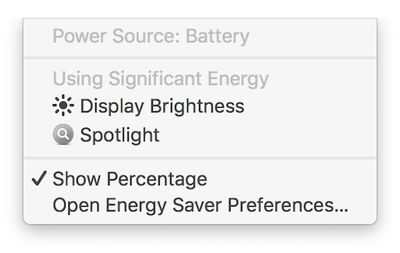
mac-significant-energy-display-brightness

New: "Display Brightness" is now listed and "Apps" has been dropped from the title

Battery life on the latest MacBook Pro models has been a controversial topic since the notebooks launched in October. A subset of users have reported getting as little as three to six hours of battery life on a single charge, sometimes even with only basic web browsing and other non-intensive tasks.

Apple has consistently stood by its advertised battery life for the latest MacBook Pro. It did, however, remove the "time remaining" battery life indicator on macOS Sierra 10.12.2, noting the estimates "couldn't accurately keep up with what users were doing" because of the "dynamic ways" people use their Macs.

Consumer Reports initially failed to recommend the latest MacBook Pro because of battery life inconsistencies, but it later worked with Apple and learned that a Safari bug triggered by its own testing configuration was to blame for the mixed results. Apple fixed that bug in macOS 10.12.3, and Consumer Reports has since reversed course and now recommends the latest MacBook Pro after retesting.

The new feature is currently limited to beta testers. It will be widely available when macOS 10.12.3 is officially released over the coming days.


Related Roundup: MacBook Pro
Buyer's Guide: MacBook Pro (Caution)
Related Forums: MacBook Pro, macOS Sierra

Popular Stories

maxresdefault

Apple Shows Off a Key Reason to Upgrade to the iPhone 17

Saturday February 7, 2026 9:26 am PST by
Apple today shared an ad that shows how the upgraded Center Stage front camera on the latest iPhones improves the process of taking a group selfie. "Watch how the new front facing camera on iPhone 17 Pro takes group selfies that automatically expand and rotate as more people come into frame," says Apple. While the ad is focused on the iPhone 17 Pro and iPhone 17 Pro Max, the regular iPhone...
wwdc sans text feature

Apple Rumored to Announce New Product on February 19

Thursday February 5, 2026 12:22 pm PST by
Apple plans to announce the iPhone 17e on Thursday, February 19, according to Macwelt, the German equivalent of Macworld. The report, citing industry sources, is available in English on Macworld. Apple announced the iPhone 16e on Wednesday, February 19 last year, so the iPhone 17e would be unveiled exactly one year later if this rumor is accurate. It is quite uncommon for Apple to unveil...
Apple Logo Zoomed

Tim Cook Teases Plans for Apple's Upcoming 50th Anniversary

Thursday February 5, 2026 12:54 pm PST by
Apple turns 50 this year, and its CEO Tim Cook has promised to celebrate the milestone. The big day falls on April 1, 2026. "I've been unusually reflective lately about Apple because we have been working on what do we do to mark this moment," Cook told employees today, according to Bloomberg's Mark Gurman. "When you really stop and pause and think about the last 50 years, it makes your heart ...
Finder Siri Feature

Why Apple's iOS 26.4 Siri Upgrade Will Be Bigger Than Originally Promised

Friday February 6, 2026 3:06 pm PST by
In the iOS 26.4 update that's coming this spring, Apple will introduce a new version of Siri that's going to overhaul how we interact with the personal assistant and what it's able to do. The iOS 26.4 version of Siri won't work like ChatGPT or Claude, but it will rely on large language models (LLMs) and has been updated from the ground up. Upgraded Architecture The next-generation...
iOS 26

iOS 26.3 and iOS 26.4 Will Add These New Features to Your iPhone

Tuesday February 3, 2026 7:47 am PST by
While the iOS 26.3 Release Candidate is now available ahead of a public release, the first iOS 26.4 beta is likely still at least a week away. Following beta testing, iOS 26.4 will likely be released to the general public in March or April. Below, we have recapped known or rumored iOS 26.3 and iOS 26.4 features so far. iOS 26.3 iPhone to Android Transfer Tool iOS 26.3 makes it easier...

Top Rated Comments

McTaste Avatar
118 months ago
Battery life of ten hours if you cripple performance and dim the screen.

Battery life of three hours under normal usage.
Score: 59 Votes (Like | Disagree)
jerry16 Avatar
118 months ago
Leave the MBP a few mm thicker and battery life wouldn't even be a conversation. Foolish obsession with thin.
Score: 59 Votes (Like | Disagree)
gpat Avatar
118 months ago
It takes a lot of courage to tell me I chose an excessive screen brightness.
Score: 27 Votes (Like | Disagree)
ryanwarsaw Avatar
118 months ago
I will refrain from saying anything. The normal comments should be dumb enough.
Score: 21 Votes (Like | Disagree)
MNWildFan Avatar
118 months ago
Interesting... Now if Apple could bring back the time remaining section back to the battery menu, that would be great. Yes, I know it can be seen in the activity monitor, but it's much more convenient to have it right in the menu bar.
Score: 16 Votes (Like | Disagree)
ArtOfWarfare Avatar
118 months ago
I don't like setting my display to less than 100% bright most of the time. I think most people feel the same way. Using 100% just seems good.

Apple should rename 100% as 130% and scale accordingly. It sends the message that, though your screen can go that bright, you shouldn't set it that bright unless you really need to.
Score: 15 Votes (Like | Disagree)














