
Banktivity 6 for Mac Adds Workspace, Tags, Quick Reports, and More - GeekWebGuides
Skip to Content

Banktivity 6 for Mac Adds Workspace, Tags, Quick Reports, and More

by

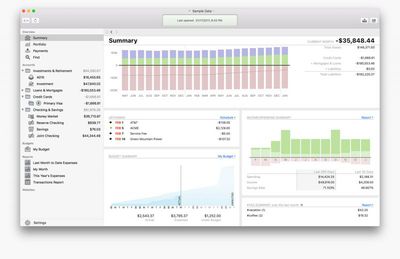
IGG Software today announced the upcoming launch of Banktivity 6, the latest version of the popular personal finance app for Mac. The software, previously known as iBank, has been redesigned for macOS Sierra and updated with several new features, including Workspace, Tags, Quick Reports, Find, and more.
banktivity-6
Banktivity 6 introduces Workspace, a new feature that enables customers to view any account, budget, report, or other view side by side. "For example, users can put transactions for an account next to a budget to see how recent spending affects the budget," the company said.

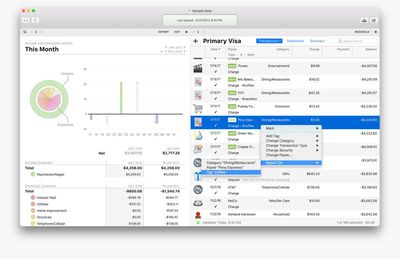
Tags have also been added, allowing individuals and small business owners to see and analyze their income and spending habits across categories. "Now when a person goes on vacation and spends money on dining out, gas, air fare and hotels they can tag all those transactions as a 'vacation,'" said IGG.

A new Quick Reports feature lets users select transactions and then quickly bring up a detailed report based on the selection. "For example, if a customer were wondering how much money was donated to a specific charity last year, a Quick Report answers that question with one click," the company said.
banktivity-6-duo
Find is a new document-wide search feature that enables customers to search "almost any part of any transaction" within an entire Banktivity document.

The app's sidebar has a new feature called Portfolio that provides quick access to the performance of investments. Portfolio's customizable view shows high-level information such as cost basis, value, gain/loss, security price, and IRR, and clicking on a security brings up a complete analysis of that holding.

Banktivity 6 features over 100 changes and enhancements, including more flexible report grouping, new transaction editor with improved keyboard support, new reconciliation process, a new summary view, improved transaction downloads, more flexible budgeting, easier in-app navigation, redesigned reports, and more.

IGG said Banktivity 6 will be released in the Spring for $64.99. Users upgrading from Banktivity 5 will qualify for upgrade pricing of $29.99. Customers who purchased Banktivity 5 from the IGG Store between January 23 and Banktivity 6's launch will receive a free registration code to unlock the new version.
banktivity-iphone-ipad
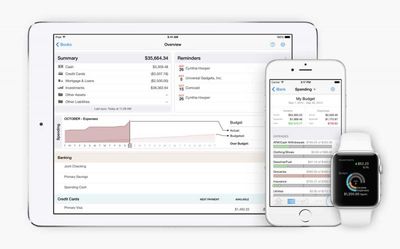
The app will sync with Banktivity for iPhone ($9.99) and Banktivity for iPad ($19.99).

Top Rated Comments

urnotl33t Avatar
127 months ago
Thanks for the description. In you opinion, what makes this better than Mint? I ask because Mint is free and this has a cost associated with it. Therefore, I would expect some extra features that make the price of admission worth while. Thanks for any insight you can provide.
My wife can have the iOS app on her iPhone (I just login with my IGG account and tell it to pull that data file for sync), and she has all the same stuff. I do the free-sync-method rather than Direct Access. When they did the name change and major app update (wonderful improvements!) the app now auto-syncs when it opens, so all she has to do is just open it now. If she makes a change, it auto-syncs again.

Honestly, I haven't used Mint in ages... I never liked their way of inspecting my info just to show me an ad or credit card referral. Long ago, the web app was unstable and took forever to update when I logged in. If they have an iOS app now, I don't know about it, because it's been *that long* since I used it. :)

For Banktivity, I like the "double-entry accounting" method they use: A charge on Account A is recorded as an expense to the Expense Account B:

01/26 Starbucks withdrawal $6.52 [a made-up number]
Expenses - Coffee
memo: muffin and tall coffee

Loans and credit cards are listed as such (the liabilities they are) and payments are recorded as transfers:

In the checking account:
01/26 Chase Card payment transfer -$100
[to:] Chase Card 1234

In the Chase card account I then see:
01/26 Chase Card payment transfer +$100
[from:] My Checking Account

Modifying that value affects the same on the other account because they are linked entries. It can also auto-calculate and keep up with installment loans like car payments (principle and interest) and even mortgage payments with combination of escrow, taxes, principle, interest, and your optional surplus payments.


They do have a 30-day free trial you can use. The article should have mentioned that. Go to their web site and just download the app. It's fully-functional for 30 days. Then you buy and enter a license key to keep going. Sadly, I don't think the iOS app has any similar free trial feature, tho. :( So you can't play with the sync service.

[no i don't work for them; i just like the product]
Score: 2 Votes (Like | Disagree)
urnotl33t Avatar
127 months ago
Is this a pseudo-self hosted alternative to Mint? Are bank transactions downloaded locally or do they go through an intermediate processor like what happens with Mint? (I hope to understand both technologies, so correct me if I'm wrong on either)
Yep, you can configure the app to pull from your financial institutions via OFX. Everything comes to your Mac directly. You can then sync that to their own custom sync service to get the info to the iOS app, but that isn't via iCloud or anything. They rolled their own sync, which works very very well. In this case, your Mac app is the main head end of everything; you have to download transactions from all of your institutions, you generally want to review it for any edits or tweaks you want to make (renaming the transaction, most often), or adding memo lines, then issue a sync to their end. Then, open the iOS app, pull the sync data and it's there. You can make changes on the iOS app as you wish, and it will re-sync back to their end, but you'll have to open the Mac app again to get the changes. Regardless, the data always ends up residing on your devices locally (kinda like Dropbox behavior, rather than iCloud behavior). In this scenario, the iOS app can't get new transaction data directly; iOS apps are only fed info from the Mac app. This sync service is free to you. The data is still encrypted by the devices before the sync is sent.

Alternatively, they do offer an optional "Direct Access" service where *everything* resides on their end, including transactions. In this case, the iOS apps *can* get new/updated transaction data directly, as would the Mac app. But you don't have to sync between the two inherently. This is more of the iCloud behavior rather than the Dropbox behavior. The Direct Access service is a subscription you pay to IGG to run all that.

No, they don't have any "web front end" service (and I consider that a feature, not a bug).

They have a ton of institutions they can work with, but if yours isn't on the list, you can always do a manual download-OFX-from-the-bank and import the file.
Score: 2 Votes (Like | Disagree)
Kaibelf Avatar
127 months ago
Looks interesting. Does anyone know how suitable this app is for tracking investments, etc., or is it really just for personal budgeting and the like?
I was curious about this too so looked it up. From what I understand it has some interesting investment tracking functionality, based on the description from the last version:

Investments

* Investment types: Track stocks, bonds, mutual funds, ETFs, CDs, money market funds, precious metals, commodities, and stock options with ease. You can also enter watchlist items and indices for quick reference.
* Quote downloading: Automatically retrieve up-to-date quotes from Yahoo! Finance at the click of a button. International exchanges are supported too.
* Security management: Check the current market value and price history for each of your securities at a glance, adjust security names and ticker symbols, and check the performance of indices.
* Investment reports: Easily generate reports to analyze your capital gains (realized and unrealized), security income, portfolio diversity, and return on investment (ROI). Check the current market value of your portfolio and drill down into any security to view details of your investment activity over time.
* Expert trading: Banktivity 5 now lets you categorize investment transactions. Banktivity also supports short and long puts and calls, stock option trading, bonds and more.

I'm curious if there are any users in the house who can speak to how well it works?
Score: 2 Votes (Like | Disagree)
122 months ago
I've been using it since April with no problems.
Thanks. I ended up downloading B6. Nice that I can run it parallel to B5 until I am comfortable switching. Spent a couple of hours checking out B6, all good so far.
Score: 1 Votes (Like | Disagree)
Weaselboy Avatar
122 months ago
Is B6 stable? I see it is now offered on the Canadian Mac App Store, but no reviews posted there. Thanks.
I've been using it since April with no problems.
Score: 1 Votes (Like | Disagree)
127 months ago
Maybe my accounting needs are simple.
After Quicken gave up I tried several others, money dance, mint, quickbooks and some open source stuff.

Using it since iBank 4 and I keep posting that the UI is somewhat non Mac intuitive and too many clicks needed for a Mac program. They claim they run their entire company finances with their own program, makes me wonder.

Once one learns the program, it's keyboard short cuts and workarounds for what is annoying it is very good, not excellent!
They wrestle with screen resolutions (No pinch and zoom, so I have to switch my display resolution)
I manually download my bank info, as I try not to pay for anything per month. Works just fine, but needs to be hand refined.
Mint is free, but inflexible and I believe it can't be free forever, plus advertising is a no go.
Don't really care who has my info, but I prefer it on my computer.

As for customer service they run hot and cold.
If you are suggesting changes for the better they send you to a requested features list, which doesn't solve your problem.
I once had a corrupted database and somebody worked with me tirelessly over a week to fix it.

Since everybody has different accounting needs it is unfair to criticize it for what it cannot do.

From what I see, I don't need any of the new features, but if some annoyances are gone in version 6
I will upgrade. It already has a lot of bells and whistles I don't use right now.

Maybe my problem is that I don't have enough money to require a super financial program.

BTW: There is a guy on Amazon who wrote the best neutral review about the original app.
Score: 1 Votes (Like | Disagree)

Popular Stories

iPhone Duo Trio

Here's What Apple's Apps Look Like on the iPhone Duo

Tuesday October 20, 2026 11:12 am PDT by
With just three days to go until the iPhone Duo is released, Apple is getting ready for the launch. Behind the scenes, the App Store now has screenshots of Apple's built-in apps running on the Duo. We've seen some apps in marketing materials, but images of the ones we haven't seen give us an idea of what it will be like using the iPhone Duo day to day. Many apps are shown in landscape...
Apple Creator Studio iWork suite

Apple Pulls Keynote, Pages and Numbers From App Store [Update: Back]

Thursday October 22, 2026 11:01 am PDT by
Apple has temporarily removed Keynote, Pages, and Numbers from the App Store, just after releasing an update that added iPhone Duo support and a new Intelligent Assistant. It is not clear if the apps were removed intentionally, or if it is a bug. Apple has not said when the apps will be reinstated, but if it was in error, they should return soon. Update: The Mac versions are back without...
M5 MacBook Pro

RIP, MacBook Ultra

Monday October 19, 2026 9:37 am PDT by
Apple today sent out invites for an experience in Los Angeles on Wednesday, October 28, and the "Pro and tell" tagline on the invitation likely means that the rumored MacBook models with touch-enabled OLED displays will stick with MacBook Pro branding instead of the once-rumored "MacBook Ultra" name. The long-rumored "iPhone Ultra" ended up being named iPhone Duo, so speculation that Apple...
Latest Stories
Happy 25th Anniversary, iPod
2 minutes ago
iPhone Duo Demand Reportedly Exceeds Apple's Expectations
3 hours ago
iPhone Duo Launch Begins as First Orders Reach Customers
9 hours ago
1Password for Agents Keeps Your Passwords Hidden From AI
10 hours ago
iPhone Duo 24 Hours Later: Your Questions Answered
10 hours ago
Apple's iWork Apps Get 'Intelligent Assistant' and iPhone Duo Support
11 hours ago
Apple is Apparently Considering a Slightly Larger iPhone Duo
11 hours ago
Giant iPhone Duo Displays Coming to Four Apple Stores
12 hours ago
Apple Pulls Keynote, Pages and Numbers From App Store [Update: Back]
13 hours ago
Apple Updates More Apps With iPhone Duo Support
14 hours ago
Apple Will Label Apps 'Made for iPhone Duo' in App Store
16 hours ago
Amazon Takes $49 Off iPad With Prices Starting at $399.99
17 hours ago
F1 on Apple TV Now Available in Dolby Atmos
17 hours ago
Apple Reveals More Than 50 Apps That Will Be Updated for iPhone Duo
18 hours ago
Apple Blocks Certificates That Could Help Attackers Fake Websites
19 hours ago
Giant iPhone Duo Installations Spotted at Apple Fifth Avenue
20 hours ago
iPhone Duo 2 Prototypes Include Under-Display Face ID
20 hours ago
Tesla App Gains iPad and iPhone Duo Support
1 day ago
Apple Reportedly Boosts iPhone Duo Orders by 44%
1 day ago
Fortnite Returning to Australian App Store After Court Ruling
1 day ago
Apple Ordered to Open iPhone to Rival App Stores in Australia
1 day ago
Apple Suppliers Face Hurdles Cutting Circuit Board Emissions
1 day ago
Things Updated for iPhone Duo With Adaptive Layout
1 day ago
Simplicity and Siri AI Are HomeView's Killer Features, Apple Says
1 day ago
iPhone Duo Reviewers Really Miss Face ID
1 day ago
Does the iPhone Duo Run Hot? Here's What Reviews Found
1 day ago
Apple Music's New Look is Now Live on Apple's Website
1 day ago
Anthropic Launches Claude Duet, a Proactive AI Agent
1 day ago
What 32,000 Folds Did to the iPhone Duo's Hinge
1 day ago
iPhone Duo's Hidden FaceTime Camera Takes 'Trash' Photos
2 days ago









































