
Giphy iOS App Gains Ability to Turn GIFs Into Live Photos - MacRumors
Skip to Content

Giphy iOS App Gains Ability to Turn GIFs Into Live Photos

by

A new update to the popular GIF-finding service Giphy this week has introduced Apple's Live Photo support into the iOS app, letting users convert any GIF they want into a Live Photo (via Mac4Ever). This allows users to more easily see what is a GIF in their camera roll, since GIFs saved as images still don't move when looked at in Photos. Giphy said the main point of the new update is to allow for custom animated iPhone lock screen wallpapers.

To create a Live Photo, users will need to first find a GIF they want in Giphy, tap on it, then tap the ellipses button underneath it to expand the sharing options. From there, Live Photos are represented by the same circular icon that Apple uses in the main Photos app, and tapping it will bring up two options: Save as Live Photo in Full Screen or Fit to Screen. In the Photos app, users can tap the image, tap the share sheet, and choose "use as wallpaper."
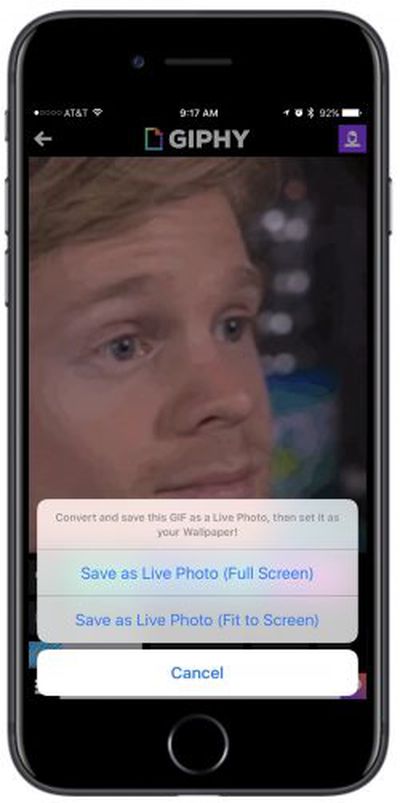
giphy live photo
There are a few compromises to using and saving GIFs as Live Photos, mainly including the low-quality nature of many of the GIFs on Giphy's service, which won't result in the best-looking iPhone wallpapers. Saving a GIF as a Live Photo also prevents it from being used natively as a GIF in Messages, where it would normally play on repeat. As a Live Photo, the image will move but only when pressed upon, as with any other Live Photo.

For those interested, Giphy is free to download on the iOS App Store [Direct Link], and anyone with an iPhone 6s or later can try out the new Live Photos feature.


Tag: Giphy

Top Rated Comments

117 months ago
I want an app that lets me convert my videos into live photos for use as wallpaper.

Does anyone know if it's possible to make a live photo, but have it be 30 or 60fps and play for longer than three seconds so you could have a more advanced motion lock screen wallpaper?
I use intoLive Pro (https://itunes.apple.com/us/app/intolive-pro-turn-your-video-into-live-photos/id1083468087?mt=8). It converts gifs and videos into Live Photos and allows some simple editing of the Live Photo, such as setting the default image that one sees before the photo comes alive, cropping to fit the iPhone or Apple Watch screen, etc.
Score: 1 Votes (Like | Disagree)

Popular Stories

Apple Event Logo

Apple's Next Era Begins September 1

Thursday May 7, 2026 10:36 am PDT by
Apple recently announced that Tim Cook will be stepping down as CEO later this year, after 15 years of leading the company. Effective September 1, Apple's hardware engineering chief John Ternus will become the company's next CEO, while Cook will become executive chairman of Apple's board of directors. In his new role, Apple said Cook will assist with "certain aspects" of the company,...
Four iPhone 18 Pro Colors Mock Feature

iPhone 18 Pro Launching in September With These 10 New Features

Saturday May 9, 2026 6:03 am PDT by
While the iPhone 18 Pro and iPhone 18 Pro Max are not launching until September, there are already plenty of rumors about the devices. It was initially reported that the iPhone 18 Pro models would have fully under-screen Face ID, with only a front camera visible in the top-left corner of the screen. However, the latest rumors indicate that only one Face ID component will be moved under the...
MacBook Pro Low Angle Wide Lens

macOS 27: Two More Changes Leaked Ahead of WWDC Next Month

Sunday May 10, 2026 9:45 am PDT by
macOS 27 will have a "slight redesign" compared to macOS Tahoe, along with an option to automatically group tabs in Safari, according to Bloomberg's Mark Gurman. In his Power On newsletter today, Gurman said the design changes will help to address some of the criticism surrounding macOS Tahoe's new Liquid Glass interface. In particular, the changes should improve overall readability....








































