
iOS 11 Preview: Control Center Gets Customizable With 3D Touch - MacRumors
Skip to Content

iOS 11 Preview: Control Center Gets Customizable With 3D Touch

Apple on Monday introduced iOS 11, the next major version of its mobile operating system for iPhone, iPad, and iPod touch. The software update, available this fall, includes a completely redesigned Control Center that fits on one page and is much more customizable thanks to 3D Touch.
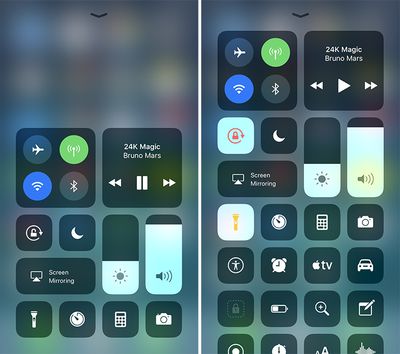
Control Center iOS 11 one

Control Center's default appearance (left) and with additional controls (right)

When you deep press on the Music pane, for example, a larger pane with volume, playback, and other controls pops open. Likewise, when you deep press on the pane with Airplane Mode, Wi-Fi, Bluetooth, and Cellular Data toggles, a larger pane pops open with AirDrop and Personal Hotspot toggles.
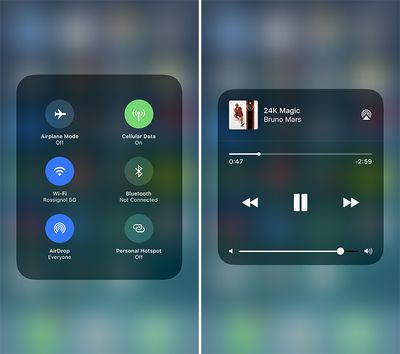
ios 11 control center two

More granular controls appear by deep pressing with 3D Touch

On iOS 11, users can add and organize additional controls and toggles to appear in Control Center through the Settings app. However, the following controls are default and cannot be hidden: the system toggles pane, music, orientation lock, brightness, volume, Do Not Disturb, and AirPlay Mirroring.
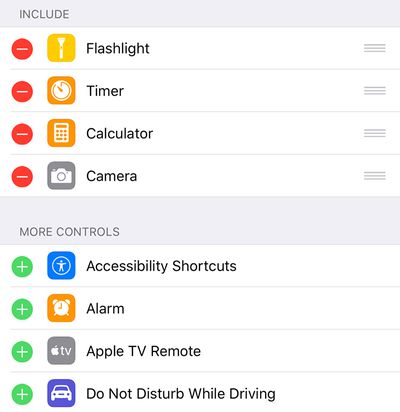
Control Center iOS 11 settings

In Settings, users can add and organize additional controls to appear in Control Center

The following controls can be added and organized in Settings:

• Accessibility Shortcuts
• Alarm
• Apple TV Remote
• Calculator
• Camera
• Do Not Disturb While Driving
• Flashlight
• Guided Access
• Home
• Low Power Mode
• Magnifier
• Notes
• Screen Recording
• Stopwatch
• Text Size
• Timer
• Voice Memos
• Wallet

Control Center still lacks a truly customizable drag-and-drop layout, but the return to a single-page design and some customizability are welcomed improvements. The ability to add additional controls such as Low Power Mode and Accessibility Shortcuts will also be appreciated by many users.
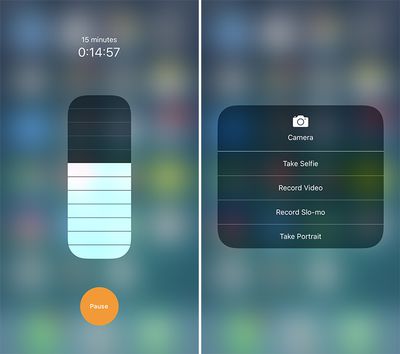
control center ios 11 three
The first iOS 11 beta was released to registered Apple developers on Monday. A public beta will be available in late June through the Apple Beta Software Program. The software update should be officially released in September.


Related Forum: iOS 11

Popular Stories

Apple Event Logo

Apple's Next Era Begins September 1

Thursday May 7, 2026 10:36 am PDT by
Apple recently announced that Tim Cook will be stepping down as CEO later this year, after 15 years of leading the company. Effective September 1, Apple's hardware engineering chief John Ternus will become the company's next CEO, while Cook will become executive chairman of Apple's board of directors. In his new role, Apple said Cook will assist with "certain aspects" of the company,...
Instagram Feature 2

PSA: Instagram Encrypted Messaging Ends on Friday, May 8

Tuesday May 5, 2026 8:24 am PDT by
Instagram will remove end-to-end encryption for direct messages between users from May 8, 2026. When the date comes around, Meta will potentially be able to see the contents of all messages between users on the social media platform. Encrypting messages has been an optional feature in Instagram since 2023, but in March of this year the social media platform quietly updated a help page to say ...
Apple Event Logo

Apple Just Released a New Accessory

Monday May 4, 2026 8:13 am PDT by
Apple today released a new Pride Edition Sport Loop for the Apple Watch. The band features a rainbow design with 11 colors of woven nylon yarns. The new Pride Edition Sport Loop is available to order now on Apple.com and in the Apple Store app in 40mm, 42mm, and 46mm sizes, and it will be available at Apple Store locations starting later this week. In the U.S., the band costs $49. There...

Top Rated Comments

teddybearstand Avatar
117 months ago
Control center looks like a mess and using the volume and brightness scrollers are quite terrible. The customization is welcome, but I hope this design changes before the GM.
Score: 43 Votes (Like | Disagree)
117 months ago
Maybe I am a minority, but 3D Touch is one of my favorite features on the iPhone. I use it for absolutely everything, and it's a huge convenience and shortcut. I think this will play nicely with the control center.
Score: 40 Votes (Like | Disagree)
BigDO Avatar
117 months ago
What a mess. iOS losing the polish and going towards Android like chaos.
Score: 37 Votes (Like | Disagree)
iapplelove Avatar
117 months ago
It's going to take a little bit of getting use to the new cluttered control center layout.
Score: 26 Votes (Like | Disagree)
routine_analyst Avatar
117 months ago
The complexity of these screens gets worse and worse with every release. What in the heck is going on internally?
Score: 24 Votes (Like | Disagree)
117 months ago
Not exactly stylish is it?
Score: 20 Votes (Like | Disagree)













