
iOS 11's SOS Feature Allows You to Temporarily Disable Touch ID and Require Passcode
In iOS 11, Apple has added an "Emergency SOS" feature that's designed to give users a quick and easy way to summon emergency services should the need arise. As it turns out, there's a secondary benefit to Emergency SOS - it's also a way to quickly and discreetly disable Touch ID.
Emergency SOS is activated by pressing on the sleep/wake button of an iPhone five times in rapid succession. When the requisite number of presses is complete, it brings up a screen that offers buttons to power off the iPhone, bring up your Medical ID (if filled out) and make an emergency 911 call.
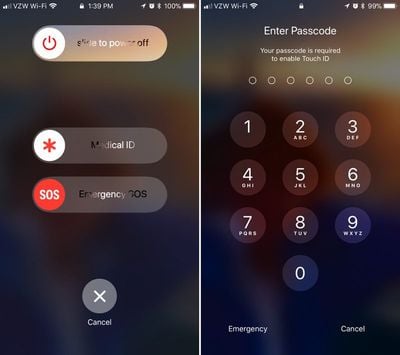
Along with these options, there's also a cancel button. If you hit the sleep/wake button five times and then hit cancel, it disables Touch ID and requires a passcode before Touch ID can be re-enabled. Touch ID is also disabled if you actually make an emergency call.
This is a handy hidden feature because it allows Touch ID to be disabled discreetly in situations where someone might be able to force a phone to be unlocked with a fingerprint, such as a robbery or an arrest. With Touch ID disabled in this way, there is no way to physically unlock an iPhone with a finger without the device's passcode.
It's also worth noting that there's no real way to tell that Touch ID has been disabled in this manner. Once you hit the sleep/wake button and then tap cancel, it's locked in the same way and with the same message that the iPhone uses when it's been more than 48 hours since a device was last unlocked with a fingerprint.
Apple's Emergency SOS feature will be available on all iPhones that run iOS 11. Along with disabling Touch ID, SOS can also be used to summon emergency services and alert your emergency contacts when an accident occurs.
iOS 11 is available to developers and public beta testers at the current time and will be released to the public in September alongside new iPhones.

Popular Stories
Apple turns 50 this year, and its CEO Tim Cook has promised to celebrate the milestone. The big day falls on April 1, 2026.
"I've been unusually reflective lately about Apple because we have been working on what do we do to mark this moment," Cook told employees today, according to Bloomberg's Mark Gurman. "When you really stop and pause and think about the last 50 years, it makes your heart ...
Apple plans to announce the iPhone 17e on Thursday, February 19, according to Macwelt, the German equivalent of Macworld.
The report, citing industry sources, is available in English on Macworld.
Apple announced the iPhone 16e on Wednesday, February 19 last year, so the iPhone 17e would be unveiled exactly one year later if this rumor is accurate. It is quite uncommon for Apple to unveil...
In the iOS 26.4 update that's coming this spring, Apple will introduce a new version of Siri that's going to overhaul how we interact with the personal assistant and what it's able to do.
The iOS 26.4 version of Siri won't work like ChatGPT or Claude, but it will rely on large language models (LLMs) and has been updated from the ground up.
Upgraded Architecture
The next-generation...
Apple today shared an ad that shows how the upgraded Center Stage front camera on the latest iPhones improves the process of taking a group selfie.
"Watch how the new front facing camera on iPhone 17 Pro takes group selfies that automatically expand and rotate as more people come into frame," says Apple. While the ad is focused on the iPhone 17 Pro and iPhone 17 Pro Max, the regular iPhone...
While the iOS 26.3 Release Candidate is now available ahead of a public release, the first iOS 26.4 beta is likely still at least a week away. Following beta testing, iOS 26.4 will likely be released to the general public in March or April.
Below, we have recapped known or rumored iOS 26.3 and iOS 26.4 features so far.
iOS 26.3
iPhone to Android Transfer Tool
iOS 26.3 makes it easier...















