

Logitech resurrected the trackball device today with its announcement of the MX ERGO, which the company is calling its "first new innovative trackball in nearly a decade".
Pitched to consumers looking for alternatives to mice and touchpads, the Bluetooth-based MX ERGO features an adjustable metal hinge with angle options at either zero or 20 degrees for personalizing the comfort level, which improves wrist posture and pronation, according to Logitech.
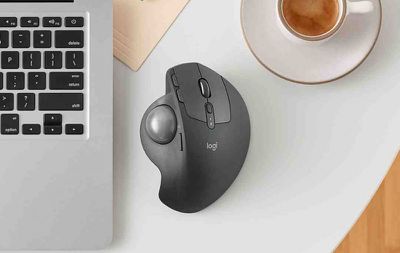
"We are so excited by this new trackball. It is back, better than ever and the idea for this trackball innovation was inspired by our users, who invented creative ways to achieve their desired level of comfort, sometimes adding additional wedges under their trackball for elevated angles," said Anatoliy Polyanker, global portfolio and brand director at Logitech. "The MX ERGO is our first adjustable trackball that delivers on the need for elevated comfort in a beautiful design."
The sculpted shape is designed to offer full palm and finger support, with a soft rubber on top for a comfortable grip over many hours of work. An LED light indicates when "precision mode" is activated using the dedicated button on the side of the MX ERGO. This special mode is said to allow the user to instantly change cursor speed and accuracy.
The device also supports multi-device connectivity through Logitech's Easy-Switch and Logitech Flow software, which allows users to seamlessly switch between two computers with one mouse, as well as copy and paste content, images and documents between them.
The rechargeable battery lasts up to four months on a full charge, depending on usage, and Logitech reckons the MX ERGO can give a complete day of work with just one minute of charge if the device is low on power.
The Logitech MX ERGO is priced at $99.99 and should be available to buy on the Logitech website and select retail stores throughout the U.S. in September.



















Top Rated Comments
It was really fantastic. It was so much better compared to a mouse! So comfortable to use and precision was great.
I had to remove the ball once every couple of weeks to clean it up, and to clean up the sensors, but it then went back to being buttery smooth and extremely precise.
If it weren't for the multitouch gestures that I have grown accustomed to using a trackpad, I would buy one of these without hesitation.
I had the original Magic Mouse when it came with my iMac and it broke down eventually. I stopped using it after getting hand cramps trying to do page layout and design-related projects. I switched to a full trackball mice and it was a godsend. My cramps and RSI went away since then.
I will never, ever touch an Apple produced mice or trackpad again unless they get their act together and go back to proper ergonomic design. They may look nice in appearance but how they function isn't really practical. It may be a lot of fun to use multi-touch on the trackpad for iMac but in the end, using, say, Photoshop with it doesn't seem effective at all. You have to use an ergonomic mice/trackball and/or a Wacom tablet for precision work.
I still use an M570 after switching to trackballs due to the start of wrist issues. None since.
The only complaint is that the bluetooth connectivity is wonky. I have stuttering issues or a real connection loss for a few seconds. I'm on Yosemite so maybe that's the problem. I do notice more after my Mac goes to sleep.
I keep wanting to switch to my trackpad which I rarely use, but i don't like how my wrist sits with it. I should give it a shot.
Cheers,
Brian
For those who don't know, here's what's awesome about this beloved device, which I hope the new controller lives up to:
[LIST=1]
* Superior ergonomics. Vastly better than mice or trackpads. It's the only thing that keeps my right-hand RSI at bay. Once you learn to use a thumb trackball, you will not go back to anything else.
* Amazing connectivity. At least in the M570, it uses a custom Logitech dongle that is far better than Bluetooth. Connects instantly, stays connected. (Incidentally the same dongle also connects to my Logitech solar-powered Mac keyboard, with its number keypad. Never needs charging, always a full battery even in part shade.)
* Amazing battery life. One AA is good for many months' use.
* Flexibility: I map the forward & back buttons to Mission Control & Dashboard, with BetterTouchTool. For good measure I keep an older Apple trackpad for my left hand to use for gestures.
Logitech's keyboards & controllers are the best on the market, bar none. Looking forward to this!