Developer Demonstrates iOS Phishing Attack That Uses Apple-Style Password Request - MacRumors
Skip to Content

Developer Demonstrates iOS Phishing Attack That Uses Apple-Style Password Request

Developer Felix Krause today shared a proof of concept phishing attack that's gaining some traction as it clearly demonstrates how app developers can use Apple-style popups to gain access to an iPhone user's Apple ID and password.

As Krause explains, iPhone and iPad users are accustomed to official Apple requests for their Apple ID and password for making purchases and accessing iCloud, even when not in the App Store or iTunes app.
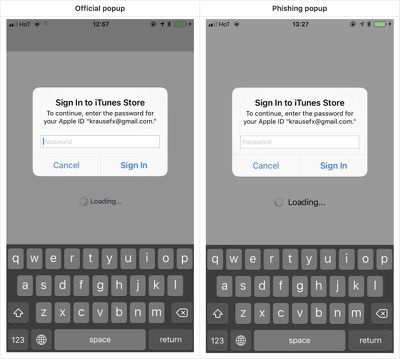
phishingconcept1
Using a UIAlertController that emulates the design of the system request for a password, developers can create an identical interface as a phishing tool that can fool many iOS users.

Showing a dialog that looks just like a system popup is super easy, there is no magic or secret code involved, it's literally the examples provided in the Apple docs, with a custom text.

I decided not to open source the actual popup code, however, note that it's less than 30 lines of code and every iOS engineer will be able to quickly build their own phishing code.

Though some of the system alerts would require a developer to have a user's Apple ID email address, there are also popup alerts that do not require an email and can recover a password.
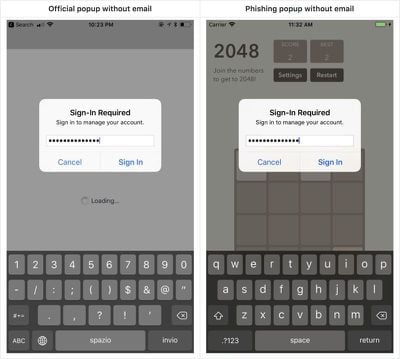
phishingconcept2
The phishing method that Krause describes is not new, and Apple vets apps that are accepted to the App Store, but it's worth highlighting for iOS users who may not be aware that such a phishing attempt is possible.

As Krause says, users can protect themselves by being wary of these popup dialogues. If one pops up, press the Home button to close the app. If the popup goes away, it's tied to the app and is a phishing attack. If it remains, it's a system request from Apple.

Krause also recommends users dismiss popups and enter their credentials directly within the Settings app.

Krause has reported the issue to Apple and recommends a fix that would include Apple asking customers to enter their credentials into the Settings app rather than directly through a popup that can be easily mimicked. Alternatively, he suggests credential requests could include an app icon to indicate that an app is asking rather than the system.

As extra protection from attacks like this, Apple customers should enable two-factor authentication as it prevents attackers from being able to log into an Apple ID account without a code from a verified device.


Popular Stories

Apple Event Logo

Apple's Next Era Begins September 1

Thursday May 7, 2026 10:36 am PDT by
Apple recently announced that Tim Cook will be stepping down as CEO later this year, after 15 years of leading the company. Effective September 1, Apple's hardware engineering chief John Ternus will become the company's next CEO, while Cook will become executive chairman of Apple's board of directors. In his new role, Apple said Cook will assist with "certain aspects" of the company,...
Instagram Feature 2

PSA: Instagram Encrypted Messaging Ends on Friday, May 8

Tuesday May 5, 2026 8:24 am PDT by
Instagram will remove end-to-end encryption for direct messages between users from May 8, 2026. When the date comes around, Meta will potentially be able to see the contents of all messages between users on the social media platform. Encrypting messages has been an optional feature in Instagram since 2023, but in March of this year the social media platform quietly updated a help page to say ...
Apple Event Logo

Apple Just Released a New Accessory

Monday May 4, 2026 8:13 am PDT by
Apple today released a new Pride Edition Sport Loop for the Apple Watch. The band features a rainbow design with 11 colors of woven nylon yarns. The new Pride Edition Sport Loop is available to order now on Apple.com and in the Apple Store app in 40mm, 42mm, and 46mm sizes, and it will be available at Apple Store locations starting later this week. In the U.S., the band costs $49. There...

Top Rated Comments

b11051973 Avatar
112 months ago
Always enter an incorrect password first. If it doesn't complain you entered the wrong password, you know it is a phishing thingie.
Score: 47 Votes (Like | Disagree)
nutmac Avatar
112 months ago
Similarly, macOS's Authorization Service dialog box is also easily spoofed.

Similar to Windows' Control-Alt-Delete, Apple's iOS and macOS should make it impossible to spoof these dialog boxes.
Score: 28 Votes (Like | Disagree)
112 months ago
This is very smart actually... I'm surprised this isn't massively used by shady apps already.
Score: 15 Votes (Like | Disagree)
BMcCoy Avatar
112 months ago
Yup, I’d fall for this.
And I’m paranoid.

Cunning.
And a bit frightening.
Score: 11 Votes (Like | Disagree)
112 months ago
I just transferred to a new iPhone and it asked many times for my apple id password at seemingly random times. Sometimes I'm never sure if I mistyped the password or it was a new request for something else. Apple needs to get more organized and at least let the user know why they have to enter the password.
Score: 10 Votes (Like | Disagree)
112 months ago
Fair point about our social conditioning on these dialogs. I don't know of a good way to address this though.
I think this one is on Apple. A user gets legitimately asked for his/her password enough times and fatigue sets in, and they stop really thinking about it.

Ultimately it's a UX problem that needs to be solved so that entering one's iCloud password is 1) hard to fake and 2) doesn't happen any more often than necessary.
Score: 10 Votes (Like | Disagree)