
Grammarly this week announced the launch of the Grammarly Keyboard app for iOS devices, which is available on the iOS App Store right now. Once added as a new keyboard in Settings, the app will then use Grammarly's grammar-checking software to proofread text you send in essentially any app that uses a keyboard.

Grammarly Keyboard will catch context-specific mistakes related to grammar, spelling, and punctuation, and Grammarly Premium users will be able to choose from various style improvements as well as gain more advanced word choice options. Above each correction is a short and clear explanation as to why Grammarly chose to fix the error, which the company says will help you "understand your mistakes and avoid them in the future."
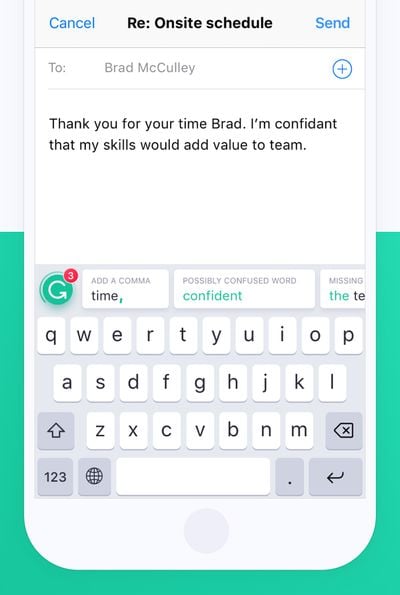
grammarly ios keyboard
In the company's blog post, examples are given of using Grammarly Keyboard in apps like Facebook, Twitter, Messages, Mail, Tinder, and more. The app can even warn you of when an auto-correct message has been typed and fix it before you send the message.

The keyboard integrates seamlessly with all your mobile apps and your mobile browser, so you’ll always look polished and professional, even on your phone.

Developed by some of the world’s leading authorities on linguistic technology, Grammarly’s algorithms not only catch context-specific grammar and spelling mistakes, but also the kind of confusing sentences that leave your colleagues (or worse, your boss) wondering what you’re talking about. For Grammarly Premium users, the keyboard will also improve word choice and suggest style improvements so the need for “Sent from my iPhone” can become a relic of the past.

After downloading Grammarly Keyboard for free [Direct Link], you'll have to allow the app to have full access to your keyboard in the iOS Settings app. Then, just tap the globe icon to cycle through your keyboards until you see Grammarly.


Top Rated Comments

randymac09 Avatar
108 months ago
This looks to good. I think their on to something, here with this app. I can'not weight too give this a try.
Score: 26 Votes (Like | Disagree)
Avieshek Avatar
108 months ago
It will know everything I type, right? The concern is, whether one can trust their servers. I would like to know from someone.
Score: 4 Votes (Like | Disagree)
thisisnotmyname Avatar
108 months ago
I've read that some linguists actually consider "text speak" its own dialect. Correcting to standard english grammar in these situations could actually be perceived as jarring or even cause confusion in your message. Just as an example, it would likely put a period at the end of every statement and that would convey anger/seriousness to most text recipients when that wasn't the intended tone. As a fan of formal grammar I like the spirit but I think the practical implementation won't be successful.
Score: 4 Votes (Like | Disagree)
Mxdanger Avatar
108 months ago
I'm typing with Grammarly right now. I stopped using it. It needs a 3D Touch cursor. Not some dumb one either, one just like the native keyboard.
Score: 3 Votes (Like | Disagree)
CrzyP Avatar
108 months ago
I use this on my Mac. Legit! I just think they charge too much for their subscriptions.
Score: 3 Votes (Like | Disagree)
JGIGS Avatar
108 months ago
This looks to good. I think their on to something, here with this app. I can'not weight too give this a try.
You missed "hear" instead of "here". But well done! ;)
Score: 3 Votes (Like | Disagree)

Popular Stories

maxresdefault

Apple Shows Off a Key Reason to Upgrade to the iPhone 17

Saturday February 7, 2026 9:26 am PST by
Apple today shared an ad that shows how the upgraded Center Stage front camera on the latest iPhones improves the process of taking a group selfie. "Watch how the new front facing camera on iPhone 17 Pro takes group selfies that automatically expand and rotate as more people come into frame," says Apple. While the ad is focused on the iPhone 17 Pro and iPhone 17 Pro Max, the regular iPhone...
wwdc sans text feature

Apple Rumored to Announce New Product on February 19

Thursday February 5, 2026 12:22 pm PST by
Apple plans to announce the iPhone 17e on Thursday, February 19, according to Macwelt, the German equivalent of Macworld. The report, citing industry sources, is available in English on Macworld. Apple announced the iPhone 16e on Wednesday, February 19 last year, so the iPhone 17e would be unveiled exactly one year later if this rumor is accurate. It is quite uncommon for Apple to unveil...
Apple Logo Zoomed

Tim Cook Teases Plans for Apple's Upcoming 50th Anniversary

Thursday February 5, 2026 12:54 pm PST by
Apple turns 50 this year, and its CEO Tim Cook has promised to celebrate the milestone. The big day falls on April 1, 2026. "I've been unusually reflective lately about Apple because we have been working on what do we do to mark this moment," Cook told employees today, according to Bloomberg's Mark Gurman. "When you really stop and pause and think about the last 50 years, it makes your heart ...
Finder Siri Feature

Why Apple's iOS 26.4 Siri Upgrade Will Be Bigger Than Originally Promised

Friday February 6, 2026 3:06 pm PST by
In the iOS 26.4 update that's coming this spring, Apple will introduce a new version of Siri that's going to overhaul how we interact with the personal assistant and what it's able to do. The iOS 26.4 version of Siri won't work like ChatGPT or Claude, but it will rely on large language models (LLMs) and has been updated from the ground up. Upgraded Architecture The next-generation...
iOS 26

iOS 26.3 and iOS 26.4 Will Add These New Features to Your iPhone

Tuesday February 3, 2026 7:47 am PST by
While the iOS 26.3 Release Candidate is now available ahead of a public release, the first iOS 26.4 beta is likely still at least a week away. Following beta testing, iOS 26.4 will likely be released to the general public in March or April. Below, we have recapped known or rumored iOS 26.3 and iOS 26.4 features so far. iOS 26.3 iPhone to Android Transfer Tool iOS 26.3 makes it easier...














