
Apple Community Envisions Better Ways to Activate Control Center on iPhone X

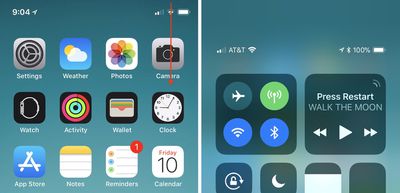
One of the biggest software changes on Apple's new iPhone X is the location of Control Center, the useful user interface that provides you with quick access to music playback controls, Bluetooth and Wi-Fi toggles, the flashlight, calculator, and much more thanks to iOS 11's customizable layout. On pre-iPhone X devices, the Control Center is awoken by swiping up from the bottom edge of the device. Because that action is now the default "go home" gesture on iPhone X, Apple has moved Control Center to the top right edge of the smartphone.

This location change has removed the simplicity and ease-of-access to Control Center for many iPhone X users -- particularly those who are left handed -- who have been posting about the iPhone X-specific issue in the MacRumors forums, Twitter, and on Reddit. Some of these users have also provided interesting alternative locations and invoking gestures that Apple could potentially implement in future iOS updates, but it should be reiterated that these are simply community ideas and not in any way an indication that we'll see them added to the iPhone X.
iphone x control center

How to activate Control Center on iPhone X

Reddit has been the source of multiple ideas for new Control Center gestures on the iPhone X, with a few that replace existing gestures (so you'd have to choose between two options in Settings) and some that are new. One user theorized that the iPhone X's new Reachability gesture (swiping down on the Home indicator, which must be activated in Settings) could have an alternate option for invoking Control Center.

Further threads provided variations on this idea: 3D Touch on the Home indicator for Reachability and pulling down on the indicator for Control Center, or keeping Reachability as it is and using 3D Touch on the Home indicator for Control Center. The 3D Touch solution has been put forward by multiple people over the last few days and appears to be a favorite, particularly because Reachability's new swipe-down gesture on the Home indicator can be difficult to execute and could potentially be an even more frustrating location for Control Center.

Other ideas have been shared on the MacRumors forums, including one that could be an additional option for the swipe-down gesture that enacts Search anywhere on the Home Screen, but that would make Control Center impossible to call up within apps. iOS developer Guilherme Rambo posted his own idea on Twitter this week, suggesting that a 3D Touch edge swipe could house Control Center. Currently, this is used as an app switching gesture, which Apple at first removed from iOS 11 and then brought back in a later update, so it's another idea where you'd have to pick one setting over another.

While Rambo's idea appears to be focused on Control Center replacing an app switcher gesture, a few users have also had ideas where Control Center is added into the app switcher. In these, you'd swipe up and hold to access other apps as normal, and Control Center would potentially be the first app you see instead of the last-used app. Or, Apple could place it on the right side of the app switcher, as one Redditor posited. Another mockup by Twitter user @jwangARK placed buttons under the app switcher for easy access to both Notifications and Control Center.

Another iOS developer, Riley Testut, theorized a simple solution that would place Control Center at the bottom right edge of the iPhone X display instead of the top right edge, while swiping up from the center would still go Home. A few iPhone X users have also pointed towards Assistive Touch in Accessibility as a workaround for easier Control Center activation, but that comes with a permanent, virtual Home Button on your iPhone screen, which will be a hard trade-off for some iPhone X owners.

With the iPhone X out in the wild for one full week as of today, November 10, the location of Control Center is one of a few gripes that early adopters have had with Apple's newest smartphone. Another notable point of contention focused on the iPhone X keyboard's "wasted space", with users presenting a few potential solutions to that as well, including placing recently used emoji or punctuation in the empty field below the space bar.

Make sure to check out our iPhone X Roundup for more details on the smartphone's new features.

Related Forums: iOS 11, iPhone

Popular Stories

maxresdefault

Apple Shows Off a Key Reason to Upgrade to the iPhone 17

Saturday February 7, 2026 9:26 am PST by
Apple today shared an ad that shows how the upgraded Center Stage front camera on the latest iPhones improves the process of taking a group selfie. "Watch how the new front facing camera on iPhone 17 Pro takes group selfies that automatically expand and rotate as more people come into frame," says Apple. While the ad is focused on the iPhone 17 Pro and iPhone 17 Pro Max, the regular iPhone...
Finder Siri Feature

Why Apple's iOS 26.4 Siri Upgrade Will Be Bigger Than Originally Promised

Friday February 6, 2026 3:06 pm PST by
In the iOS 26.4 update that's coming this spring, Apple will introduce a new version of Siri that's going to overhaul how we interact with the personal assistant and what it's able to do. The iOS 26.4 version of Siri won't work like ChatGPT or Claude, but it will rely on large language models (LLMs) and has been updated from the ground up. Upgraded Architecture The next-generation...
wwdc sans text feature

Apple Rumored to Announce New Product on February 19

Thursday February 5, 2026 12:22 pm PST by
Apple plans to announce the iPhone 17e on Thursday, February 19, according to Macwelt, the German equivalent of Macworld. The report, citing industry sources, is available in English on Macworld. Apple announced the iPhone 16e on Wednesday, February 19 last year, so the iPhone 17e would be unveiled exactly one year later if this rumor is accurate. It is quite uncommon for Apple to unveil...
apple wallet drivers license feature iPhone 15 pro

Apple Says These 7 U.S. States Plan to Offer iPhone Driver's Licenses

Monday February 9, 2026 6:24 am PST by
In select U.S. states, residents can add their driver's license or state ID to the Apple Wallet app on the iPhone and Apple Watch, and then use it to display proof of identity or age at select airports and businesses, and in select apps. The feature is currently available in 13 U.S. states and Puerto Rico, and it is expected to launch in at least seven more in the future. To set up the...
14 inch MacBook Pro Keyboard

New MacBook Pros Could Now Arrive in March

Sunday February 8, 2026 6:02 am PST by
New MacBook Pro models with the M5 Pro and M5 Max chips could arrive as soon as Monday, March 2, according to Bloomberg's Mark Gurman. In today's "Power On" newsletter, Gurman said that the release of new MacBook Pro models is tied to the release of macOS Tahoe 26.3. The launch is said to be slated for as early as the week of March 2. He added that the M4 Pro and M4 Max models on sale today...

Top Rated Comments

Patriks7 Avatar
108 months ago
Am I the only one slightly ticked off with the way apps are closed on the X? Feels like a completely unnecessary step to press and hold the app instead of just swiping up.
Score: 75 Votes (Like | Disagree)
dlewis23 Avatar
108 months ago
No. A 3D Touch swipe from the edge would be a horrid idea for invoking control center.
Score: 46 Votes (Like | Disagree)
borgqueenx Avatar
108 months ago
They are not gonna change this soon, that would be admitting it was a wrong first choice. Apple doesn't make mistakes.
[doublepost=1510329398][/doublepost]
Am I the only one slightly ticked off with the way apps are closed on the X? Feels like a completely unnecessary step to press and hold the app instead of just swiping up.
Yes, more people dislike this just like all of this:
[LIST=1]
* Bring up the status bar information so it fits better next to the notch, if needed make the font of it smaller.
* Add an option to unlock the phone without swiping up.
* Add control center to the multitasking screen instead of stretching your thumb every time.
* Force close apps by swiping up instead of holding one down first. One can simply swipe from bottom to get back.
* Get back battery percentage in the status bar.
* Make safari landscape mode wider on the iPhone X.
* Customize lock screen force touch buttons.
* Hide the "home" bar.
* Dark mode is even more important for the X due to OLED burn-ins.
* Lower the keyboard or add useful function to the wasted space below the keyboard.
Score: 41 Votes (Like | Disagree)
Polaroid Avatar
108 months ago
Why not add it to the multi taking page like iPads???
Score: 18 Votes (Like | Disagree)
dlewis23 Avatar
108 months ago
Am I the only one slightly ticked off with the way apps are closed on the X? Feels like a completely unnecessary step to press and hold the app instead of just swiping up.
It's probably because other then an app that has gotten stuck/crashed there really is no reason to close an app because it doesn't really make a difference.
Score: 15 Votes (Like | Disagree)
Jimmdean Avatar
108 months ago
Personally I like where it is. Then again I don't mind the notch either...
Score: 11 Votes (Like | Disagree)















