
iOS 11.2 Beta 3 Introduces Pop-up to Explain Control Center Wi-Fi/Bluetooth Functionality

With iOS 11, Apple changed the way the Bluetooth and Wi-Fi toggles in Control Center work. The two buttons are no longer standard on/off switches, and instead disable Bluetooth and Wi-Fi only for a set period of time.

In the new iOS 11.2 beta released this morning, Apple has added new informational pop-ups to let users know exactly how these toggles work. The new pop-ups explain that Bluetooth and Wi-Fi will be disabled temporarily rather than permanently.
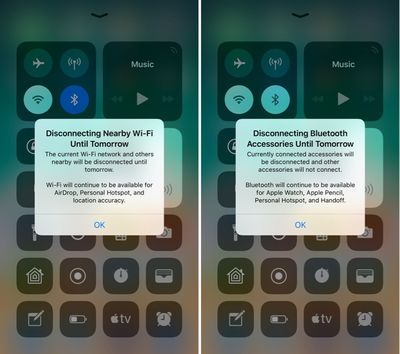
controlcenterwifitoggles
Prior to today's update, the Control Center toggles for Wi-Fi and Bluetooth could be somewhat confusing, because there was no on-device explanation. Apple outlined how the toggles work in a support document, but if you didn't see it, you might wonder why Wi-Fi or Bluetooth were turning themselves back on after being disabled via Control Center.

These new messages will appear the first time the Control Center toggles are used. Subsequent uses will show a message at the top that reads "Disconnecting Nearby Wi-Fi Networks Until Tomorrow" or "Disconnecting Bluetooth Devices Until Tomorrow."

bluetoothwifidisconnectingmessage
While Apple's new pop-ups offer a better explanation than was previously available, there are other situations where Wi-Fi or Bluetooth might be turned back on sooner than one day. When you use the Wi-Fi toggle in Control Center, Wi-Fi is disabled until one of the following conditions occurs:

- Wi-Fi is reactivated using Control Center
- You connect to a Wi-Fi network using Settings > Wi-Fi
- You walk or drive to a new location
- It's 5:00 a.m. local time
- Your iOS device is restarted

When you use the Bluetooth toggle in Control Center, Bluetooth is disabled until one of the following conditions occurs:

- Bluetooth is reactivated using control Center
- You connect to a Bluetooth accessory in Settings > Bluetooth
- It's 5:00 a.m. local time
- Your iOS device is restarted

To more permanently disable Bluetooth and Wi-Fi on an iOS device running iOS 11, it's necessary to go to the Settings app and toggle these features off in the Wi-Fi and Bluetooth sections. Apple likely made the change to Control Center in iOS 11 for a better overall user experience, as some iPhone and iPad owners might not realize the impact that turning Wi-Fi and Bluetooth off can have when it comes to iOS features like GPS directions, Continuity, and more.

In addition to introducing a message to let users know how Bluetooth and Wi-Fi work in Control Center, on the iPhone X, there's also a small UI change designed to make the Control Center gesture more obvious. Whenever you're on the Lock screen, there's a small bar underneath the icons on the right side of the device, letting you know there's more to see there. The bar is not displayed on the Home screen of an unlocked iPhone X, nor is it displayed within apps.
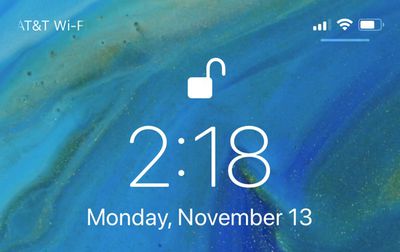
lockscreencontrolcenterbar
For those unfamiliar, accessing the Control Center on the iPhone X is done from a swipe down on the top right side of the device rather than a swipe upwards from the bottom.


Related Forum: iOS 11

Popular Stories

maxresdefault

Apple Shows Off a Key Reason to Upgrade to the iPhone 17

Saturday February 7, 2026 9:26 am PST by
Apple today shared an ad that shows how the upgraded Center Stage front camera on the latest iPhones improves the process of taking a group selfie. "Watch how the new front facing camera on iPhone 17 Pro takes group selfies that automatically expand and rotate as more people come into frame," says Apple. While the ad is focused on the iPhone 17 Pro and iPhone 17 Pro Max, the regular iPhone...
wwdc sans text feature

Apple Rumored to Announce New Product on February 19

Thursday February 5, 2026 12:22 pm PST by
Apple plans to announce the iPhone 17e on Thursday, February 19, according to Macwelt, the German equivalent of Macworld. The report, citing industry sources, is available in English on Macworld. Apple announced the iPhone 16e on Wednesday, February 19 last year, so the iPhone 17e would be unveiled exactly one year later if this rumor is accurate. It is quite uncommon for Apple to unveil...
Apple Logo Zoomed

Tim Cook Teases Plans for Apple's Upcoming 50th Anniversary

Thursday February 5, 2026 12:54 pm PST by
Apple turns 50 this year, and its CEO Tim Cook has promised to celebrate the milestone. The big day falls on April 1, 2026. "I've been unusually reflective lately about Apple because we have been working on what do we do to mark this moment," Cook told employees today, according to Bloomberg's Mark Gurman. "When you really stop and pause and think about the last 50 years, it makes your heart ...
Finder Siri Feature

Why Apple's iOS 26.4 Siri Upgrade Will Be Bigger Than Originally Promised

Friday February 6, 2026 3:06 pm PST by
In the iOS 26.4 update that's coming this spring, Apple will introduce a new version of Siri that's going to overhaul how we interact with the personal assistant and what it's able to do. The iOS 26.4 version of Siri won't work like ChatGPT or Claude, but it will rely on large language models (LLMs) and has been updated from the ground up. Upgraded Architecture The next-generation...
iOS 26

iOS 26.3 and iOS 26.4 Will Add These New Features to Your iPhone

Tuesday February 3, 2026 7:47 am PST by
While the iOS 26.3 Release Candidate is now available ahead of a public release, the first iOS 26.4 beta is likely still at least a week away. Following beta testing, iOS 26.4 will likely be released to the general public in March or April. Below, we have recapped known or rumored iOS 26.3 and iOS 26.4 features so far. iOS 26.3 iPhone to Android Transfer Tool iOS 26.3 makes it easier...

Top Rated Comments

Derekeys Avatar
108 months ago
I understand what they’re trying to do, but I believe it’s unnecessary.

Off should be off, on should be on.

Keep it simple stupid.
Score: 134 Votes (Like | Disagree)
Scottsoapbox Avatar
108 months ago
Why keep it an intuitive on/off when you can add a pop up explaining it? :rolleyes:
Score: 76 Votes (Like | Disagree)
Z400Racer37 Avatar
108 months ago
Why not long press for the option to turn it off completely?...
Score: 61 Votes (Like | Disagree)
theelysium Avatar
108 months ago
They are turned off to SAVE BATTERY DURPA-DURRRR Apple!

I want my OFF toggles back. I understand how to manage my antennas I don't need to be antenna coddled by Apple's OS.

We should be able to swap the toggles out or HOLD on the WiFi Bluetooth to switch them OFF!

So STUPID.
Score: 42 Votes (Like | Disagree)
0958400 Avatar
108 months ago
iOS used to be such an elegant, simple and clear way of accessing a device.
That was a long time ago.
Score: 30 Votes (Like | Disagree)
spazzcat Avatar
108 months ago
I understand what they’re trying to do, but I believe it’s unnecessary.

Off should be off, on should be on.

Keep it simple stupid.
The new way is much better. When I get to my car for example at work, it has a very weak connection to wifi. I don't want to turn off wifi, I want to just disconnect from work. The old way I would forget to turn wifi back on.
Score: 29 Votes (Like | Disagree)














