

Promise Technology today announced the launch of its new TD-300 Thunderbolt 3 dock, which is designed for Apple's latest MacBook Pro models with USB-C and Thunderbolt 3.
The TD-300 features five USB 3.0 ports (three at the back and two at the front), two Thunderbolt 3 ports, a Gigabit Ethernet port, an audio in/out port, and an HDMI 2.0 port.
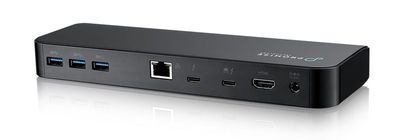
There are a range of Thunderbolt 3 docks on the market now, but Promise Technology's TD-300 includes a good number of ports and an SD card slot, something that we've only seen on OWC's TB3 dock. A Thunderbolt 3 cable and power adapter are also included.
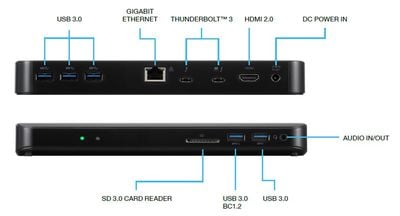
Promise Technology's dock supports two 4K displays or one 5K display and delivers up to 60W of power to charge a MacBook Pro. That's sufficient for the 13-inch MacBook Pro models, but may be inadequate for charging a 15-inch MacBook Pro under a heavy load.
"As part of our mission to offer solutions that are optimized for rich media workflows, we're constantly expanding our portfolio of innovative solutions that harness the latest technology," noted Vijay Char, president, Promise Technology USA. "The addition of a Thunderbolt 3 dock brings a new level of efficiency and flexibility to creative professionals. Laptops can be charged at the fastest speeds possible, images from DSLR cameras are easily transferred, peripherals such as hard drives and monitors can be daisy-chained for increased productivity, 4K video can be sent to multiple displays, and more. The possibilities are truly endless."
The TD-300 Thunderbolt 3 Dock can be purchased from the Promise website or from Amazon for $249.
Top Rated Comments
[doublepost=1511077850][/doublepost]Unless you are pegging all CPU cores constantly, an 60 W charger will still charge the 15" MBP just fine while using it, merely more slowly. Look at the range of battery life times people report, you find numbers from three hours (or even less) upwards. Meaning if running the MBP full throttle results in three hours of battery life (and the same usage while on the 87 W power adaptor maintains the battery charging level), than a usage corresponding to a six hour battery life only requires half as much power, ie, 43.5 W. Therefore a 60 W power supply will still have power left to charge the battery, just more slowly.
And I am sure those numbers are still conservative from my point of view. Pegging all CPU cores (+GPU, full screen brightness) probably results in a battery life even lower, maybe only two hours. Meaning usage resulting in six hours of battery life would only need 29 W. Thus instead of having 58 W of 'charging power' (87 - 29 W), you'd have 31 W (60 - 29 W) of charging power. My guess would then be that using a 60 W power supply (instead of an 87 W power supply), charging during usage might on average take twice as long. And charging while the machine is sleeping might only take 50% longer.
[doublepost=1511078004][/doublepost]Nonsense, see above.
EDIT: Just found some numbers on battery life under very heavy load, of about 80 minutes ('https://www.pcworld.com/article/3157392/laptop-computers/tested-the-truth-behind-the-macbook-pros-terrible-battery-life.html'). Again that means, even if your usual battery life is only four hours, you are only using 80/240 * 87 W = 29 W to power the computer, leaving 31 W to charge its battery.
Popular Stories
RIP, MacBook Ultra
Here's What Apple's Apps Look Like on the iPhone Duo
Apple Announcing New Products Next Week: 'Pro and Tell'
Next Article
Videos
Guides
Our comprehensive guide highlighting every major new addition in iOS 27, plus how-tos that walk you through using the new features.
New features and lesser-known changes to check out if you're upgrading.
Time to upgrade? Here's all of the improvements you'll get if you're moving up from an iPhone 16 Pro.
Whether you're upgrading from an older iPhone or completely new to Apple, this guide will help you get the most out your new device.
Upcoming
Apple's first foldable iPhone, with a book-style design featuring a 5.4-inch outer display and a 7.6-inch inner display with a minimal crease down the middle.
S10 chip, Sound Glow top, Siri AI, and more.
Apple's smart home hub with 7-inch square display, A18 chip with Siri AI support, and more.
A19 chip, Siri AI support, and more.
Other Stories
6 days ago by Hartley Charlton
6 days ago by Joe Rossignol
1 week ago by Joe Rossignol
1 week ago by Joe Rossignol
1 week ago by Joe Rossignol