

Nomad today announced the launch of its new Wireless Charging Hub, which is designed to be the ultimate desktop hub for iPhone X, iPhone 8, and iPhone 8 Plus users.
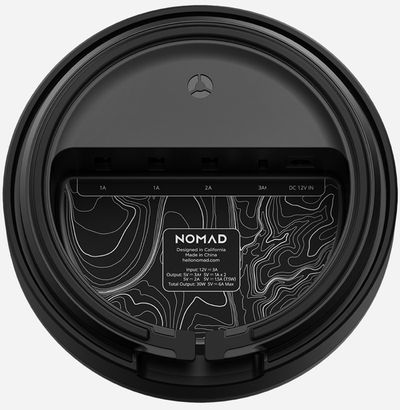
The top of the Hub is a wireless charging pad that offers up to 7.5W of wireless charging power for Apple's glass-backed iPhones, and underneath, there are four additional ports.
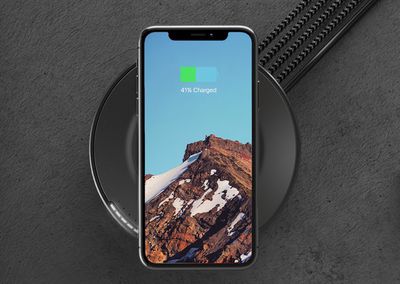
Three are USB-A ports meant for charging all kinds of devices, and one is a USB-C port that offers 15W of power for fast charging the iPhone X, 8, or 8 Plus with a USB-C to Lightning cable.
Ahead of the launch of the Wireless Charging Hub, I was able to spend some hands-on time with it. The hub a bit larger than the average wireless charger, but it doesn't take up too much space on my desk. The top, where the wireless charging coil is located, is covered with a rubber material that's designed to add a bit of grip to prevent the iPhone from sliding off from vibrations and bumps.
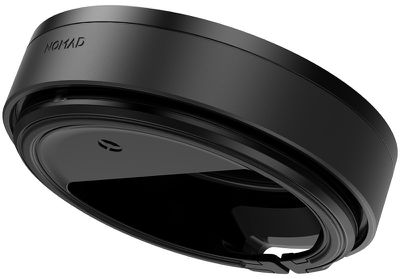
Five LEDs on the top of the hub let you know exactly what's plugged in and what's still charging. LEDs are green when charging has been completed and orange while power is still being delivered to one of your devices. There's an ambient light sensor that dims the LEDs in a dark room, which is a nice feature.
With support for 7.5W wireless charging, the hub offers the faster wireless charging speeds that were introduced with iOS 11.2, and if you need a lot of juice in a pinch, you can use the USB-C port to fast charge Apple's latest iPhones. USB-C fast charging with a USB-C to Lightning cable can charge your iPhone from 0 to 50 percent in a half an hour.
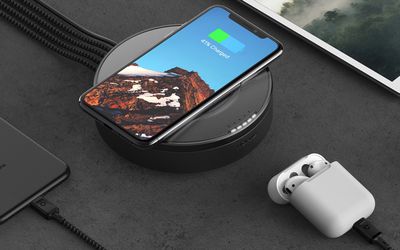
This is a 15W USB-C port (3A x 5V), so while it's suitable for your iPhone and other USB-C smartphones or devices, it's not enough power for a MacBook or MacBook Pro. Three other 2.1A USB-A ports are included so you can charge up all of your devices and accessories at once. The hub itself is powered by an adapter that plugs into the wall.
One thing to note -- the Wireless Charging Hub does not come with cables and it does not feature any built-in cable hiding mechanism, which is a negative. If you're using this on a desktop, you're probably going to want to purchase smaller Lightning cables to use with it, because it was a huge mess of cables on my desk with the 1m and 0.5m Apple cables.
Nomad recommends its 0.3m Universal Cables with micro-USB, USB-C, and USB-A, but I don't think most people are going to want to pay $30 per cable. Luckily, Amazon has options for affordable shorter iPhone cables that will work well on the desktop. Unfortunately, there are no Apple certified USB-C to Lightning cables that are shorter in length, so you'll need to use the standard 0.5m cable.
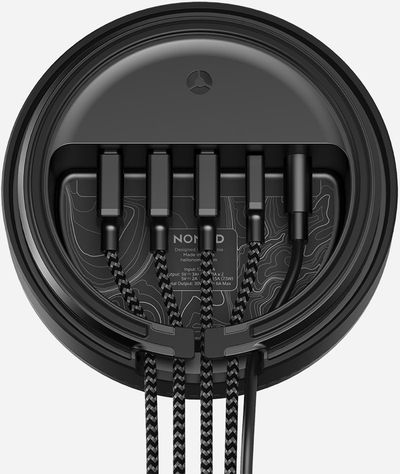
When paired with the appropriate cables, the Wireless Charging Hub is a convenient desktop charging accessory. If your iPhone just needs a bit of a top up, it's easy to plunk it down on the wireless charging pad, and if you need more power in a hurry, it's great having an easily accessible USB-C fast charging port.
This isn't a cheap accessory at $80, and you're going to want to make sure you have shorter cables if you want a neat and organized desktop, which can add an additional cost, but it does offer unmatched versatility and convenience if you don't mind the price tag.
You can purchase the new Wireless Charging Hub from Nomad's website for $79.95.
Note: Nomad provided MacRumors with a Wireless Charging Hub for the purpose of this review. No other compensation was received. This post contains affiliate links and MacRumors may earn commissions on purchases made using those links.



















Top Rated Comments
https://www.imaiges.com/photo/broken-top-volcano-mountain-moon-66802
Registered here to post it :)
Aside from that, I'm surprised that we're not seeing more stand-type inductive chargers hitting the market, as the hockey puck style certainly doesn't work for using an iPhone X, unless you're planning on being hunched over the puck when you want to use it (to look at and read notifications for example).
I've used an acrylic stand I designed back in 2011, made to hold both an iPhone and iPad side by side, with openings through the tray they sit on for the then 30pin plugs to fit in, so you could keep both devices plugged in and have them positioned so you are looking at them much like the screen of a laptop. Now with the X I have, I've simply double sided taped the Mophie charger to the stand and I now have a wireless stand that allows me to just glance at my X any time a notification pops up.
I'll likely design a new version and buy a raw charging coil to incorporate into a stand, but for now it's a great way to make using and charging my iPhone X.
Much appreciated!