Apple Shares Tips on Avoiding App Store and iTunes Phishing Emails

Apple last week shared a new support document that's designed to help App Store and iTunes users avoid phishing emails that mimic legitimate emails from Apple.

In the document, Apple outlines techniques to identify an actual App Store or iTunes email, which the company says will always include a current billing address, something scammers are unlikely to have access to.
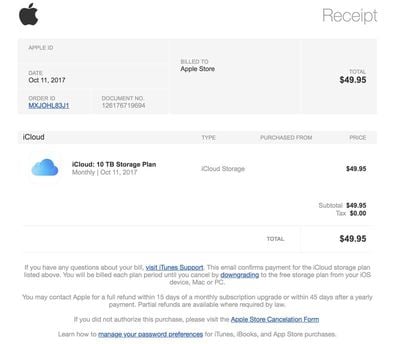
applescamemail

An example of a well-crafted phishing email

Apple also says that emails from the App Store, iBooks Store, iTunes Store, or Apple Music will never ask customers to provide details like a Social Security Number, mother's maiden name, a credit card number, or a credit card CCV code.

Apple recommends that customers who receive emails asking them to update their account or payment information do so directly in the Settings app on an iPhone, iPad, or iPod touch, in iTunes or the App Store on a Mac, or in iTunes on a PC rather than through any kind of web interface.

Customers who receive a suspicious email can forward it to reportphishing@apple.com, and any customer who may have entered personal information on a scam website should update their Apple ID password immediately.

Scam and phishing emails like those Apple describes in this support document are not new, but at the current time, there's a new wave of legitimate-looking emails going around that look much like Apple emails that can easily fool customers who don't know what to look for.

Related Forum: Mac Apps

Popular Stories

Apple Logo Zoomed

Tim Cook Teases Plans for Apple's Upcoming 50th Anniversary

Thursday February 5, 2026 12:54 pm PST by
Apple turns 50 this year, and its CEO Tim Cook has promised to celebrate the milestone. The big day falls on April 1, 2026. "I've been unusually reflective lately about Apple because we have been working on what do we do to mark this moment," Cook told employees today, according to Bloomberg's Mark Gurman. "When you really stop and pause and think about the last 50 years, it makes your heart ...
wwdc sans text feature

Apple Rumored to Announce New Product on February 19

Thursday February 5, 2026 12:22 pm PST by
Apple plans to announce the iPhone 17e on Thursday, February 19, according to Macwelt, the German equivalent of Macworld. The report, citing industry sources, is available in English on Macworld. Apple announced the iPhone 16e on Wednesday, February 19 last year, so the iPhone 17e would be unveiled exactly one year later if this rumor is accurate. It is quite uncommon for Apple to unveil...
Finder Siri Feature

Why Apple's iOS 26.4 Siri Upgrade Will Be Bigger Than Originally Promised

Friday February 6, 2026 3:06 pm PST by
In the iOS 26.4 update that's coming this spring, Apple will introduce a new version of Siri that's going to overhaul how we interact with the personal assistant and what it's able to do. The iOS 26.4 version of Siri won't work like ChatGPT or Claude, but it will rely on large language models (LLMs) and has been updated from the ground up. Upgraded Architecture The next-generation...
iOS 26

iOS 26.3 and iOS 26.4 Will Add These New Features to Your iPhone

Tuesday February 3, 2026 7:47 am PST by
While the iOS 26.3 Release Candidate is now available ahead of a public release, the first iOS 26.4 beta is likely still at least a week away. Following beta testing, iOS 26.4 will likely be released to the general public in March or April. Below, we have recapped known or rumored iOS 26.3 and iOS 26.4 features so far. iOS 26.3 iPhone to Android Transfer Tool iOS 26.3 makes it easier...
maxresdefault

Apple Shows Off a Key Reason to Upgrade to the iPhone 17

Saturday February 7, 2026 9:26 am PST by
Apple today shared an ad that shows how the upgraded Center Stage front camera on the latest iPhones improves the process of taking a group selfie. "Watch how the new front facing camera on iPhone 17 Pro takes group selfies that automatically expand and rotate as more people come into frame," says Apple. While the ad is focused on the iPhone 17 Pro and iPhone 17 Pro Max, the regular iPhone...


Top Rated Comments

bbzzz Avatar
104 months ago
PROTIP: disable html in your mail client, it's harder to phish when you can see the links that will be used are not what the text claims they are.

Bonus: tell anyone sending html only to not be a muppet, helping the phishers by conditioning users to accepts such emails. Ask them to include the regular plain text body for those who are trying to not be phished.
Score: 6 Votes (Like | Disagree)
iModFrenzy Avatar
104 months ago
How about tips for recognizing battery throttling scams?
How much longer are we gonna beat a dead horse?
Score: 4 Votes (Like | Disagree)
AndyUnderscoreR Avatar
104 months ago
Well, you SAY that's an Apple support document....
Score: 3 Votes (Like | Disagree)
Apple_Robert Avatar
104 months ago
Good move on Apple for doing what they can to inform people about phishing.
Score: 3 Votes (Like | Disagree)
fastasleep Avatar
104 months ago
I think the current app store's "Today" section design is kind of phishing too.
If you hold the phone with your right hand and scroll through the Today's stories with your right thumb, you can so easily touch the "GET" or "purchase" buttons by mistake, and when that happens some people's first reaction is to press the home button to quit the app store app, but if you do that and if you are using touch ID to approve purchases, the purchase gets approved.
That's not what phishing means.
[doublepost=1519875375][/doublepost]
You’d think they could use their fancy smancy machine learning to stop these from coming through for all sorts of major companies. I know companies like PayPal have trouble with this all the time. Even if you can’t cover everything it’s better to get at least 90% of them.

Heck, you could probably just regex to match certain strings like their footer or other common phrases used in Apple emails. Then check the sender against official Apple email addresses and if it doesn’t check out, send it to the spam folder or put a big red warning at the top saying the email seems suspicious and might be a phishing attempt. This seems like a solvable problem in 2018.
They often do. My spam filter (ASSP) correctly flag all the phishing emails I get as spam. When reviewing stuff in my spambox for false positives, I often take a second look at things that look like they came from Netflix or Apple, only to realize they were correctly flagged. But remember there are a ton of email providers out there with various types and qualities of spam filters.
Score: 3 Votes (Like | Disagree)
goatless Avatar
104 months ago
('https://www.geekwebguides.com/2018/02/28/apple-app-store-phishing-emails/')

Apple last week shared a new support document ('https://support.apple.com/en-us/HT201679') that's designed to help App Store and iTunes users avoid phishing emails that mimic legitimate emails from Apple.

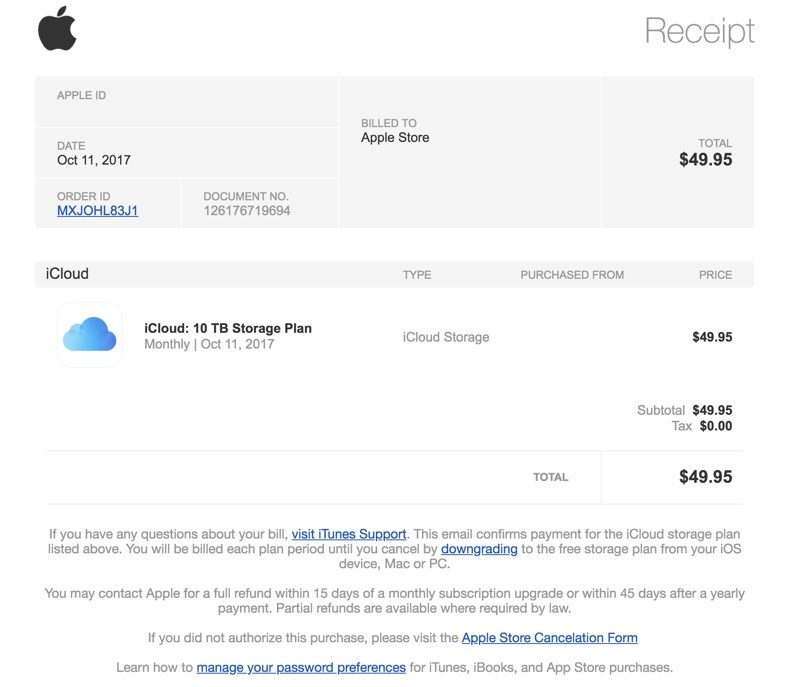
In the document, Apple outlines techniques to identify an actual App Store or iTunes email, which the company says will always include a current billing address, something scammers are unlikely to have access to.


An example of a well-crafted phishing email
Apple also says that emails from the App Store, iBooks Store, iTunes Store, or Apple Music will never ask customers to provide details like a Social Security Number, mother's maiden name, a credit card number, or a credit card CCV code.

Apple recommends that customers who receive emails asking them to update their account or payment information do so directly in the Settings app on an iPhone, iPad, or iPod touch, in iTunes or the App Store on a Mac, or in iTunes on a PC rather than through any kind of web interface.

Customers who receive a suspicious email can forward it to reportphishing@apple.com, and any customer who may have entered personal information on a scam website should update their Apple ID password ('https://support.apple.com/kb/HT201355') immediately.

Scam and phishing emails like those Apple describes in this support document are not new, but at the current time, there's a new wave of legitimate-looking emails going around that look much like Apple emails that can easily fool customers who don't know what to look for.

Article Link: Apple Shares Tips on Avoiding App Store and iTunes Phishing Emails ('https://www.geekwebguides.com/2018/02/28/apple-app-store-phishing-emails/')

[doublepost=1519861795][/doublepost]That's actually a pretty good fake. The ones I receive are usually riddled with odd, non-native phrasing. Not that my english is perfect, but english does have its idiomatic ways, and certain words, phrases, and capitalization patterns standout as not being businesslike.
Score: 2 Votes (Like | Disagree)