
Popular photo editing app Darkroom reached version 3.5 today, introducing the ability to edit Depth shots taken on supporting iPhone cameras, along with several other notable new features.

After updating to v3.5, Darkroom will automatically load the depth map for Portrait photos encountered in the library and recreate applied blur from scratch, handing control of its strength and location back to the user. Thanks to a new depth range selector, it's now possible to define exactly where the foreground and the background are.
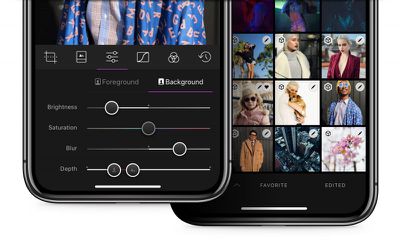
Darkroom 3 5 depth
Meanwhile, in what the developers are calling an industry first, Darkroom 3.5 now features Depth-Aware filters. These come premium Portrait Filter pack to be depth-aware. Each filter will automatically adjust foreground and background settings to optimize the focal point of the image on the face, not on the background. User-created filters with depth settings also now carry over those settings to the filter itself.

Additionally in this release, Darkroom's RAW engine has been rebuilt to take full advantage of the Extended-Range color space of Raw files, which should enable photographers to dramatically improve the amount of detail that's recoverable from shadows and highlights. Similarly, the brightness, contrast, highlights and shadows sliders have been rebuilt to operate in the extended space, offering finer-grain tone control.
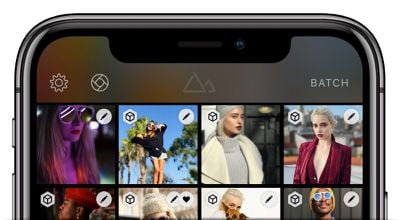
35 halide
Elsewhere, the developers have undertaken app-wide performance refinements in an effort to make photo editing in Darkroom as fast as photo browsing. There's also now a dedicated button at the top of the library view for accessing popular third-party camera app Halide, ready for when the announced Darkroom X Halide integration goes live.

Darkroom is a free download from the App Store and includes in-app purchases for some tools. [Direct Link].


Top Rated Comments

Majd Taby Avatar
103 months ago
I enjoy using this app. But one thing I’ve struggled with is the best use off all the options in the app. Individually they make sense: contrast, highlights, shadows, plus the curves you can drag. But put them all together and it’s a challenge to know when you should adjust one feature vs another. Every picture is different and there’s always going to be some trial and error, but I’d love to get pointers on a holistic approach to editing my pictures that takes advantage of the features without the overkill of trying to use every option.
Great point. We're going to be releasing educational material inside the app and our blog later this year. Just need to fine the time somewhere....
[doublepost=1522347311][/doublepost]
Cool! I've never heard of Darkroom before today, but as soon as my phone and iPad finish updating to 11.3 I'll be giving it a spin :)

I currently use Lightroom for most iOS photo editing since I like its raw capture support, its basic functionality as compared to the desktop version, and the great jpeg exporting. But (afaik) it can't natively work with the iOS camera effects, so that sounds like fun!
Lightroom is a fantastic app, but it's locked within the Adobe CC ecosystem. What you'll find different (and we hope, amazing) in Darkroom, is how tightly integrated we are to the native photo library. We call it Library Sync: No import, all actions are automatically mapped back to the photo library (except export, that's an explicit step).
Score: 5 Votes (Like | Disagree)
Majd Taby Avatar
103 months ago
Hello all, I'm the co-founder of Darkroom, happy to answer any questions you may have!
Score: 4 Votes (Like | Disagree)
Majd Taby Avatar
103 months ago
Then answer the question above your post....;)
Haha fair.

From a capture perspective, Apple calls depth-capture "Portrait Mode" because it's ideally suited for capturing portraits of people (We can't guess what they're potentially doing under the hood as far as ML-backed detection and manipulation of depth data). The native camera app enforces this by setting distance limits and light-limits to ensure the quality of the depth map is high. When you use portrait mode in non-portrait contexts, you may very well have an excellent depth map, but often you end up with artifacts.

From an editing perspective, the use of depth-editing is much more obvious and the benefit you get from it as a photographer is much more prevalent when used to add contrast between foreground and background, in portrait settings.

tl;dr- It's a better context for explaining the feature and why it's useful, though it can certainly be used in other contexts.
[doublepost=1522339872][/doublepost]
Is denoise something you guys are working on? I'd much rather do my editing in one app than have to bounce out to Light Room to denoise my .raw files.

The notes specifically mention "the face" when talking about depth. What's that mean for those of us who use portrait mode on things other than people?
Denoise is currently not high on our priority list. We're a two-man company, so we're resource limited on what we can do at one time, but it's on our radar. Just have to get through some of the very high priority items first.
Score: 4 Votes (Like | Disagree)
Majd Taby Avatar
103 months ago
first time user for the app...(i had previously downloaded it but never opened)
-Is the app OK for JPEG or more for iPhone RAW 'images' (I just have a iP6...but will upgrade later this year)
-Does the $7.99 in-app purchase knock everything...there are quite a few in-app purchase options and a bit confusing to me.


Thanks
Yes, the $7.99 purchase unlocks everything in the app :)

Darkroom handles most kinds of images you send its way: JPEG, RAW, Portrait, Live, etc. Try it with your DSLR photos as well!
Score: 4 Votes (Like | Disagree)
aevan Avatar
103 months ago
Hello all, I'm the co-founder of Darkroom, happy to answer any questions you may have!
No questions, just to say “thank you”. Love the app. A lot of attention to detail here, from the design to the haptics when you move sliders around. Personally, I like using curves the most.

I rarely use photo editing apps outside built in ones, but Darkroom is the exception. The only thing missing, I guess, is some kind of context-aware fix brush (to remove smudges and blemishes), but even without it, it’s worth the IAP price. Thanks.
Score: 2 Votes (Like | Disagree)
Majd Taby Avatar
103 months ago
No questions, just to say “thank you”. Love the app. A lot of attention to detail here, from the design to the haptics when you move sliders around. Personally, I like using curves the most.

I rarely use photo editing apps outside built in ones, but Darkroom is the exception. The only thing missing, I guess, is some kind of context-aware fix brush (to remove smudges and blemishes), but even without it, it’s worth the IAP price. Thanks.
Thank you very much for the kind words, it's very much appreciated
Score: 2 Votes (Like | Disagree)

Popular Stories

Apple Logo Zoomed

Tim Cook Teases Plans for Apple's Upcoming 50th Anniversary

Thursday February 5, 2026 12:54 pm PST by
Apple turns 50 this year, and its CEO Tim Cook has promised to celebrate the milestone. The big day falls on April 1, 2026. "I've been unusually reflective lately about Apple because we have been working on what do we do to mark this moment," Cook told employees today, according to Bloomberg's Mark Gurman. "When you really stop and pause and think about the last 50 years, it makes your heart ...
wwdc sans text feature

Apple Rumored to Announce New Product on February 19

Thursday February 5, 2026 12:22 pm PST by
Apple plans to announce the iPhone 17e on Thursday, February 19, according to Macwelt, the German equivalent of Macworld. The report, citing industry sources, is available in English on Macworld. Apple announced the iPhone 16e on Wednesday, February 19 last year, so the iPhone 17e would be unveiled exactly one year later if this rumor is accurate. It is quite uncommon for Apple to unveil...
Finder Siri Feature

Why Apple's iOS 26.4 Siri Upgrade Will Be Bigger Than Originally Promised

Friday February 6, 2026 3:06 pm PST by
In the iOS 26.4 update that's coming this spring, Apple will introduce a new version of Siri that's going to overhaul how we interact with the personal assistant and what it's able to do. The iOS 26.4 version of Siri won't work like ChatGPT or Claude, but it will rely on large language models (LLMs) and has been updated from the ground up. Upgraded Architecture The next-generation...
iOS 26

iOS 26.3 and iOS 26.4 Will Add These New Features to Your iPhone

Tuesday February 3, 2026 7:47 am PST by
While the iOS 26.3 Release Candidate is now available ahead of a public release, the first iOS 26.4 beta is likely still at least a week away. Following beta testing, iOS 26.4 will likely be released to the general public in March or April. Below, we have recapped known or rumored iOS 26.3 and iOS 26.4 features so far. iOS 26.3 iPhone to Android Transfer Tool iOS 26.3 makes it easier...
iphone 17 pro dark blue 1

iPhone 18 Pro Max Rumored to Deliver Next-Level Battery Life

Friday February 6, 2026 5:14 am PST by
The iPhone 18 Pro Max will feature a bigger battery for continued best-in-class battery life, according to a known Weibo leaker. Citing supply chain information, the Weibo user known as "Digital Chat Station" said that the iPhone 18 Pro Max will have a battery capacity of 5,100 to 5,200 mAh. Combined with the efficiency improvements of the A20 Pro chip, made with TSMC's 2nm process, the...















