

Popular iOS photography app Darkroom received a major update today, introducing a long list of app-wide improvements, a new Frames tool, a premium filter pack, and more.
The new Frames tool, which marks Darkroom's first top-level tool addition in three years, offers up content-aware frame colors. Content-aware color allows the frames tool to analyze the colors in your photograph and generate a set of frame colors that will match your image.
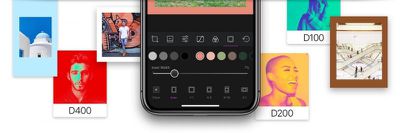
The color of the frame itself is hugely impactful to how the viewer's eye perceives colors in your photos. That's why we added content-aware colors which automatically analyze the photo and pick a curated set of colors that perfectly match your photo. This ensures you always have frame colors to pick from with just a tap, that will fit the mood of your photo seamlessly.
Support has also been added for the 9:16 aspect ratio for Snapchat and Instagram stories, as well as 4:5 for Instagram portrait photos. 2:1 has also been included, and all of the frame aspects can be used when exporting a single image or multiple images.
Also included in today's update is a new premium filter pack, Duotone Filters. Darkroom says these filters are designed to be "extremely graphical and punchy," to make photos "feel like they popped right out of a magazine."
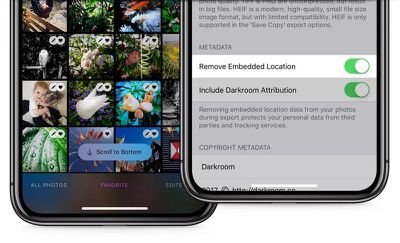
New privacy tools have been added to allow users to enable or disable embedded location information when exporting photos. The option will let location be included on your phone for captured photos, but it gives users the ability to strip it out when publicly sharing photos.
In addition to these new features, the new version of Darkroom includes app-wide refinements that make the Darkroom editing experience on iOS better. Specifically, "drastic improvements" have been made to how Darkroom handles photos that were previously edited in other apps, with the ability to "gracefully overwrite them."
A full list of changes and updates in Darkroom can be found on the Darkroom website. The Darkroom app can be downloaded from the App Store for free, but unlocking full functionality requires a $7.99 in-app purchase. [Direct Link]





















Top Rated Comments