
Netflix today revealed a new design for its "TV experiences," or TV-based apps, that aims to make it easier to find TV shows and movies on the service.

In addition to the rows with various themes, Netflix subscribers watching on a TV will now see a sidebar on the left side of the app that expands when they scroll over to it. This UI has Search, Home, Series, Movies, My List, and New hubs, making it far simpler to jump directly to specific sections of Netflix you want to get to without having to scroll around looking for them.
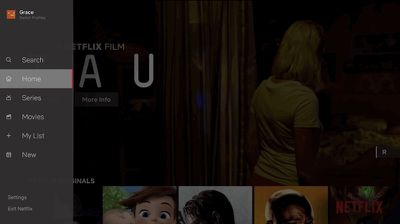
netflix new interface
Otherwise, browsing around Netflix on a TV app appears to be largely the same, with video previews that automatically play once you've stopped on a show or movie. Netflix's director of product innovation Stephen Garcia said that the new update came out of "extensive research" into how its users browse for content.

While this may feel like an obvious update to some, validating that this TV experience was better for our members took extensive research, testing and technology improvements. Along those lines, we will continuously learn from our members and evolve the TV experience so that it gets even more simple, fun and easy to find the stories that make Netflix great.

In our testing of this new interface, we saw that that this simpler design helped members find something great to watch.

The company didn't directly confirm which platforms this update will arrive on, but it typically uses "TV experiences" as an all-encompassing reference to apps on streaming boxes, game consoles, smart TVs, and anywhere else Netflix is viewed on a TV set. This should mean that fourth-generation and fifth-generation Apple TV users will see the update alongside other platforms, with a rollout that begins worldwide today.


Tag: Netflix

Top Rated Comments

Jest3r Avatar
99 months ago
About time! Now, just PLEASE add an option to turn off the auto play previews!
Score: 17 Votes (Like | Disagree)
m0sher Avatar
99 months ago
I love Netflix yet no option to mark a movie or TV show as ‘watched’ without having to actually watch it, if you already did and would like it to reflect your personal watched history on a particular show.
Score: 11 Votes (Like | Disagree)
itsmilo Avatar
99 months ago
I could not agree more. It’s so annoying playing the very first ep of a show you already finished binging by mistake and having the unfinished bar of a show you indeed finished waiting in your play list. Sends my OCD through the roof. I want a watched button badly
Score: 5 Votes (Like | Disagree)
thisisnotmyname Avatar
99 months ago
This will be helpful. Netflix' seemingly random placement of "My List" and "Continue Watching" is a big annoyance. Sometimes one or the other will be up top, sometimes I have to move through new and trending first. Randomness is exactly what you want in a user experience right? RIGHT?
[doublepost=1531939134][/doublepost]
About time! Now, just PLEASE add an option to turn off the auto play previews!
and THIS!
Score: 5 Votes (Like | Disagree)
jim.arrows Avatar
99 months ago
About time! Now, just PLEASE add an option to turn off the auto play previews!
I've stopped using Netflix altogether due to the auto-previews, I've completely switched to Amazon. Infuriating.
Score: 4 Votes (Like | Disagree)
austinmcguire Avatar
99 months ago
I have yet to see this myself, but I actually preferred the ATV3 menus to the pre-update ATV4 menus. It was annoying to have to scroll up and down to find where it put "My List" this time. This new layout appears to fix that issue.
Score: 4 Votes (Like | Disagree)

Popular Stories

Apple Logo Zoomed

Tim Cook Teases Plans for Apple's Upcoming 50th Anniversary

Thursday February 5, 2026 12:54 pm PST by
Apple turns 50 this year, and its CEO Tim Cook has promised to celebrate the milestone. The big day falls on April 1, 2026. "I've been unusually reflective lately about Apple because we have been working on what do we do to mark this moment," Cook told employees today, according to Bloomberg's Mark Gurman. "When you really stop and pause and think about the last 50 years, it makes your heart ...
wwdc sans text feature

Apple Rumored to Announce New Product on February 19

Thursday February 5, 2026 12:22 pm PST by
Apple plans to announce the iPhone 17e on Thursday, February 19, according to Macwelt, the German equivalent of Macworld. The report, citing industry sources, is available in English on Macworld. Apple announced the iPhone 16e on Wednesday, February 19 last year, so the iPhone 17e would be unveiled exactly one year later if this rumor is accurate. It is quite uncommon for Apple to unveil...
Finder Siri Feature

Why Apple's iOS 26.4 Siri Upgrade Will Be Bigger Than Originally Promised

Friday February 6, 2026 3:06 pm PST by
In the iOS 26.4 update that's coming this spring, Apple will introduce a new version of Siri that's going to overhaul how we interact with the personal assistant and what it's able to do. The iOS 26.4 version of Siri won't work like ChatGPT or Claude, but it will rely on large language models (LLMs) and has been updated from the ground up. Upgraded Architecture The next-generation...
maxresdefault

Apple Shows Off a Key Reason to Upgrade to the iPhone 17

Saturday February 7, 2026 9:26 am PST by
Apple today shared an ad that shows how the upgraded Center Stage front camera on the latest iPhones improves the process of taking a group selfie. "Watch how the new front facing camera on iPhone 17 Pro takes group selfies that automatically expand and rotate as more people come into frame," says Apple. While the ad is focused on the iPhone 17 Pro and iPhone 17 Pro Max, the regular iPhone...
iOS 26

iOS 26.3 and iOS 26.4 Will Add These New Features to Your iPhone

Tuesday February 3, 2026 7:47 am PST by
While the iOS 26.3 Release Candidate is now available ahead of a public release, the first iOS 26.4 beta is likely still at least a week away. Following beta testing, iOS 26.4 will likely be released to the general public in March or April. Below, we have recapped known or rumored iOS 26.3 and iOS 26.4 features so far. iOS 26.3 iPhone to Android Transfer Tool iOS 26.3 makes it easier...














