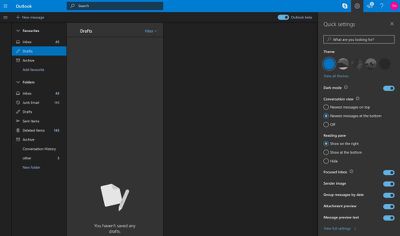
Microsoft today launched a much-requested dark mode for its Outlook.com web mail service. The company teased the new mode earlier this month, suggesting it would be reminiscent of last year's Halloween theme for Outlook.
outlook dark mode
The new dark mode actually adopts shades of grey to generate panel contrast, providing a more polished look as a result. You can enable it from the Quick settings menu (the cog wheel icon in the upper right). Currently it only works with the default blue theme.

The dark mode for Outlook.com is one of the most highly requested features for Microsoft's web mail service, according to listings on the Outlook.com feedback site, although there's still no word on whether a similar mode is coming to the mobile Outlook app.

Last month, Microsoft launched a rebranded version of its Microsoft News app for iOS with a dark mode. Several other iOS apps have similar modes, including Twitter, YouTube, Reddit, and Twitch, while Apple's upcoming macOS Mojave also includes dark mode support.


Top Rated Comments

44267547 Avatar
99 months ago
What’s so special about dark mode?
When dark mode is enabled, it provides a reverse color scheme to Improve readability, thus resulting in making it easier on the eyes when reading for less strain. For some, dimming isn’t the answer, when dark mode is preferred.
Score: 5 Votes (Like | Disagree)
Music Ambulance Avatar
99 months ago
The less outlook the better
Score: 3 Votes (Like | Disagree)
0815 Avatar
99 months ago
This will make lots of people happy. I personally don’t care for dark modes - for me it reduces readability. But everybody is different. I tried dark mode in the macOS beta and also before in many other tools ... maybe I’m too old for this.

But choice is good and as long as everybody can pick their favorite, everybody should be happy.
Score: 3 Votes (Like | Disagree)
honeycombz Avatar
99 months ago
Dark mode is pointless. Everyone has their macs running in a freezer now anyways. Plenty dark in there.
Score: 2 Votes (Like | Disagree)
Cpk Avatar
99 months ago
If I look at the attached screenshot I have to say though... this is what I'd prefer for iOS.

Dark Gray + BLUE
not
Dark Gray + ORANGE how Apple did it.
(Sorry for the long post...)

I agree! As a person with poor eyes, this is awesome! I really hate Apple for taking so long to implement a good, simple and consistent OS wide Dark mode. I hate Microsoft for implementing it half-a**ed as well.

On my iOS devices I have my home button triple click set on invert screen. Unfortunately Apple's 'Smart Invert' is ok once On, but awful to use due to the long time it takes to swap between normal and Smart Invert (on iphone 6, anyways). Then, just like Microsoft (half a**), the alarm clock is in Dark Mode by default, so if I'm reading and I'm in invert colors mode, and before sleep I need to check my Alarms, I open a bright white app that burns my eyes. This is so simple to properly fix or introduce into iOS and yet it takes years before they do it. If ever.
On PC, my tool of choice is a little program called Negative Screen that has smart invert features. I have it an all my computers and it help a lot. I do photography. Photoshop had a darkish' gray background since version 3! Now it's even darker. I always had all my photo viewers set with dark (er) background for thumbnail view. It just helps to see the colors so much better because your eyes don't fight the all the white space around them. I'm an engineer. All my CAD stuff is on black. I've tried once to swap the colors just for fun...you get headache after half an hour of work.

And for all the people out there that think Dark Mode is just a fad or completely useless, please understand that taking the brightness down all the way at night is NOT what you need in order to comfortably read stuff on your phone or tablet. And no, don't compare it with the 'books' either please. You never ever read books in the dark. You always have a light above or nearby that lights up more than just your book. There is no strain because your eyes don't have to adjust to anything as the light reflected off of your book is just about at the same intensity as the light reflected off of your walls or ceiling, or night stand. Reading on a backlit screen is NOT like reading in a book. It's like someone points a flashlight in your eyes. At night, in a dark room, with dark mode on, your eyes don't fight lights of 0 intensity (your room) and bright intensity (your screen). You can keep your brightness quite high for pictures and such, and still read comfortably.

Sorry, but yeah...the more Dark Mode, the better.
Score: 2 Votes (Like | Disagree)
Glockworkorange Avatar
99 months ago
So is this available in Office 365 Outlook or just Outlook.com? I can't find it in Office 365.
Not in Office 365. Just Outkook web mail
Score: 2 Votes (Like | Disagree)

Popular Stories

Apple Logo Zoomed

Tim Cook Teases Plans for Apple's Upcoming 50th Anniversary

Thursday February 5, 2026 12:54 pm PST by
Apple turns 50 this year, and its CEO Tim Cook has promised to celebrate the milestone. The big day falls on April 1, 2026. "I've been unusually reflective lately about Apple because we have been working on what do we do to mark this moment," Cook told employees today, according to Bloomberg's Mark Gurman. "When you really stop and pause and think about the last 50 years, it makes your heart ...
wwdc sans text feature

Apple Rumored to Announce New Product on February 19

Thursday February 5, 2026 12:22 pm PST by
Apple plans to announce the iPhone 17e on Thursday, February 19, according to Macwelt, the German equivalent of Macworld. The report, citing industry sources, is available in English on Macworld. Apple announced the iPhone 16e on Wednesday, February 19 last year, so the iPhone 17e would be unveiled exactly one year later if this rumor is accurate. It is quite uncommon for Apple to unveil...
Finder Siri Feature

Why Apple's iOS 26.4 Siri Upgrade Will Be Bigger Than Originally Promised

Friday February 6, 2026 3:06 pm PST by
In the iOS 26.4 update that's coming this spring, Apple will introduce a new version of Siri that's going to overhaul how we interact with the personal assistant and what it's able to do. The iOS 26.4 version of Siri won't work like ChatGPT or Claude, but it will rely on large language models (LLMs) and has been updated from the ground up. Upgraded Architecture The next-generation...
iOS 26

iOS 26.3 and iOS 26.4 Will Add These New Features to Your iPhone

Tuesday February 3, 2026 7:47 am PST by
While the iOS 26.3 Release Candidate is now available ahead of a public release, the first iOS 26.4 beta is likely still at least a week away. Following beta testing, iOS 26.4 will likely be released to the general public in March or April. Below, we have recapped known or rumored iOS 26.3 and iOS 26.4 features so far. iOS 26.3 iPhone to Android Transfer Tool iOS 26.3 makes it easier...
maxresdefault

Apple Shows Off a Key Reason to Upgrade to the iPhone 17

Saturday February 7, 2026 9:26 am PST by
Apple today shared an ad that shows how the upgraded Center Stage front camera on the latest iPhones improves the process of taking a group selfie. "Watch how the new front facing camera on iPhone 17 Pro takes group selfies that automatically expand and rotate as more people come into frame," says Apple. While the ad is focused on the iPhone 17 Pro and iPhone 17 Pro Max, the regular iPhone...