Apple TV Remote App Gains Support for New Screen Sizes, Password AutoFill - MacRumors
Skip to Content

Apple TV Remote App Gains Support for New Screen Sizes, Password AutoFill

Apple today updated its Apple TV Remote app for iOS devices to introduce several new features for the 2018 iPhone lineup and the iOS 12 update, which was released this morning.

The app now supports new screen sizes, making it compatible with the upcoming 6.5-inch iPhone XS Max and the upcoming 6.1-inch iPhone XR. The iPhone XS Max will be available starting this Friday, while the iPhone XR is coming in October.
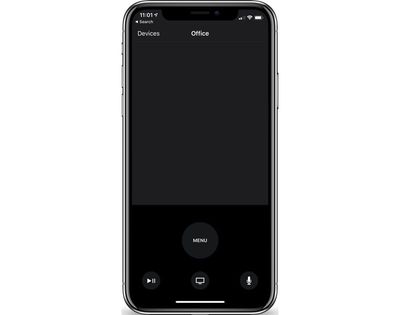
appletvremoteapp
Today's Apple TV Remote update also brings support for AutoFill Passwords, a feature that is designed to let you fill saved passwords securely from an iOS device to the Apple TV, alleviating the need to type in a full username and password.

Apple TV Remote is also automatically being added to Control Center as a default option, providing quick access to controls for the fourth and fifth-generation Apple TV. Apple TV Remote access has been available in Control Center since iOS 11, but until now, it was not one of the default Control Center icons.

Apple TV Remote can be downloaded from the App Store for free. [Direct Link]

Related Roundup: Apple TV
Buyer's Guide: Apple TV (Buy Now)

Popular Stories

Apple TV Sans Remote Feature

New Apple TV 4K Leaked

Friday September 25, 2026 8:16 am PDT by
MacRumors contributor Aaron Perris has uncovered an image file from Apple for an unreleased Apple TV 4K, suggesting that a new model will finally be released soon. The image is specifically for an "Apple TV 4K (4th generation)" model. Apple TV 4K (4th generation) image (on a gradient) The image reveals that the Apple TV will have the same external design as the current model, with all of its...
Apple TV 4K HomeView HomePod Mini tweaked

New Apple TV 4K, HomeView, and HomePod Mini: 16 Details Just Leaked

Sunday October 11, 2026 12:56 pm PDT by
Just two days before Apple's "Welcome home" experience in New York, Bloomberg's Mark Gurman has leaked several details about the new products set to be unveiled, including an all-new smart home hub, a HomePod mini 2, and a new Apple TV 4K. Here is an all-in-one summary of the details shared by Gurman:Apple's home hub with a touch-enabled display will be named HomeView, seemingly confirming a ...
HomePod minis Apple TV and iPad mini Leak Feature

iPad Mini With A20 Pro, New HomePod Mini Colors, and New Apple TV 4K All Just Leaked

Friday September 25, 2026 8:18 am PDT by
The next iPad mini, HomePod mini, and Apple TV 4K models have all leaked, just a few weeks before the devices are expected to be announced. Specifically, MacRumors contributor Aaron Perris discovered a few of Apple's official images of the devices, confirming their existence and some new features that are planned. The most notable iPad mini details revealed in today's leak include an A20 Pro ...

Top Rated Comments

106 months ago
Volume control???
It's there, just use the volume buttons on your phone.
Score: 5 Votes (Like | Disagree)
106 months ago
Other than what I posted how would I find that out? As best I know it’s set to auto. Either way that’s the remote itself curious why the ios remote ATv app would try to use an IR setting when the iPhone has never had an IR emitter
For my setup I had my ATV4 learn the control for my A/V remote. It can’t turn it on but it can control the volume. I have and older A/V setup, no Bluetooth or Wifi.

Did you have to do the same?

What I’m getting at is in order for the iPhone to communicate with your setup, there has to be some method for it to talk to your TV, A/V etc..

I’m not an A/V expert so perhaps someone else who has a working volume control and more knowledge can jump in.

If you could take a pic of your Settings - Remotes and Devices - Volume Control screen it may shed some light.

Edit: I found this on Apple site:

Looking for the app's onscreen keyboard or volume controls?


* A keyboard appears in the Apple TV Remote app when you select a text field on your Apple TV.
* Want to change the volume using your iOS device? Receivers with HDMI-CEC volume support let you adjust volume with the volume buttons on the side of your iOS device. You just need to plug your Apple TV directly into your receiver and not into your television. Get help with HDMI-CEC ('https://support.apple.com/kb/ht205225').

[doublepost=1537235796][/doublepost]After playing around with two different setups and reviewing your original comment, it appears your TV is setup to “Auto via IR (TV)”.

If that is the case it appears you are not using HDMI-CEC which is what is required according to what I posted earlier.
Score: 2 Votes (Like | Disagree)
106 months ago
Nope. Doesn’t work from iPhone 8/256GB on iOS 11. I tried before and after TVOS update (11, now 12). My ATV4 is connected directly to my TV using HDMI. Only the TV remote or the ATV4 remote will control volume.

Settings, Remotes & Devices:
Volume Control is ser to “Auto” yet displays “Auto via IR (TV)”. Only TV via IR, Off, or Learn New Device are my options.

Maybe you think it’s my HDMI Cable?
Question. Is your ATV4 remote using the IR sesnsor to control sound?
Score: 2 Votes (Like | Disagree)
106 months ago
@sinsin07 , the early post as stated above was to my situation and since I have no receiver the ATV is using IR to control myTV volume which sucks I’ve noticed the icon for volume change to sho the TVs on screen display vs the ATV volume display. So bummed out but it works so not too bad.

Well...you could look at it this way...this is an excuse to get an a/v receiver that supports hdmi-cec. Maybe one of those "theater in a box" setups has the feature. I'm not sure. It will enhance your movie watching/music listening experience a lot. Or, build your own system...
There are tv's that have hdmi-cec, too. But, that won't sound as good.
Score: 1 Votes (Like | Disagree)
106 months ago
FALSE
Not clear why you insist the remote app on the iphone cannot control volume.
Yes the iphone does not have an IR Transmitter.
It can control volume throudh HDMI-CEC as specified earlier.
It may not help DeepIn2u but your conclusion is incorrect, there is a method.

If you have any links that show Apple is in error, please post for the benefit of all, otherwise stop posting false information.
I was responding to someone’s post. In their case, they do not have an hdmi-cec tv. They won’t be able to control tv volume with their iPhone. They were asking why they could with the ATV remote, but not with the phone.
I was responding to ONE person. NOT making a general comment. Simma down na.
Geeez...o_O
Score: 1 Votes (Like | Disagree)
106 months ago
[doublepost=1537361174][/doublepost]
I don’t have a receiver of any kind.

TV plugged into wall, HDMI input direct from ATV4. ATV4 has WiFi connection to Cable Módem/Router.

TV has its own remote to control volume. ATV remote can control volume. Yet the iOS Remote app on iPhone doesn’t control the TV or shows volume being sent by the ATV. ATV settings for Audio is Auto and no I’m not using SPDIF either.
tv OR receiver. o_O Doesn’t matter. Either way. I was just saying...
Anyway...the iPhone doesn’t have an IR transmitter. It can’t control the volume on your tv. The  TV remote has an IR transmitter, so, it can.
[doublepost=1537362188][/doublepost]
Your comment contradicts Apple’s help site.

* Want to change the volume using your iOS device? Receivers with HDMI-CEC volume support let you adjust volume with the volume buttons on the side of your iOS device. You just need to plug your Apple TV directly into your receiver and not into your television. Get help with HDMI-CEC ('https://support.apple.com/kb/ht205225').

Are you saying the above is incorrect?

Control your TV or receiver with your Siri Remote or Apple TV Remote ('https://support.apple.com/en-us/HT205225')
[SIZE=3]Use the Apple TV Remote app ('https://support.apple.com/en-us/HT204989')[/SIZE]
Nope
Score: 1 Votes (Like | Disagree)
Latest Stories
iPhone Duo Demand Reportedly Exceeds Apple's Expectations
2 hours ago
iPhone Duo Launch Begins as First Orders Reach Customers
8 hours ago
1Password for Agents Keeps Your Passwords Hidden From AI
8 hours ago
iPhone Duo 24 Hours Later: Your Questions Answered
9 hours ago
Apple's iWork Apps Get 'Intelligent Assistant' and iPhone Duo Support
10 hours ago
Apple is Apparently Considering a Slightly Larger iPhone Duo
10 hours ago
Giant iPhone Duo Displays Coming to Four Apple Stores
11 hours ago
Apple Pulls Keynote, Pages and Numbers From App Store [Update: Back]
12 hours ago
Apple Updates More Apps With iPhone Duo Support
12 hours ago
Apple Will Label Apps 'Made for iPhone Duo' in App Store
15 hours ago
Amazon Takes $49 Off iPad With Prices Starting at $399.99
16 hours ago
F1 on Apple TV Now Available in Dolby Atmos
16 hours ago
Apple Reveals More Than 50 Apps That Will Be Updated for iPhone Duo
17 hours ago
Apple Blocks Certificates That Could Help Attackers Fake Websites
18 hours ago
Giant iPhone Duo Installations Spotted at Apple Fifth Avenue
19 hours ago
iPhone Duo 2 Prototypes Include Under-Display Face ID
19 hours ago
Tesla App Gains iPad and iPhone Duo Support
23 hours ago
Apple Reportedly Boosts iPhone Duo Orders by 44%
1 day ago
Fortnite Returning to Australian App Store After Court Ruling
1 day ago
Apple Ordered to Open iPhone to Rival App Stores in Australia
1 day ago
Apple Suppliers Face Hurdles Cutting Circuit Board Emissions
1 day ago
Things Updated for iPhone Duo With Adaptive Layout
1 day ago
Simplicity and Siri AI Are HomeView's Killer Features, Apple Says
1 day ago
iPhone Duo Reviewers Really Miss Face ID
1 day ago
Does the iPhone Duo Run Hot? Here's What Reviews Found
1 day ago
Apple Music's New Look is Now Live on Apple's Website
1 day ago
Anthropic Launches Claude Duet, a Proactive AI Agent
1 day ago
What 32,000 Folds Did to the iPhone Duo's Hinge
1 day ago
iPhone Duo's Hidden FaceTime Camera Takes 'Trash' Photos
1 day ago
iPhone Duo Has 'Edge Light' Feature That Debuted on Macs Last Year
2 days ago











































